一致性

Python 数据清洗

Adel Nehme

VP of AI Curriculum, DataCamp

本章内容


第 3 章 - 高级数据问题

Python 数据清洗

数据范围约束

range_examples

Python 数据清洗

一致性

单位
温度 32°C 也可写作 89.6°F
体重 70 Kg 也可写作 11 st.
日期 26-11-2019 也可写作 26, November, 2019
金额 100$ 也可写作 10763.90¥
Python 数据清洗

一个示例

temperatures = pd.read_csv('temperature.csv')
temperatures.head()
       Date  Temperature
0  03.03.19         14.0
1  04.03.19         15.0
2  05.03.19         18.0
3  06.03.19         16.0
4  07.03.19         62.6
Python 数据清洗

一个示例

temperatures = pd.read_csv('temperature.csv')
temperatures.head()
       Date  Temperature
0  03.03.19         14.0
1  04.03.19         15.0
2  05.03.19         18.0
3  06.03.19         16.0
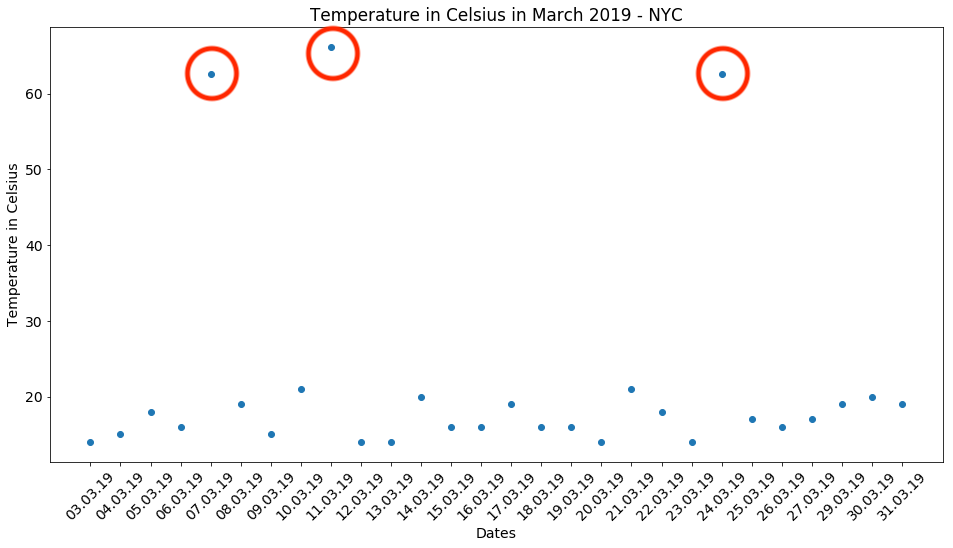
4  07.03.19         62.6   <--
Python 数据清洗

一个示例

# 导入 matplotlib
import matplotlib.pyplot as plt

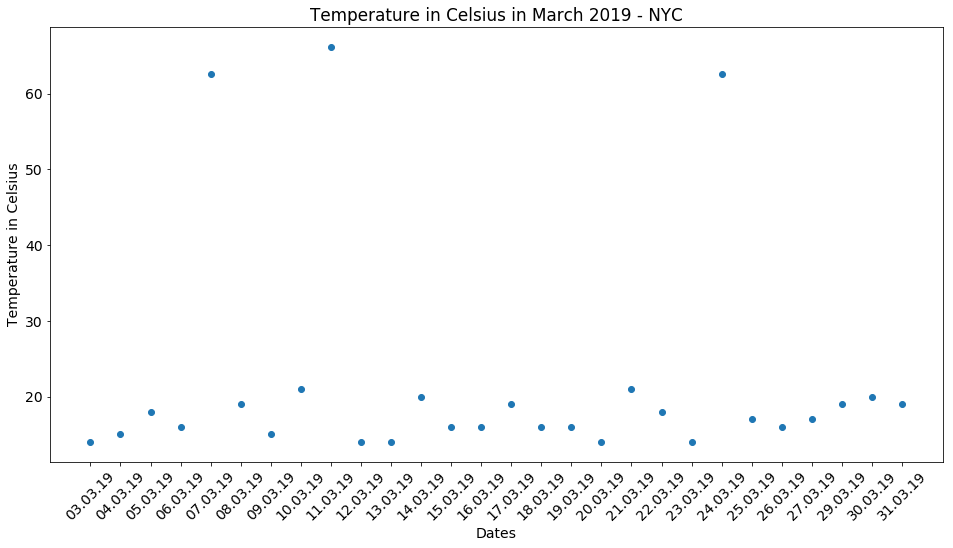
# 创建散点图 plt.scatter(x = 'Date', y = 'Temperature', data = temperatures)
# 添加标题、x 轴与 y 轴标签 plt.title('Temperature in Celsius March 2019 - NYC') plt.xlabel('Dates') plt.ylabel('Temperature in Celsius')
# 显示图表 plt.show()
Python 数据清洗

Python 数据清洗

Python 数据清洗

处理温度数据

$$C = (F - 32) \times \frac{5}{9}$$


temp_fah = temperatures.loc[temperatures['Temperature'] > 40, 'Temperature']

temp_cels = (temp_fah - 32) * (5/9)
temperatures.loc[temperatures['Temperature'] > 40, 'Temperature'] = temp_cels
# 断言转换正确
assert temperatures['Temperature'].max() < 40
Python 数据清洗

处理日期数据

birthdays.head()
          Birthday First name Last name
0         27/27/19      Rowan     Nunez
1         03-29-19      Brynn      Yang
2  March 3rd, 2019     Sophia    Reilly
3         24-03-19     Deacon    Prince
4         06-03-19   Griffith      Neal
Python 数据清洗

处理日期数据

birthdays.head()

显示 birthdays 数据集输出的表格——一行是月/日/年格式;一行为完整英文写法;还有一行明显出错,日期中的"日"重复。

Python 数据清洗

日期时间格式化

datetime 适合表示日期

日期 datetime 格式
25-12-2019 %d-%m-%Y
December 25th 2019 %c
12-25-2019 %m-%d-%Y
... ...

pandas.to_datetime()

  • 多数格式可自动识别
  • 对错误或未知格式可能失败
Python 数据清洗

处理日期数据

# 转为 datetime —— 但会失败!
birthdays['Birthday'] = pd.to_datetime(birthdays['Birthday'])
ValueError: month must be in 1..12
# 这样可行!
birthdays['Birthday'] = pd.to_datetime(birthdays['Birthday'],
                                       # 转换失败的行返回 NA
                                       errors = 'coerce')
Python 数据清洗

处理日期数据

birthdays.head()
    Birthday First name Last name
0        NaT      Rowan     Nunez
1 2019-03-29      Brynn      Yang
2 2019-03-03     Sophia    Reilly
3 2019-03-24     Deacon    Prince
4 2019-06-03   Griffith      Neal
Python 数据清洗

处理日期数据

birthdays['Birthday'] = birthdays['Birthday'].dt.strftime("%d-%m-%Y")
birthdays.head()
     Birthday First name Last name
0         NaT      Rowan     Nunez
1  29-03-2019      Brynn      Yang
2  03-03-2019     Sophia    Reilly
3  24-03-2019     Deacon    Prince
4  03-06-2019   Griffith      Neal
Python 数据清洗

处理含糊的日期


"2019-03-08是 8 月还是 3 月?


  • 转为 NA 并相应处理
  • 结合数据来源推断格式
  • 结合 DataFrame 前后数据推断格式
Python 数据清洗

Passons à la pratique !

Python 数据清洗

Preparing Video For Download...