提取非表格数据

使用 Python 的 ETL 和 ELT

Jake Roach

Data Engineer

提取非表格数据

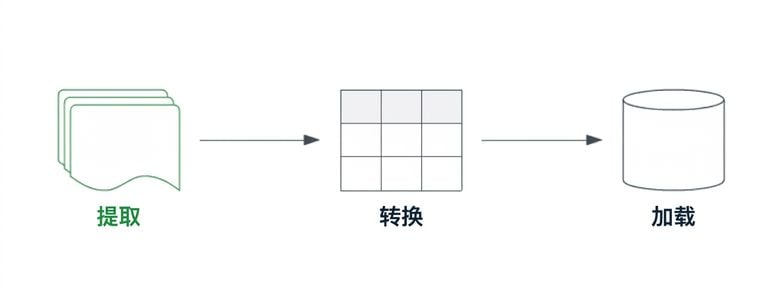
突出显示提取组件的 ETL 流水线。

使用 Python 的 ETL 和 ELT

非表格数据的类型

大多数生成与使用的数据是非结构化数据

  • 文本
  • 音频
  • 图像
  • 视频
  • 空间数据
  • 物联网(IoT)

非结构化数据源经历转换。

1 https://mitsloan.mit.edu/ideas-made-to-matter/tapping-power-unstructured-data
使用 Python 的 ETL 和 ELT

使用 API 与 JSON 数据

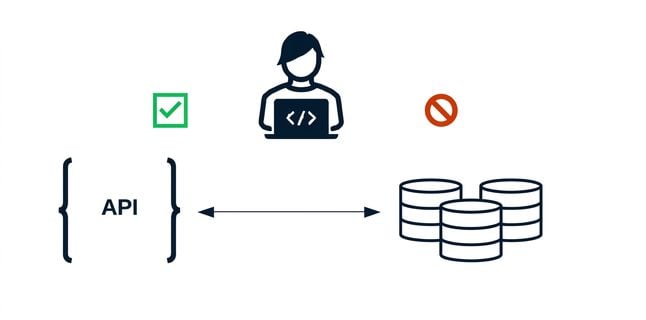
API(应用程序编程接口)

  • 运行在数据源之上的软件
  • 阻止直接与数据库交互

$$

数据工程师使用 API 与数据库交互。

JSON(JavaScript 对象表示法)

  • 键值对
  • 无固定架构
  • 外观与dict字典相似
{
    "key": "value",
    ...
    "open": 0.121875
}
使用 Python 的 ETL 和 ELT

用 pandas 读取 JSON 文件

{
    "timestamps": [863703000, 863789400, ...],
    "open": [0.121875, 0.098438, ...],
    "close": [...],
    "volume": [...]
}

使用.read_json()函数

# 读取上述格式的 JSON 文件
raw_stock_data = pd.read_json("raw_stock_data.json", orient="columns")
1 https://pandas.pydata.org/docs/reference/api/pandas.read_json.html
使用 Python 的 ETL 和 ELT

嵌套或非结构化 JSON 数据

数据并非总是可直接变为 DataFrame

  • 嵌套对象
  • 可变"架构"
{
    "863703000": {
        "volume": 1443120000,
        "price": {
            "close": 0.09791,
            "open": 0.12187
        }
    }, 
    "863789400": {
        ...
    }, ...
}
使用 Python 的 ETL 和 ELT

用 json 读取 JSON 文件

import json

with open("raw_stock_data.json", "r") as file:
    # 将文件加载为字典
    raw_stock_data = json.load(file)

# 确认 raw_stock_data 变量的类型
print(type(raw_stock_data))
<class 'dict'>
使用 Python 的 ETL 和 ELT

开始练习!

使用 Python 的 ETL 和 ELT

Preparing Video For Download...