Căutare semantică cu Pinecone
Crearea aplicațiilor AI cu Pinecone

James Chapman
Curriculum Manager, DataCamp
Motoare de căutare semantică
- Vectorizați și încărcați documentele într-un index Pinecone
- Vectorizați interogarea utilizatorului
- Interogați indexul cu vectorul obținut
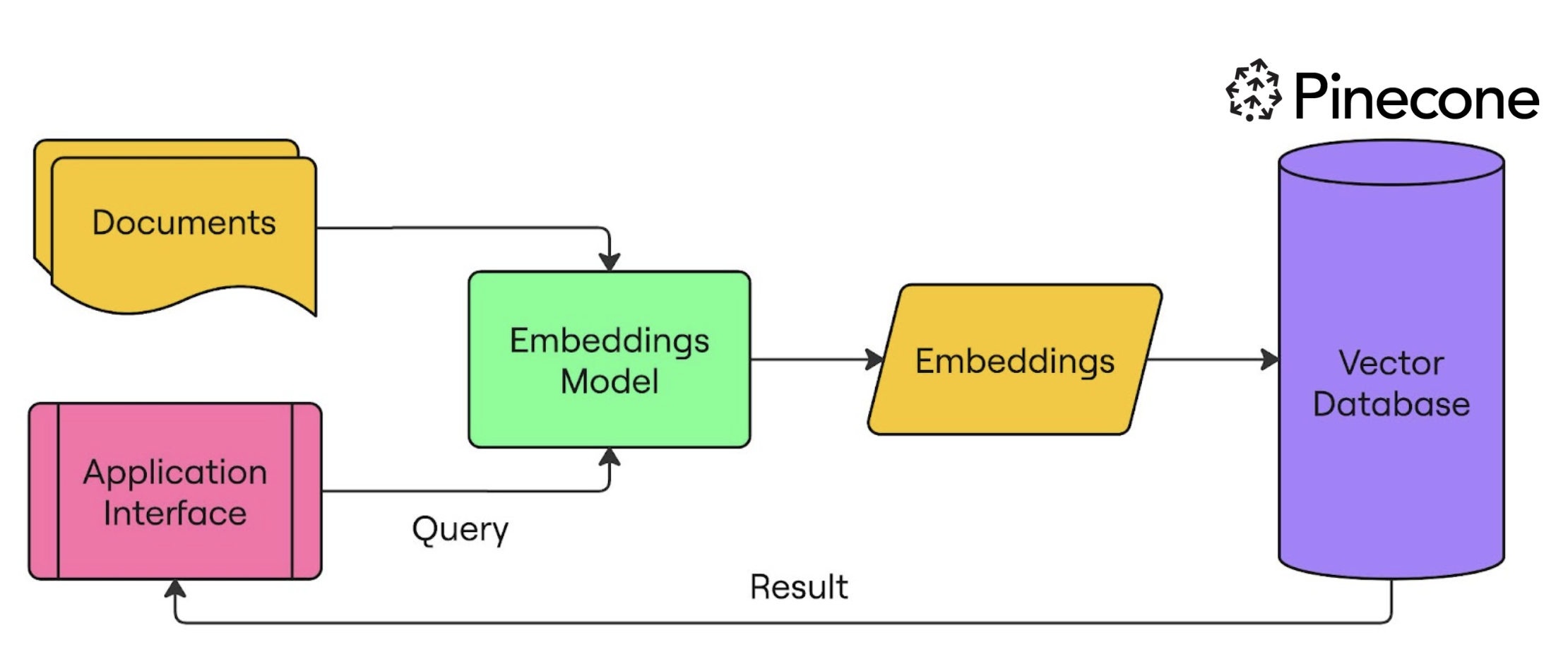
Configurarea Pinecone și OpenAI pentru căutare semantică
from openai import OpenAI from pinecone import Pinecone, ServerlessSpec client = OpenAI(api_key="OPENAI_API_KEY") pc = Pinecone(api_key="PINECONE_API_KEY")pc.create_index( name="semantic-search-datacamp",dimension=1536,spec=ServerlessSpec(cloud='aws', region='us-east-1') )index = pc.Index("semantic-search-datacamp")
Încărcarea documentelor în indexul Pinecone
import pandas as pd
import numpy as np
from uuid import uuid4

df = pd.read_csv('squad_dataset.csv')
| id | text                                              | title             |
|----|---------------------------------------------------|-------------------|
| 1  | Architecturally, the school has a Catholic cha... | University of ... |
| 2  | The College of Engineering was established in.... | University of ... |
| 3  | Following the disbandment of Destiny's Child in.. | Beyonce           |
| 4  | Architecturally, the school has a Catholic cha... | University of ... |
Încărcarea documentelor în indexul Pinecone
batch_limit = 100for batch in np.array_split(df, len(df) / batch_limit):metadatas = [{"text_id": row['id'], "text": row['text'], "title": row['title']} for _, row in batch.iterrows()]texts = batch['text'].tolist()ids = [str(uuid4()) for _ in range(len(texts))]response = client.embeddings.create(input=texts, model="text-embedding-3-small") embeds = [np.array(x.embedding) for x in response.data]index.upsert(vectors=zip(ids, embeds, metadatas), namespace="squad_dataset")
Încărcarea documentelor în indexul Pinecone
index.describe_index_stats()
{'dimension': 1536, 'index_fullness': 0.02,
 'namespaces': {'squad_dataset': {'vector_count': 2000}},
 'total_vector_count': 2000}
Interogare cu Pinecone
query = "To whom did the Virgin Mary allegedly appear in 1858 in Lourdes France?"query_response = client.embeddings.create( input=query, model="text-embedding-3-small") query_emb = query_response.data[0].embeddingretrieved_docs = index.query(vector=query_emb, top_k=3, namespace=namespace, include_metadata=True)
Interogare cu Pinecone
for result in retrieved_docs['matches']:
    print(f"{round(result['score'], 2)}: {result['metadata']['text']}")
0.41: Architecturally, the school has a Catholic character. Atop the Main Building
gold dome is a golden statue of the Virgin Mary...

0.3: Because of its Catholic identity, a number of religious buildings stand on
campus. The Old College building has become one of two seminaries...

0.29: Within the white inescutcheon, the five quinas (small blue shields) with
their five white bezants representing the five wounds...
Timp să construim!
Crearea aplicațiilor AI cu Pinecone

