การสรุปและแก้ไขข้อความ

การทำงานกับ OpenAI API

James Chapman

Curriculum Manager, DataCamp

ทบทวน...

  • Q&A
response = client.chat.completions.create(
  model="gpt-4o-mini",
  messages=[{"role": "user", "content": "How many days are in October?"}]
)

print(response.choices[0].message.content)
October has 31 days.
การทำงานกับ OpenAI API

การแก้ไขข้อความ

  • ตัวอย่าง: การอัปเดตชื่อ สรรพนาม และตำแหน่งงาน

$$

prompt = """
Update name to Maarten, pronouns to he/him, and job title to Senior Content Developer
in the following text:

Joanne is a Content Developer at DataCamp. Her favorite programming language is R,
which she uses for her statistical analyses.
"""
การทำงานกับ OpenAI API

การแก้ไขข้อความ

response = client.chat.completions.create(
    model="gpt-4o-mini",

messages=[{"role": "user", "content": prompt}]
) print(response.choices[0].message.content)
Maarten is a Senior Content Developer at DataCamp. His favorite programming language
is R, which he uses for his statistical analyses.
การทำงานกับ OpenAI API

การสรุปข้อความ

  • ตัวอย่าง: สรุปบทสนทนาของฝ่ายบริการลูกค้า

ทีมบริการลูกค้า

text = """
Customer: Hi, I'm trying to log into 
my account, but it keeps saying 
my password is incorrect. I'm sure 
I'm entering the right one.  

Support: I'm sorry to hear that! 
Have you tried resetting your password?  
...
"""
การทำงานกับ OpenAI API

การสรุปข้อความ

prompt = f"""Summarize the customer support chat 
             in three concise key points: {text}"""


response = client.chat.completions.create( model="gpt-4o-mini", messages=[{"role": "user", "content": prompt}] ) print(response.choices[0].message.content)
1. Customer couldn't log in due to a password issue and missing reset link.  
2. Support resent the reset email after confirming it was sent.  
3. Customer resolved the issue by using Google sign-in.
การทำงานกับ OpenAI API

การควบคุมความยาวของคำตอบ

  • max_completion_tokens = 5
response = client.chat.completions.create(
  model="gpt-4o-mini",
  messages=[{"role": "user", 
  "content": "Write a haiku about AI."}],
  max_completion_tokens=5
)

AI so powerful
Computers
  • max_completion_tokens = 30
response = client.chat.completions.create(
  model="gpt-4o-mini",
  messages=[{"role": "user", 
  "content": "Write a haiku about AI."}],
  max_completion_tokens=30
)

A machine mind thinks
Logic dictates its choices
Mankind ponders anew
การทำงานกับ OpenAI API

ทำความเข้าใจ Token

$$

  • Token: หน่วยของข้อความที่ช่วยให้ AI เข้าใจและตีความข้อความ

$$
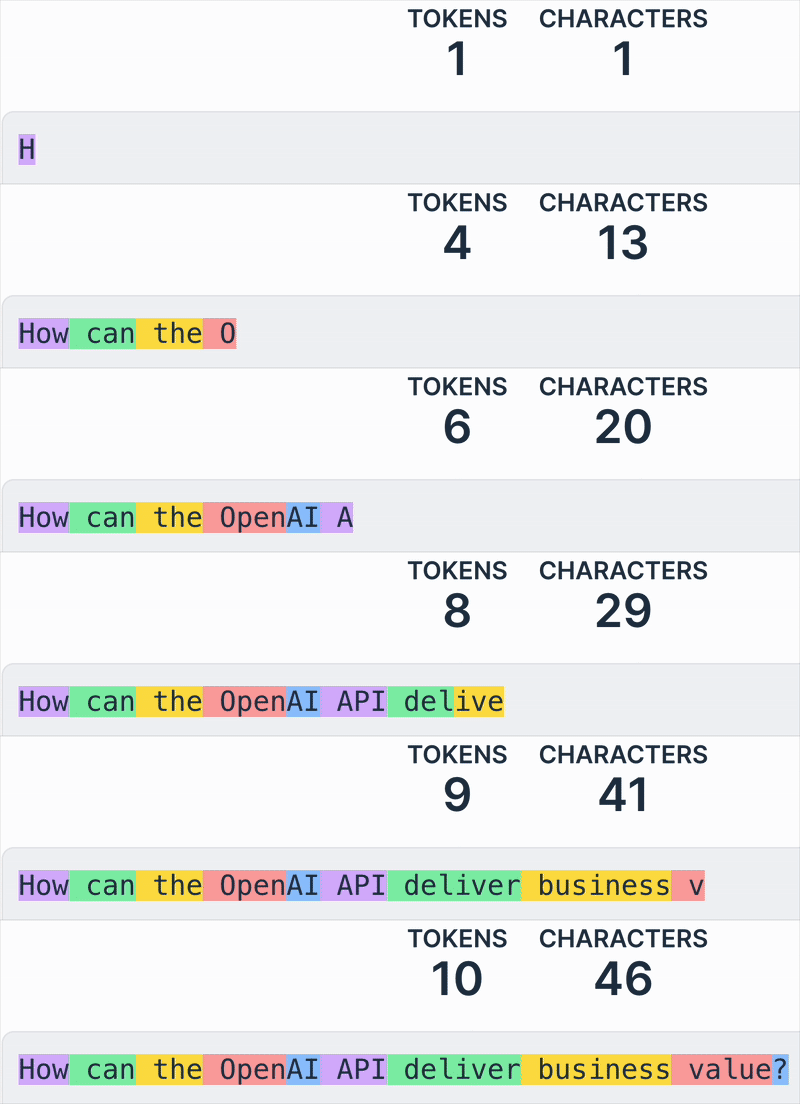
ประโยค "How can the OpenAI API deliver business value?" โดยแต่ละ token ถูกไฮไลต์ด้วยสีที่ต่างกัน

1 https://platform.openai.com/tokenizer
การทำงานกับ OpenAI API

การคำนวณค่าใช้จ่าย


  • ค่าใช้จ่ายขึ้นอยู่กับ โมเดล และจำนวน token 💰

    • โมเดลคิดราคาตาม ค่าใช้จ่าย/token
    • token ขาเข้าและขาออกอาจมีราคาต่างกัน
  • การเพิ่ม max_completion_tokens ทำให้ค่าใช้จ่ายสูงขึ้น 📈

Screenshot 2025-03-05 at 11.46.54.png

การทำงานกับ OpenAI API

การคำนวณค่าใช้จ่าย

prompt = f"""Summarize the customer support chat 
             in three concise key points: {text}"""

max_completion_tokens = 500

response = client.chat.completions.create(
  model="gpt-4o-mini",
  messages=[{"role": "user", "content": prompt}], 
  max_completion_tokens=max_completion_tokens
  )

การทำงานกับ OpenAI API

การคำนวณค่าใช้จ่าย

# Define price per token
input_token_price = 0.15 / 1_000_000
output_token_price = 0.6 / 1_000_000

# Extract token usage input_tokens = response.usage.prompt_tokens
output_tokens = max_completion_tokens
# Calculate cost cost = (input_tokens * input_token_price + output_tokens * output_token_price) print(f"Estimated cost: ${cost}")
Estimated cost: $0.00124
1 https://openai.com/pricing
การทำงานกับ OpenAI API

มาฝึกกันเถอะ!

การทำงานกับ OpenAI API

Preparing Video For Download...