เคล็ดลับและเทคนิคสำหรับประวัติเวอร์ชัน

Introduction to Git

George Boorman

Curriculum Manager, DataCamp

โปรเจกต์เติบโตขึ้น!

  • โปรเจกต์ใหญ่ขึ้น = คอมมิตมากขึ้น = ผลลัพธ์มากขึ้น
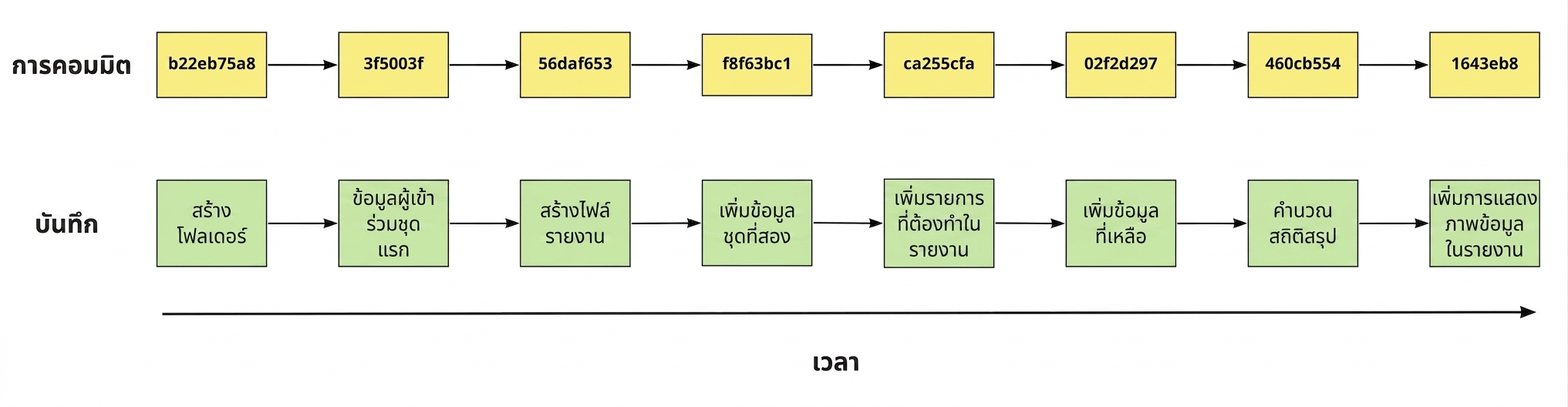
 

ไดอะแกรมแสดงคอมมิต 8 รายการพร้อม hash และข้อความ log

Introduction to Git

การจำกัดจำนวนคอมมิต

  • จำกัดจำนวนคอมมิตที่แสดงโดยใช้ -:

  • จำกัดให้แสดงเฉพาะ 3 คอมมิตล่าสุด

    git log -3
    
Introduction to Git

การจำกัดไฟล์

  • หากต้องการดูประวัติคอมมิตของไฟล์เพียงไฟล์เดียว:
git log report.md
Introduction to Git

การใช้เทคนิคร่วมกัน

cd data
git log -2 mental_health_survey.csv
Introduction to Git

ผลลัพธ์ของ git log

commit f35b9487c063d3facc853c1789b0b77087a859fa
Author: Rep Loop <[email protected]>
Date:   Fri Jul 26 15:14:32 2024 +0000

    Add two new participants' data.

commit 7f71eadea60bf38f53c8696d23f8314d85342aaf
Author: Rep Loop <[email protected]>
Date:   Fri Jul 19  09:58:21 2024 +0000

    Adding fresh data for the survey.
Introduction to Git

การกำหนดช่วงวันที่

  • จำกัด git log ตามวันที่:
git log --since='Month Day Year'
  • คอมมิตตั้งแต่วันที่ 2 เมษายน 2024:
git log --since='Apr 2 2024'
  • คอมมิตระหว่างวันที่ 2 ถึง 11 เมษายน:
git log --since='Apr 2 2024' --until='Apr 11 2024'
Introduction to Git

รูปแบบตัวกรองที่ยอมรับได้

ภาษาธรรมชาติ

  • "2 weeks ago"
  • "3 months ago"
  • "yesterday"

รูปแบบวันที่

  • "07-15-2024"
    • แนะนำให้ใช้รูปแบบ ISO "YYYY-MM-DD"
    • ตรวจสอบการตั้งค่าระบบเพื่อความเข้ากันได้ เช่น 12-06-2024 อาจหมายถึง 6 ธ.ค. หรือ 12 มิ.ย.!
  • "15 Jul 2024" หรือ "15 July 2024"
    • รูปแบบที่ไม่ถูกต้อง: "15 Jul, 2024"
1 https://www.iso.org/iso-8601-date-and-time-format.html
Introduction to Git

การค้นหาคอมมิตที่ต้องการ

git log
  • ใช้เพียง 8-10 ตัวอักษรแรกของ hash
git show c27fa856
Introduction to Git

ผลลัพธ์ของ git show

ผลลัพธ์ของ git show แสดงผลลัพธ์ git log ด้านบนและผลลัพธ์ git diff ด้านล่าง พร้อมข้อมูลที่บันทึกผิดพลาดที่ส่วนท้าย

Introduction to Git

มาฝึกกันเถอะ!

Introduction to Git

Preparing Video For Download...