ยินดีด้วย

Introduction to Git

George Boorman

Curriculum Manager, DataCamp

สรุปบทที่ 1

  • ประโยชน์และการใช้งาน Git สำหรับ version control
  • การใช้งาน terminal - ls, cd
  • การเริ่มต้นโปรเจกต์ Git - git init
  • การใช้ Git ติดตามไฟล์ - git add ., git commit -m
Introduction to Git

สรุปบทที่ 2

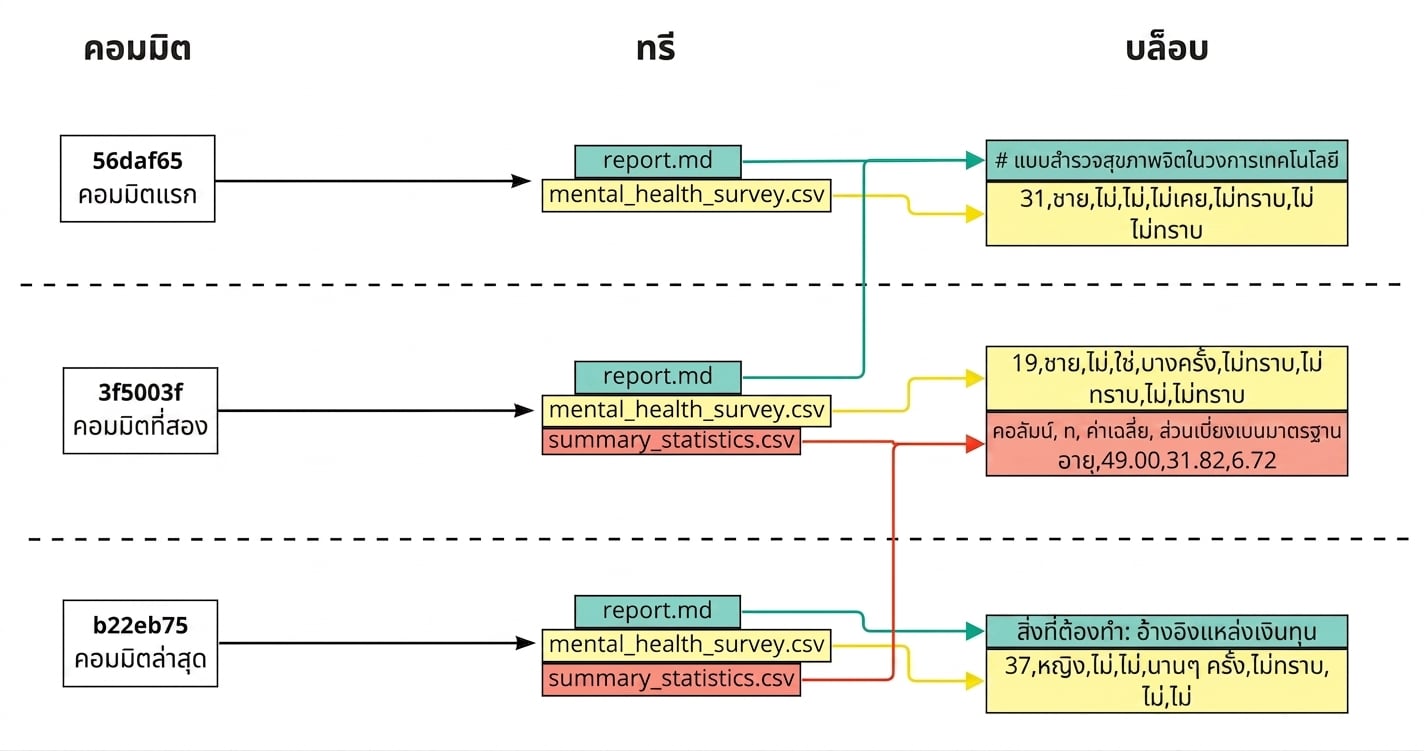
  • วิธีที่ Git จัดเก็บข้อมูล

    1. Commit
    2. Tree
    3. Blob
  • git log

    • 3
    • --since
    • --until
  • git show c27fa856

ไดอะแกรมแสดง 3 commit โดยมีไฟล์ที่ commit เชื่อมกับ tree และแต่ละไฟล์เชื่อมกับ blob ของ commit ล่าสุดที่ไฟล์นั้นอยู่

Introduction to Git

สรุปบทที่ 2

คำสั่ง ฟังก์ชัน
git diff report.md แสดงความแตกต่างระหว่างไฟล์ที่ยังไม่ได้ stage กับ commit ล่าสุด
git diff --staged report.md แสดงความแตกต่างระหว่างไฟล์ที่ stage แล้วกับ commit ล่าสุด
git diff 35f4b4d 186398f แสดงความแตกต่างระหว่าง 2 commit โดยใช้ commit hash
git diff HEAD~1 HEAD~2 แสดงความแตกต่างระหว่าง 2 commit โดยใช้ HEAD syntax
Introduction to Git

สรุปบทที่ 2

คำสั่ง ผลลัพธ์
git revert HEAD ย้อนกลับไฟล์ทั้งหมดจาก commit ที่ระบุ
git revert HEAD --no-edit ย้อนกลับโดยไม่เปิด text editor
git revert HEAD -n ย้อนกลับโดยไม่สร้าง commit ใหม่
git checkout HEAD~1 -- report.md ย้อนกลับไฟล์เดียวจาก commit ก่อนหน้า
git restore --staged report.md นำไฟล์เดียวออกจาก staging area
git restore --staged นำไฟล์ทั้งหมดออกจาก staging area
Introduction to Git

ถัดไปจะเรียนอะไร?

  • Branches
  • Remote repos
  • Rebasing
  • Bisecting
  • Submodules
Introduction to Git

ยินดีด้วย

Introduction to Git

Preparing Video For Download...