การกู้คืนและย้อนกลับไฟล์

Introduction to Git

George Boorman

Curriculum Manager, DataCamp

เกิดข้อผิดพลาด
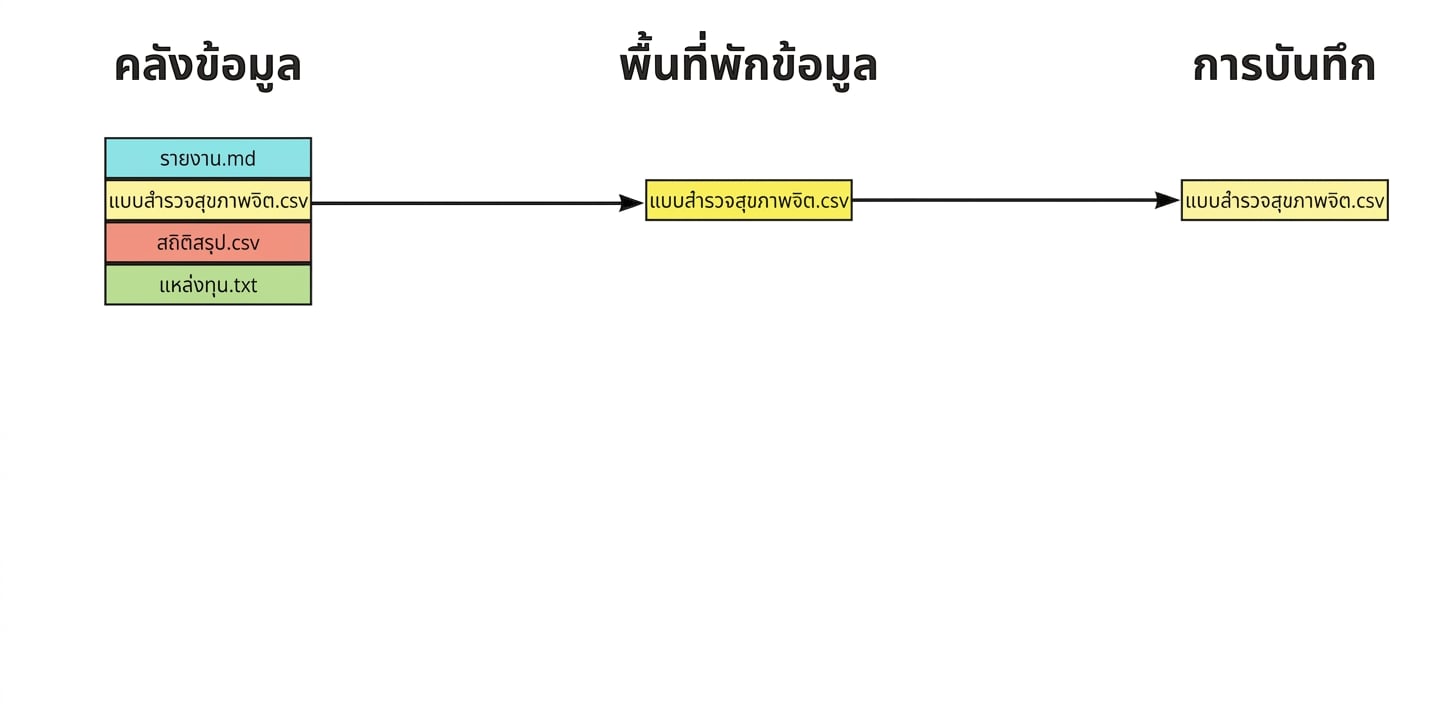
ไฟล์สี่ไฟล์ในรีโพ โดยสามไฟล์ถูกเพิ่มในพื้นที่ Staging และหนึ่งไฟล์ถูก Commit แล้ว ได้แก่ report.md, mental health survey.csv และ summary statistics.csv

Introduction to Git

การย้อนกลับไฟล์

  • การกู้คืนรีโพให้กลับสู่สถานะก่อน Commit ล่าสุด

  • git revert

    • นำเวอร์ชันก่อนหน้ากลับมาและสร้าง Commit ใหม่
    • กู้คืนไฟล์ทั้งหมดที่อัปเดตใน Commit ที่ระบุ
    • a845edcb, ebe93178, ฯลฯ
    • HEAD, HEAD~1, ฯลฯ
git revert HEAD
Introduction to Git

การย้อนกลับไฟล์

git revert HEAD

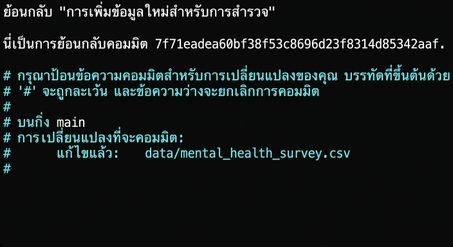
Text editor แสดง Commit

  • บันทึก: Ctrl + O แล้วกด Enter
  • ออก: Ctrl + X
Introduction to Git

การย้อนกลับไฟล์

[main 7d11f79] Revert "Adding fresh data for the survey."
 Date: Tue Jul 30 14:17:56 2024 +0000
 1 file changed, 3 deletions(-)
Introduction to Git

Flags ของ git revert

  • หลีกเลี่ยงการเปิด Text Editor
    git revert --no-edit HEAD


  • ย้อนกลับโดยไม่ Commit (นำไฟล์เข้า Staging Area)
    git revert -n HEAD
    
Introduction to Git

การย้อนกลับไฟล์เดียว

  • git revert ทำงานกับ Commit ไม่ใช่ไฟล์รายไฟล์

  • การย้อนกลับไฟล์เดียว:

    • git checkout
    • ใช้ Commit Hash หรือ Syntax แบบ HEAD
git checkout HEAD~1 -- report.md
Introduction to Git

ตรวจสอบผล Checkout

git status
On branch main
Changes to be committed:
  (use "git restore --staged <file>..." to unstage)

        modified:   report.md
Introduction to Git

การสร้าง Commit

git commit -m "Checkout previous version of report.md"
[main daa6c87] Checkout previous version of report.md
 1 file changed, 1 deletion(-)
Introduction to Git

การนำไฟล์ออกจาก Staging Area

ไฟล์สี่ไฟล์ในรีโพ โดยสามไฟล์ถูกเพิ่มใน Staging Area ได้แก่ report.md, mental health survey.csv และ summary statistics.csv

Introduction to Git

การนำไฟล์ออกจาก Staging Area

Summary statistics ถูกย้ายออกจาก Staging Area กลับไปยังรีโพ

Introduction to Git

การนำไฟล์เดียวออกจาก Staging Area

  • การนำไฟล์เดียวออกจาก Staging Area:
git restore --staged summary_statistics.csv
  • แก้ไขไฟล์
git add summary_statistics.csv
git commit -m "Adding age summary statistics"
Introduction to Git

การนำไฟล์ทั้งหมดออกจาก Staging Area

  • การนำไฟล์ทั้งหมดออกจาก Staging Area:
git restore --staged
Introduction to Git

สรุป

คำสั่ง ผลลัพธ์
git revert HEAD ย้อนกลับไฟล์ทั้งหมดจาก Commit ที่ระบุ
git revert HEAD --no-edit ย้อนกลับโดยไม่เปิด Text Editor
git revert HEAD -n ย้อนกลับโดยไม่สร้าง Commit ใหม่
git checkout HEAD~1 -- report.md ย้อนกลับไฟล์เดียวจาก Commit ก่อนหน้า
git restore --staged report.md นำไฟล์เดียวออกจาก Staging Area
git restore --staged นำไฟล์ทั้งหมดออกจาก Staging Area
Introduction to Git

มาฝึกกันเถอะ!

Introduction to Git

Preparing Video For Download...