Exécuter des conteneurs Docker

Introduction à Docker

Tim Sangster

Software Engineer @ DataCamp

Préalable

Commande Usage
nano <file-name> Ouvre <file-name> dans l'éditeur nano
touch <file-name> Crée un fichier vide avec ce nom
echo "<text>" Affiche <text> à la console
<command> >> <file> Ajoute la sortie de <command> à la fin de <file>
<command> -y Répond « oui » automatiquement à toutes les invites de <command>
Introduction à Docker

La CLI Docker

  • L'interface en ligne de commande de Docker envoie des instructions au démon Docker.
  • Chaque commande commence par docker.

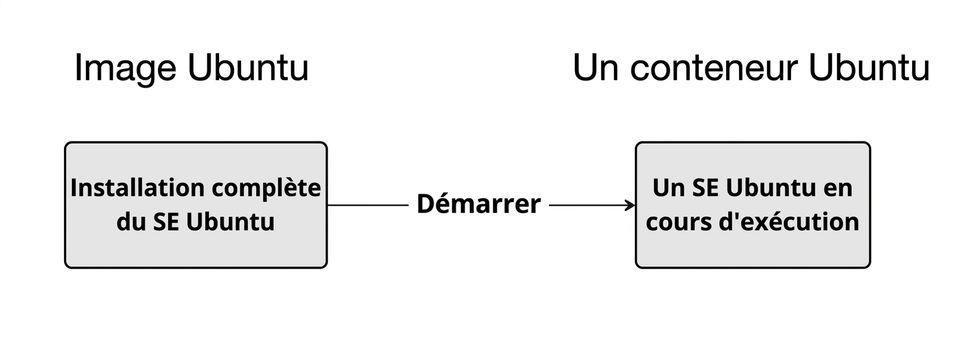
L'image appelée Ubuntu, avec une installation complète d'Ubuntu, peut être lancée pour créer un OS Ubuntu en cours d'exécution avec lequel on peut interagir via un shell.

Introduction à Docker

Sortie d'un conteneur Docker

docker run <image-name>
docker run hello-world
Hello from Docker!

To generate this message, Docker took the following steps:
1. The Docker client contacted the Docker daemon.
2. The Docker daemon created a new container from the hello-world image which runs
 the executable that produces the output you are currently reading.
3. The Docker daemon streamed that output to the Docker client, which sent it to 
 your terminal.
Introduction à Docker

Choisir la sortie d'un conteneur Docker

docker run <image-name>
docker run ubuntu
repl@host:/# docker run ubuntu

repl@host:/#
Introduction à Docker

Un conteneur Docker interactif

Ajouter -it à docker run donne un shell interactif dans le conteneur lancé.

docker run -it <image-name>
docker run -it ubuntu
repl@container:/#
repl@container:/# exit
exit
repl@host:/#
Introduction à Docker

Exécuter un conteneur en mode détaché

Ajouter -d à docker run exécute le conteneur en arrière-plan et rend la main au shell.

docker run -d <image-name>
docker run -d postgres
repl@host:/# docker run -d postgres
4957362b5fb7019b56470a99f52218e698b85775af31da01958bab198a32b072
repl@host:/#
Introduction à Docker

Lister et arrêter les conteneurs en cours

docker ps
repl@host:/# docker ps
CONTAINER ID   IMAGE      COMMAND                  CREATED  
4957362b5fb7   postgres   "docker-entrypoint.s…"   About a minute ago
STATUS              PORTS      NAMES
Up About a minute   5432/tcp   awesome_curie
docker stop <container-id>
repl@host:/# docker stop cf91547fd657
cf91547fd657
Introduction à Docker

Résumé des nouvelles commandes

Usage Commande
Démarrer un conteneur docker run <image-name>
Démarrer un conteneur interactif docker run -it <image-name>
Démarrer un conteneur détaché docker run -d <image-name>
Lister les conteneurs en cours docker ps
Arrêter un conteneur docker stop <container-id>
Introduction à Docker

Passons à la pratique !

Introduction à Docker

Preparing Video For Download...