Créer vos propres images Docker
Introduction à Docker

Tim Sangster
Software Engineer @ DataCamp
Créer des images avec des Dockerfiles
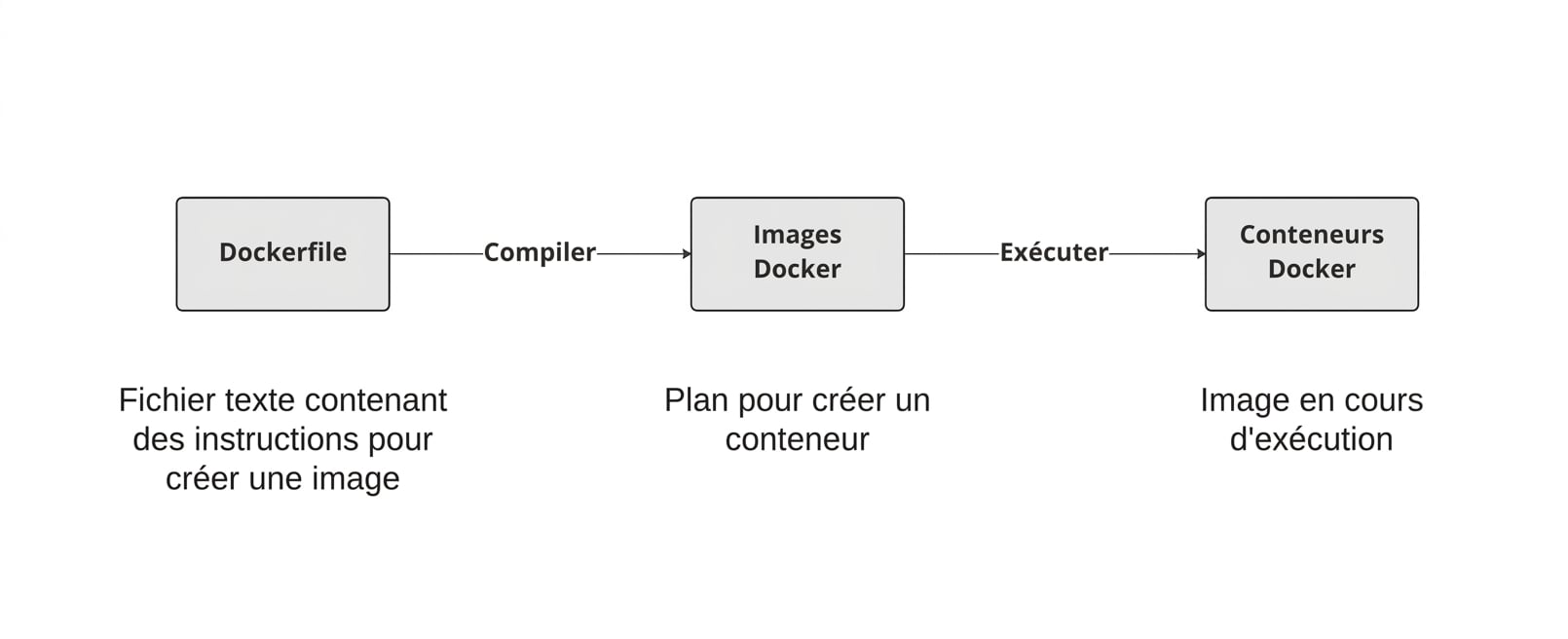
Démarrer un Dockerfile
Un Dockerfile commence toujours à partir d'une autre image, indiquée avec l'instruction FROM.
FROM postgres
FROM ubuntu
FROM hello-world
FROM my-custom-data-pipeline
FROM postgres:15.0
FROM ubuntu:22.04
FROM hello-world:latest
FROM my-custom-data-pipeline:v1
Construire un Dockerfile
Construire un Dockerfile crée une image.
docker build /location/to/Dockerfile
docker build .
[+] Building 0.1s (5/5) FINISHED
 => [internal] load build definition from Dockerfile
 => => transferring dockerfile: 54B
...
 => CACHED [1/1] FROM docker.io/library/ubuntu
 => exporting to image
 => => exporting layers
 => => writing image sha256:a67f41b1d127160a7647b6709b3789b1e954710d96df39ccaa21..
Nommer l'image
En pratique, on donne presque toujours un nom à l'image avec l'option -t :
docker build -t first_image .
...
=> => writing image sha256:a67f41b1d127160a7647b6709b3789b1e954710d96df39ccaa21..
=> => naming to docker.io/library/first_image
docker build -t first_image:v0 .
=> => writing image sha256:a67f41b1d127160a7647b6709b3789b1e954710d96df39ccaa21..
=> => naming to docker.io/library/first_image:v0
Personnaliser des images
RUN <valid-shell-command>
FROM ubuntu
RUN apt-get update
RUN apt-get install -y python3
Utilisez l'option -y pour éviter toute invite :
...
After this operation, 22.8 MB of additional disk space will be used.
Do you want to continue? [Y/n]
Construire un Dockerfile non trivial
Lors de la construction, Docker exécute réellement les commandes après RUN
L'exécution par Docker de RUN apt-get update prend autant de temps que si vous l'exécutiez vous-même !
root@host:/# apt-get update
Get:1 http://ports.ubuntu.com/ubuntu-ports jammy InRelease [270 kB]
...
Get:17 http://ports.ubuntu.com/ubuntu-ports jammy-security/restricted arm64 Pack..
Fetched 23.0 MB in 2s (12.3 MB/s)
Reading package lists... Done
Résumé
| Usage | Instruction Dockerfile |
|---|---|
| Démarrer un Dockerfile à partir d'une image | FROM <image-name> |
| Ajouter une commande de l'interpréteur à l'image | RUN <valid-shell-command> |
| S'assurer qu'aucune saisie n'est requise par la commande | RUN apt-get install -y python3 |
| Usage | Commande Shell |
|---|---|
| Construire une image à partir d'un Dockerfile | docker build /location/to/Dockerfile |
| Construire l'image dans le répertoire de travail courant | docker build . |
| Choisir un nom lors de la construction | docker build -t first_image . |
Passons à la pratique !
Introduction à Docker

