Recherche sémantique avec Pinecone

Créer des applications d'IA avec Pinecone

James Chapman

Curriculum Manager, DataCamp

Moteurs de recherche sémantique

  1. Intégrer et ingérer des documents dans un index Pinecone
  2. Intégrer une requête d'utilisateur
  3. Interroger l'index avec la requête intégrée
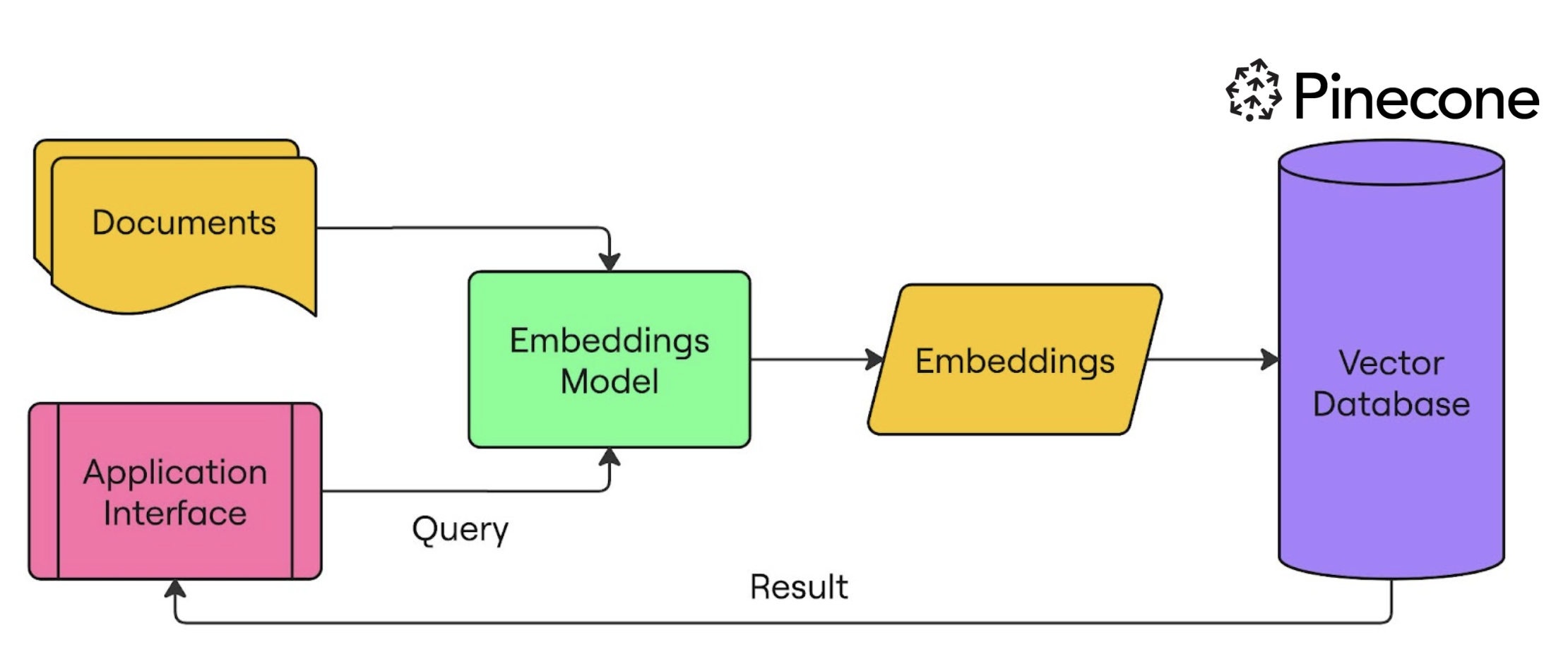
recherche sémantique

Créer des applications d'IA avec Pinecone

Configurer Pinecone et OpenAI pour la recherche sémantique

from openai import OpenAI
from pinecone import Pinecone, ServerlessSpec

client = OpenAI(api_key="OPENAI_API_KEY")
pc = Pinecone(api_key="PINECONE_API_KEY")


pc.create_index( name="semantic-search-datacamp",
dimension=1536,
spec=ServerlessSpec(cloud='aws', region='us-east-1') )
index = pc.Index("semantic-search-datacamp")
Créer des applications d'IA avec Pinecone

Ingestion de documents dans l'index Pinecone

import pandas as pd
import numpy as np
from uuid import uuid4

df = pd.read_csv('squad_dataset.csv')
| id | text                                              | title             |
|----|---------------------------------------------------|-------------------|
| 1  | Architecturally, the school has a Catholic cha... | University of ... |
| 2  | The College of Engineering was established in.... | University of ... |
| 3  | Following the disbandment of Destiny's Child in.. | Beyonce           |
| 4  | Architecturally, the school has a Catholic cha... | University of ... |
Créer des applications d'IA avec Pinecone

Ingestion de documents dans l'index Pinecone

batch_limit = 100


for batch in np.array_split(df, len(df) / batch_limit):
metadatas = [{"text_id": row['id'], "text": row['text'], "title": row['title']} for _, row in batch.iterrows()]
texts = batch['text'].tolist()
ids = [str(uuid4()) for _ in range(len(texts))]
response = client.embeddings.create(input=texts, model="text-embedding-3-small") embeds = [np.array(x.embedding) for x in response.data]
index.upsert(vectors=zip(ids, embeds, metadatas), namespace="squad_dataset")
Créer des applications d'IA avec Pinecone

Ingestion de documents dans l'index Pinecone

index.describe_index_stats()
{'dimension': 1536, 'index_fullness': 0.02,
 'namespaces': {'squad_dataset': {'vector_count': 2000}},
 'total_vector_count': 2000}
Créer des applications d'IA avec Pinecone

Interroger avec Pinecone

query = "To whom did the Virgin Mary allegedly appear in 1858 in Lourdes France?"

query_response = client.embeddings.create( input=query, model="text-embedding-3-small") query_emb = query_response.data[0].embedding
retrieved_docs = index.query(vector=query_emb, top_k=3, namespace=namespace, include_metadata=True)
Créer des applications d'IA avec Pinecone

Interroger avec Pinecone

for result in retrieved_docs['matches']:
    print(f"{round(result['score'], 2)}: {result['metadata']['text']}")
0.41: Architecturally, the school has a Catholic character. Atop the Main Building
gold dome is a golden statue of the Virgin Mary...

0.3: Because of its Catholic identity, a number of religious buildings stand on 
campus. The Old College building has become one of two seminaries...

0.29: Within the white inescutcheon, the five quinas (small blue shields) with 
their five white bezants representing the five wounds...
Créer des applications d'IA avec Pinecone

À vos claviers !

Créer des applications d'IA avec Pinecone

Preparing Video For Download...