Python में APIs परिचय
Chris Ramakers
Engineering manager


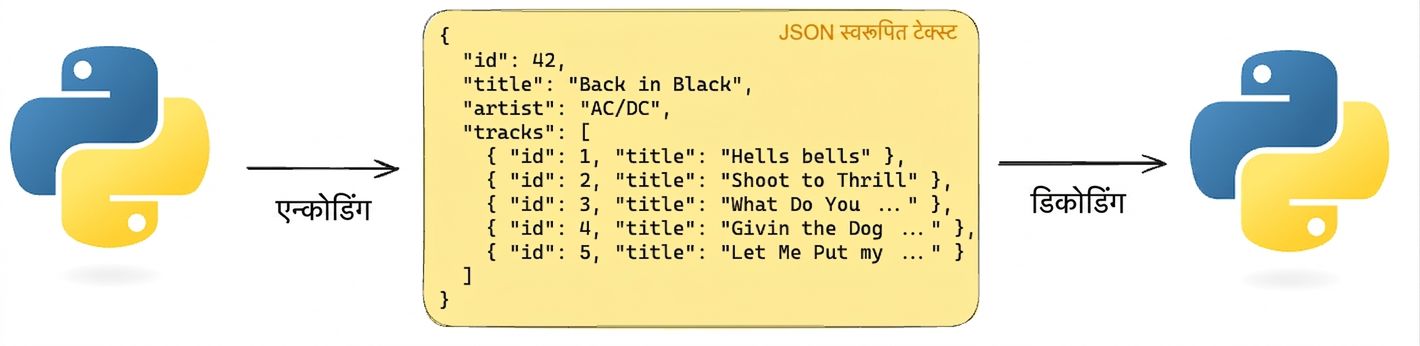
JSON

import json
album = {'id': 42, 'title':"Back in Black"}
string = json.dumps(album) # Encodes a python object to a JSON string
album = json.loads(string) # Decodes a JSON string to a Python object
# हेडर के बिना GET रिक्वेस्ट
response = requests.get('http://api.music-catalog.com/lyrics')
print(response.text)
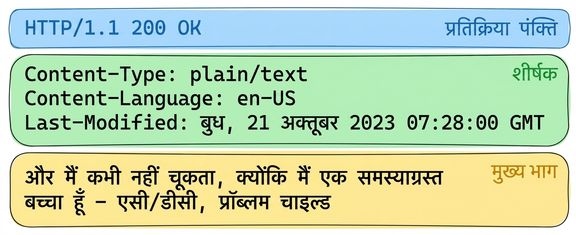
N' I never miss Cause I'm a problem child - AC/DC, Problem Child
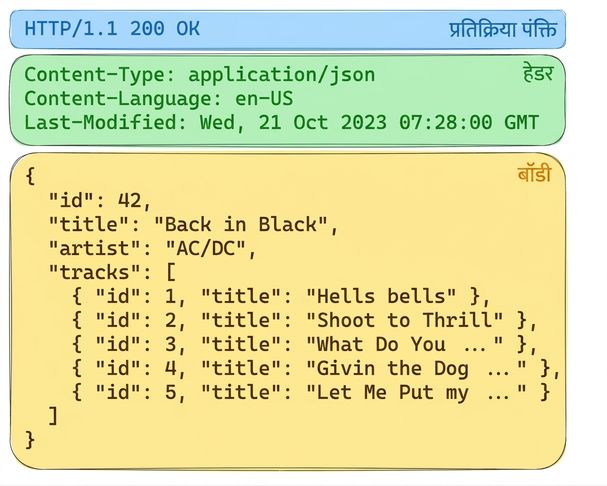
# accept हेडर के साथ GET रिक्वेस्ट response = requests.get('http://api.music-catalog.com/lyrics', headers={'accept': 'application/json'}) # JSON टेक्स्ट प्रिंट करें print(response.text)# Python ऑब्जेक्ट में डिकोड करें data = response.json() print(data['artist'])
{'artist': 'AC/DC', 'lyric': "N' I never miss Cause I'm a problem child", 'track': 'Problem Child'}AC/DC
import requests
playlist = {"name": "Road trip", "genre":"rock", "private":"true"}
# `json` आर्ग्युमेंट के जरिए playlist जोड़ें
response = requests.post("http://api.music-catalog.com/playlists", json=playlist)
# रिक्वेस्ट ऑब्जेक्ट लें
request = response.request
# रिक्वेस्ट का content-type हेडर प्रिंट करें
print(request.headers['content-type'])
application/json
Python में APIs परिचय