अपनी खुद की Docker इमेज बनाएँ
Docker परिचय

Tim Sangster
Software Engineer @ DataCamp
Dockerfiles से इमेज बनाना
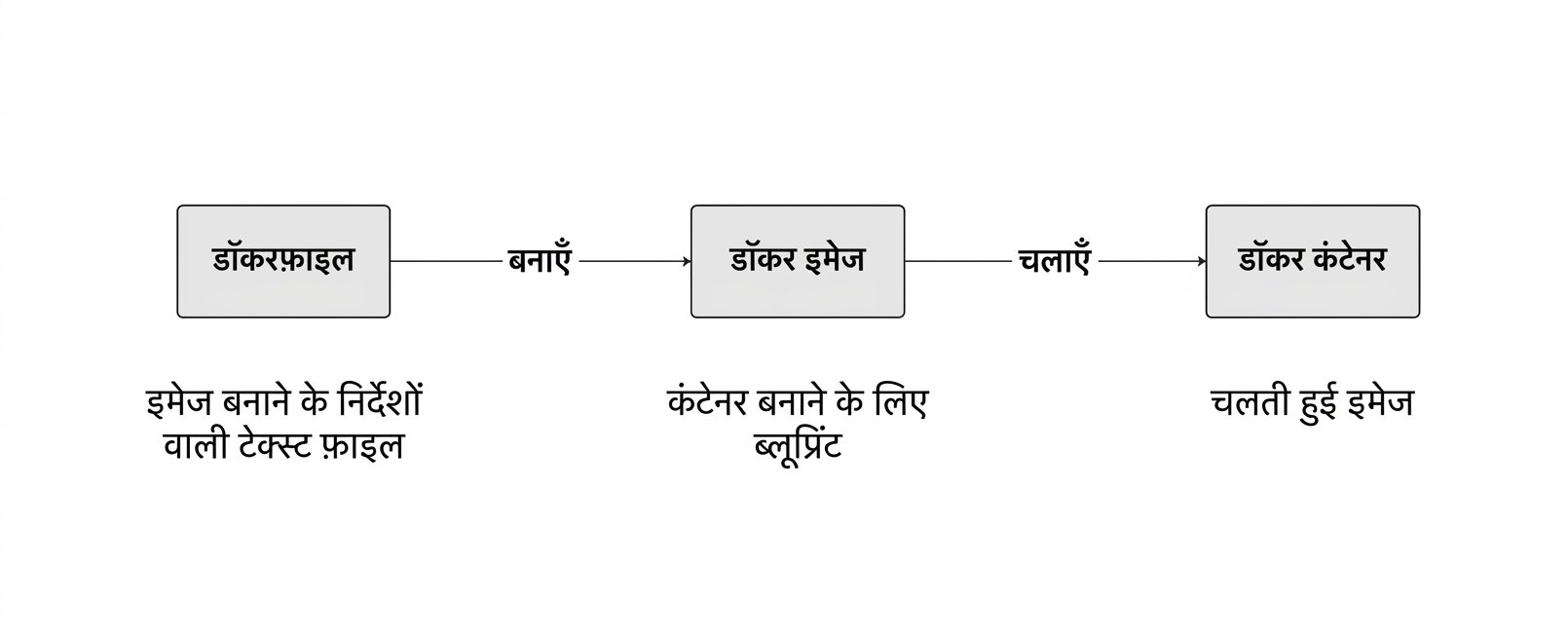
Dockerfile शुरू करना
एक Dockerfile हमेशा किसी दूसरी इमेज से शुरू होता है, जिसे FROM निर्देश से दिया जाता है.
FROM postgres
FROM ubuntu
FROM hello-world
FROM my-custom-data-pipeline
FROM postgres:15.0
FROM ubuntu:22.04
FROM hello-world:latest
FROM my-custom-data-pipeline:v1
Dockerfile build करना
Dockerfile को build करने से एक इमेज बनती है.
docker build /location/to/Dockerfile
docker build .
[+] Building 0.1s (5/5) FINISHED
 => [internal] load build definition from Dockerfile
 => => transferring dockerfile: 54B
...
 => CACHED [1/1] FROM docker.io/library/ubuntu
 => exporting to image
 => => exporting layers
 => => writing image sha256:a67f41b1d127160a7647b6709b3789b1e954710d96df39ccaa21..
इमेज को नाम देना
प्रैक्टिस में हम लगभग हमेशा -t फ्लैग से इमेज को नाम देते हैं:
docker build -t first_image .
...
=> => writing image sha256:a67f41b1d127160a7647b6709b3789b1e954710d96df39ccaa21..
=> => naming to docker.io/library/first_image
docker build -t first_image:v0 .
=> => writing image sha256:a67f41b1d127160a7647b6709b3789b1e954710d96df39ccaa21..
=> => naming to docker.io/library/first_image:v0
इमेज कस्टमाइज़ करना
RUN <valid-shell-command>
FROM ubuntu
RUN apt-get update
RUN apt-get install -y python3
कोई प्रॉम्प्ट न आए, इसके लिए -y फ्लैग का उपयोग करें:
...
After this operation, 22.8 MB of additional disk space will be used.
Do you want to continue? [Y/n]
एक non-trivial Dockerfile बनाना
इमेज build करते समय Docker, RUN के बाद कमांड सचमुच चलाता है
Docker द्वारा RUN apt-get update चलाने में उतना ही समय लगता है जितना हमें सीधे चलाने में लगता है!
root@host:/# apt-get update
Get:1 http://ports.ubuntu.com/ubuntu-ports jammy InRelease [270 kB]
...
Get:17 http://ports.ubuntu.com/ubuntu-ports jammy-security/restricted arm64 Pack..
Fetched 23.0 MB in 2s (12.3 MB/s)
Reading package lists... Done
सारांश
| उपयोग | Dockerfile निर्देश |
|---|---|
| किसी इमेज से Dockerfile शुरू करें | FROM <image-name> |
| इमेज में shell कमांड जोड़ें | RUN <valid-shell-command> |
| सुनिश्चित करें कि shell कमांड में यूज़र इनपुट न लगे. | RUN apt-get install -y python3 |
| उपयोग | Shell कमांड |
|---|---|
| Dockerfile से इमेज build करें | docker build /location/to/Dockerfile |
| current working directory में इमेज build करें | docker build . |
| इमेज बनाते समय नाम चुनें | docker build -t first_image . |
अभ्यास करते हैं!
Docker परिचय

