ยินดีด้วย

Git ระดับกลาง

George Boorman

Curriculum Manager, DataCamp

Branch

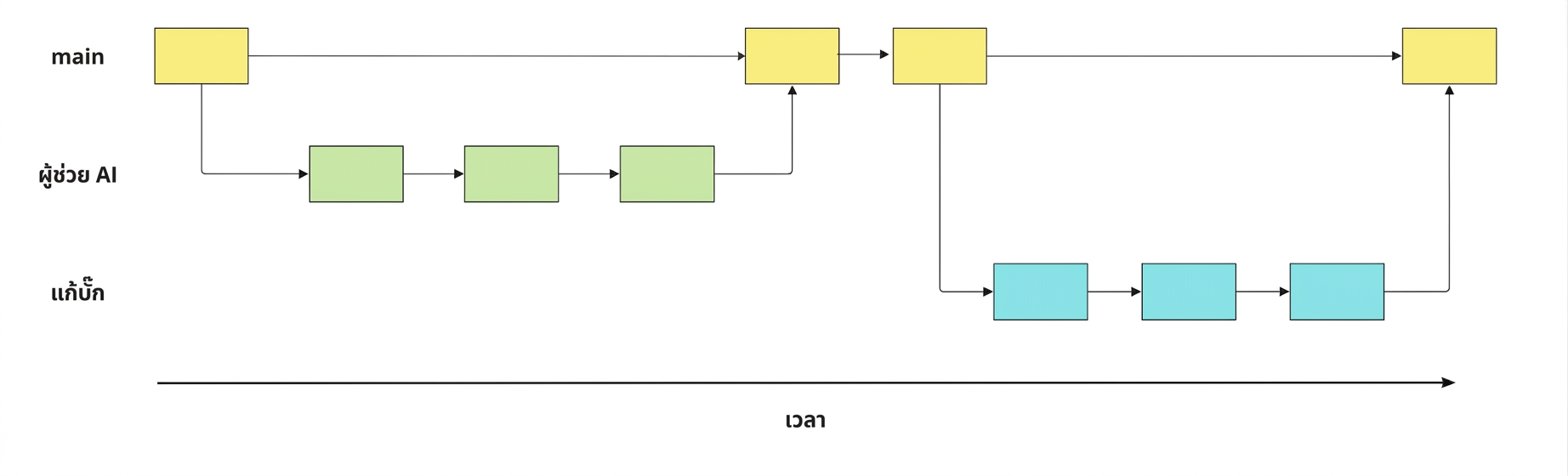
ภาพของ branch bug-fix, ai-assistant และ main พร้อม commit และการ merge

Git ระดับกลาง

การทำงานกับ branch

  • ดู branch ทั้งหมด
git branch
  • สลับไปยัง branch ที่มีอยู่
git switch hotfix
  • สร้างและสลับไปยัง branch ใหม่
git switch -c hotfix
  • เปรียบเทียบสอง branch
git diff main hotfix
  • เปลี่ยนชื่อ branch
git branch -m hotfix bugfix
  • ลบ branch
git branch -d hotfix
Git ระดับกลาง

การ merge branch

  • จาก main เพื่อ merge ai-assistant เข้า main:
git merge ai-assistant
  • จาก branch อื่น: git merge source destination
git merge ai-assistant main
  • การจัดการ merge conflict
Git ระดับกลาง

การทำงานกับ remote

  • Clone remote repo
git clone https://github.com/datacamp/project
  • ดูข้อมูล remote ทั้งหมด
git remote -v
  • เพิ่ม remote ใหม่
git remote add george https://github.com/george_datacamp/repo 
Git ระดับกลาง

การซิงค์ repo ในเครื่องและ remote

git fetch origin
git pull origin
git push origin documentation
Git ระดับกลาง

ขั้นตอนถัดไป

  • GitHub Concepts

  • GitHub and Git Tutorial

  • เริ่มใช้ Git กับโปรเจกต์ซอฟต์แวร์และข้อมูลของคุณได้เลย!

Git ระดับกลาง

มาฝึกกันเถอะ!

Git ระดับกลาง

Preparing Video For Download...