ความสม่ำเสมอ

การทำความสะอาดข้อมูลใน Python

Adel Nehme

VP of AI Curriculum, DataCamp

ในบทนี้


บทที่ 3 - ปัญหาข้อมูลขั้นสูง

การทำความสะอาดข้อมูลใน Python

ข้อจำกัดช่วงค่าของข้อมูล

range_examples

การทำความสะอาดข้อมูลใน Python

ความสม่ำเสมอ

คอลัมน์ หน่วย
อุณหภูมิ 32°C ก็คือ 89.6°F
น้ำหนัก 70 Kg ก็คือ 11 st.
วันที่ 26-11-2019 ก็คือ 26, November, 2019
เงิน 100$ ก็คือ 10763.90¥
การทำความสะอาดข้อมูลใน Python

ตัวอย่าง

temperatures = pd.read_csv('temperature.csv')
temperatures.head()
       Date  Temperature
0  03.03.19         14.0
1  04.03.19         15.0
2  05.03.19         18.0
3  06.03.19         16.0
4  07.03.19         62.6
การทำความสะอาดข้อมูลใน Python

ตัวอย่าง

temperatures = pd.read_csv('temperature.csv')
temperatures.head()
       Date  Temperature
0  03.03.19         14.0
1  04.03.19         15.0
2  05.03.19         18.0
3  06.03.19         16.0
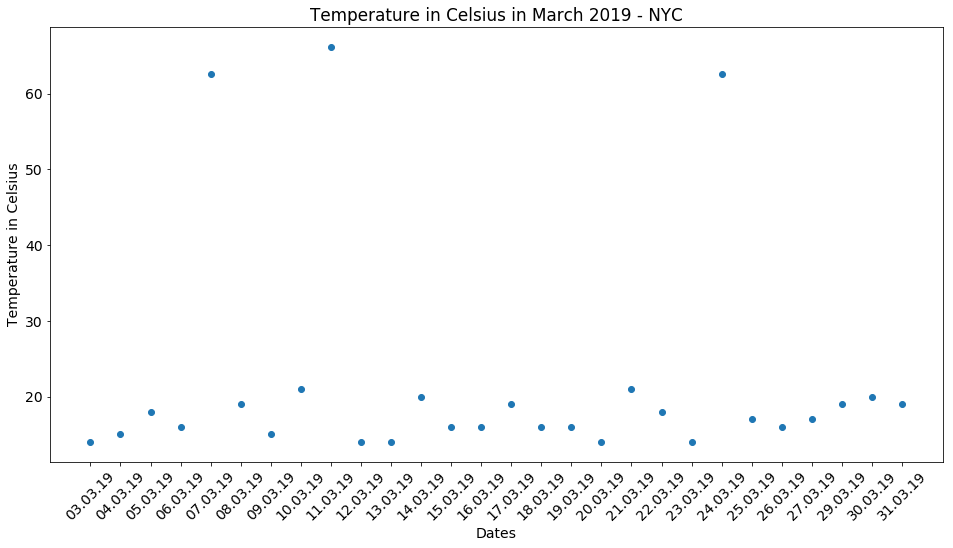
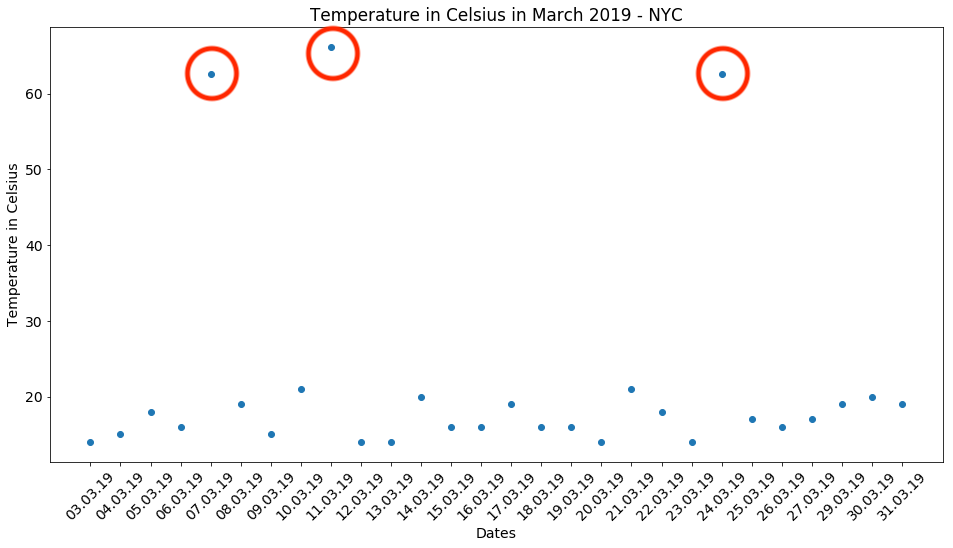
4  07.03.19         62.6   <--
การทำความสะอาดข้อมูลใน Python

ตัวอย่าง

# Import matplotlib
import matplotlib.pyplot as plt

# Create scatter plot plt.scatter(x = 'Date', y = 'Temperature', data = temperatures)
# Create title, xlabel and ylabel plt.title('Temperature in Celsius March 2019 - NYC') plt.xlabel('Dates') plt.ylabel('Temperature in Celsius')
# Show plot plt.show()
การทำความสะอาดข้อมูลใน Python

การทำความสะอาดข้อมูลใน Python

การทำความสะอาดข้อมูลใน Python

การจัดการข้อมูลอุณหภูมิ

$$C = (F - 32) \times \frac{5}{9}$$


temp_fah = temperatures.loc[temperatures['Temperature'] > 40, 'Temperature']

temp_cels = (temp_fah - 32) * (5/9)
temperatures.loc[temperatures['Temperature'] > 40, 'Temperature'] = temp_cels
# Assert conversion is correct
assert temperatures['Temperature'].max() < 40
การทำความสะอาดข้อมูลใน Python

การจัดการข้อมูลวันที่

birthdays.head()
          Birthday First name Last name
0         27/27/19      Rowan     Nunez
1         03-29-19      Brynn      Yang
2  March 3rd, 2019     Sophia    Reilly
3         24-03-19     Deacon    Prince
4         06-03-19   Griffith      Neal
การทำความสะอาดข้อมูลใน Python

การจัดการข้อมูลวันที่

birthdays.head()

ตารางแสดงผลลัพธ์ของชุดข้อมูล birthdays - แถวหนึ่งมีวันที่ในรูปแบบเดือน วัน ปี อีกแถวเขียนวันที่แบบเต็ม และอีกแถวมีรูปแบบที่ผิดพลาดชัดเจน โดยซ้ำค่าวันสองครั้ง

การทำความสะอาดข้อมูลใน Python

การจัดรูปแบบ datetime

datetime มีประโยชน์สำหรับการแทนค่าวันที่

วันที่ รูปแบบ datetime
25-12-2019 %d-%m-%Y
December 25th 2019 %c
12-25-2019 %m-%d-%Y
... ...

pandas.to_datetime()

  • รู้จักรูปแบบส่วนใหญ่โดยอัตโนมัติ
  • อาจล้มเหลวเมื่อพบรูปแบบที่ผิดพลาดหรือจำไม่ได้
การทำความสะอาดข้อมูลใน Python

การจัดการข้อมูลวันที่

# Converts to datetime - but won't work!
birthdays['Birthday'] = pd.to_datetime(birthdays['Birthday'])
ValueError: month must be in 1..12
# Will work!
birthdays['Birthday'] = pd.to_datetime(birthdays['Birthday'],
                                       # Return NA for rows where conversion failed
                                       errors = 'coerce')
การทำความสะอาดข้อมูลใน Python

การจัดการข้อมูลวันที่

birthdays.head()
    Birthday First name Last name
0        NaT      Rowan     Nunez
1 2019-03-29      Brynn      Yang
2 2019-03-03     Sophia    Reilly
3 2019-03-24     Deacon    Prince
4 2019-06-03   Griffith      Neal
การทำความสะอาดข้อมูลใน Python

การจัดการข้อมูลวันที่

birthdays['Birthday'] = birthdays['Birthday'].dt.strftime("%d-%m-%Y")
birthdays.head()
     Birthday First name Last name
0         NaT      Rowan     Nunez
1  29-03-2019      Brynn      Yang
2  03-03-2019     Sophia    Reilly
3  24-03-2019     Deacon    Prince
4  03-06-2019   Griffith      Neal
การทำความสะอาดข้อมูลใน Python

การจัดการข้อมูลวันที่ที่กำกวม


2019-03-08 อยู่ในเดือนสิงหาคมหรือมีนาคม?


  • แปลงเป็น NA แล้วจัดการตามนั้น
  • อนุมานรูปแบบจากการทำความเข้าใจแหล่งข้อมูล
  • อนุมานรูปแบบจากข้อมูลก่อนหน้าและถัดไปใน DataFrame
การทำความสะอาดข้อมูลใน Python

มาฝึกกันเถอะ!

การทำความสะอาดข้อมูลใน Python

Preparing Video For Download...