การดึงข้อมูลจากเว็บด้วย Python

การนำเข้าข้อมูลด้วย Python ระดับกลาง

Hugo Bowne-Anderson

Data Scientist at DataCamp

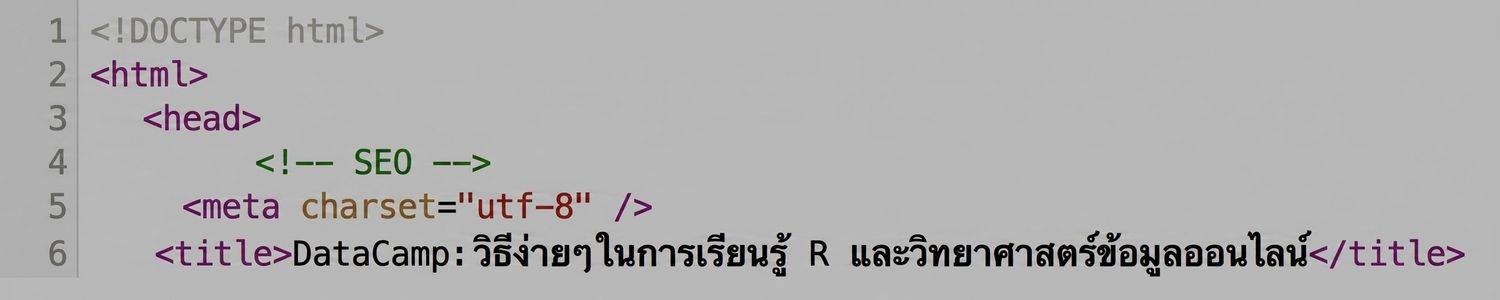
HTML

  • ข้อมูลแบบมีโครงสร้างและไม่มีโครงสร้างปะปนกัน

  • ข้อมูลแบบมีโครงสร้าง:

    • มีโมเดลข้อมูลที่กำหนดไว้ล่วงหน้า หรือ

    • จัดเรียงในรูปแบบที่ชัดเจน

  • ข้อมูลแบบไม่มีโครงสร้าง: ไม่มีคุณสมบัติเหล่านี้
ch_1_3.008.png

การนำเข้าข้อมูลด้วย Python ระดับกลาง

BeautifulSoup

  • แยกวิเคราะห์และดึงข้อมูลแบบมีโครงสร้างจาก HTML

ch_1_3.011.png

  • จัดการ tag soup และดึงข้อมูลที่ต้องการ
การนำเข้าข้อมูลด้วย Python ระดับกลาง

BeautifulSoup

from bs4 import BeautifulSoup
import requests
url = 'https://www.crummy.com/software/BeautifulSoup/'
r = requests.get(url)
html_doc = r.text
soup = BeautifulSoup(html_doc)
การนำเข้าข้อมูลด้วย Python ระดับกลาง

Prettified Soup

print(soup.prettify())
<!DOCTYPE HTML PUBLIC "-//W3C//DTD HTML 4.0 Transitional//EN" "http://www.w3.org/TR/REC-html40/transitional.dtd">
<html>
 <head>
  <meta content="text/html; charset=utf-8" http-equiv="Content-Type"/>
  <title>
   Beautiful Soup: We called him Tortoise because he taught us.
  </title>
  <link href="mailto:[email protected]" rev="made"/>
  <link href="/nb/themes/Default/nb.css" rel="stylesheet" type="text/css"/>
  <meta content="Beautiful Soup: a library designed for screen-scraping HTML and XML." name="Description"/>
  <meta content="Markov Approximation 1.4 (module: leonardr)" name="generator"/>
  <meta content="Leonard Richardson" name="author"/>
 </head>
 <body alink="red" bgcolor="white" link="blue" text="black" vlink="660066">
  <img align="right" src="10.1.jpg" width="250"/>
  <br/>
  <p>
การนำเข้าข้อมูลด้วย Python ระดับกลาง

สำรวจ BeautifulSoup

  • เมธอดที่ใช้บ่อย เช่น:
print(soup.title)
<title>Beautiful Soup: We called him Tortoise because he taught us.</title>
print(soup.get_text())
Beautiful Soup: We called him Tortoise because he taught us.
You didn't write that awful page. You're just trying to
get some data out of it. Beautiful Soup is here to 
help. Since 2004, it's been saving programmers hours or
days of work on quick-turnaround screen scraping 
projects.
การนำเข้าข้อมูลด้วย Python ระดับกลาง

สำรวจ BeautifulSoup

  • find_all()
for link in soup.find_all('a'):
    print(link.get('href'))
bs4/download/
#Download
bs4/doc/
#HallOfFame
https://code.launchpad.net/beautifulsoup
https://groups.google.com/forum/?fromgroups#!forum/beautifulsoup
http://www.candlemarkandgleam.com/shop/constellation-games/
http://constellation.crummy.com/Constellation%20Games%20excerpt.html
https://groups.google.com/forum/?fromgroups#!forum/beautifulsoup
https://bugs.launchpad.net/beautifulsoup/
http://lxml.de/
http://code.google.com/p/html5lib/
การนำเข้าข้อมูลด้วย Python ระดับกลาง

มาฝึกกันเถอะ!

การนำเข้าข้อมูลด้วย Python ระดับกลาง

Preparing Video For Download...