การทำงานกับข้อมูลที่มีโครงสร้าง

Python เบื้องต้นสำหรับ API

Chris Ramakers

Engineering manager

โครงสร้างข้อมูลที่ซับซ้อน

การตอบกลับของ Lyric API
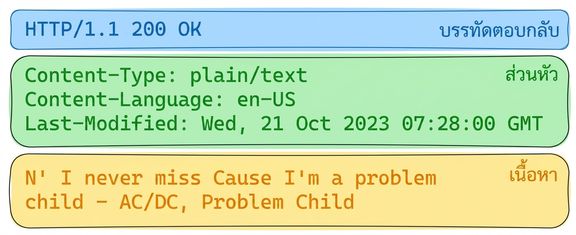
การตอบกลับของ Lyric API พร้อม HTTP 200 OK Headers: Content-Type: plain/text, Content-Language: en-US, Last-Modified: Wed, 21 Oct 2023. Body: เนื้อเพลง "Problem Child" ของ AC/DC

การตอบกลับของ Album API

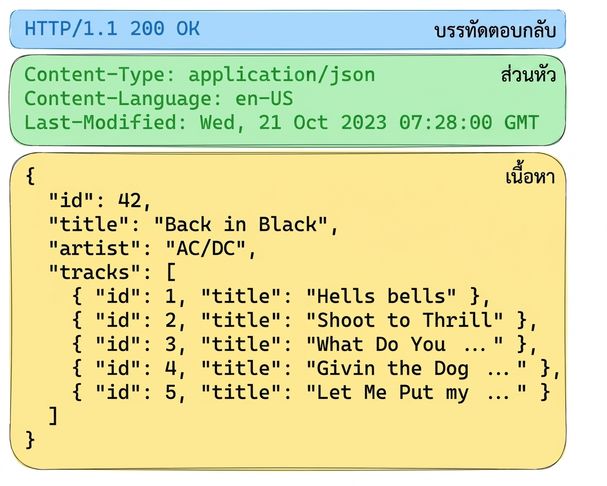
การตอบกลับของ Album API พร้อม HTTP 200 OK Headers ระบุเนื้อหาเป็น JSON Body มีรายละเอียดอัลบั้ม "Back in Black" ของ AC/DC พร้อมรายชื่อเพลง

Python เบื้องต้นสำหรับ API

โครงสร้างข้อมูลที่ซับซ้อน: JSON

  • JSON
    • JavaScript Object Notation
    • รองรับการใช้งานอย่างกว้างขวาง
    • อ่านได้ง่ายและใช้งานได้กับเครื่อง
  • Content-type, mime-type หรือ media-type
  • รูปแบบอื่น ๆ
    • XML
    • CSV
    • YAML

การตอบกลับของ Album API

การตอบกลับของ Album API พร้อม HTTP 200 OK Headers ระบุเนื้อหาเป็น JSON Body มีรายละเอียดอัลบั้ม "Back in Black" ของ AC/DC พร้อมรายชื่อเพลง

Python เบื้องต้นสำหรับ API

จาก Python สู่ JSON และกลับมา

  ภาพแสดงการเข้ารหัสและถอดรหัสข้อความในรูปแบบ JSON โดยใช้ Python JSON มีรายละเอียดอัลบั้ม "Back in Black" ของ AC/DC

import json
album =  {'id': 42, 'title':"Back in Black"}
string = json.dumps(album) # Encodes a python object to a JSON string
album = json.loads(string) # Decodes a JSON string to a Python object
Python เบื้องต้นสำหรับ API

การร้องขอข้อมูล JSON

# GET request without headers
response = requests.get('http://api.music-catalog.com/lyrics')
print(response.text)
N' I never miss Cause I'm a problem child - AC/DC, Problem Child
# GET request with an accept header
response = requests.get('http://api.music-catalog.com/lyrics', headers={'accept': 'application/json'})

# Print the JSON text
print(response.text)

# Decode into a Python object data = response.json() print(data['artist'])
{'artist': 'AC/DC', 'lyric': "N' I never miss Cause I'm a problem child", 'track': 'Problem Child'}

AC/DC
Python เบื้องต้นสำหรับ API

การส่งข้อมูล JSON

import requests
playlist = {"name": "Road trip", "genre":"rock", "private":"true"}

# Add the playlist using via the `json` argument 
response = requests.post("http://api.music-catalog.com/playlists", json=playlist)
# Get the request object
request = response.request

# Print the request content-type header
print(request.headers['content-type'])
application/json
Python เบื้องต้นสำหรับ API

มาฝึกกันเถอะ!

Python เบื้องต้นสำหรับ API

Preparing Video For Download...