การสร้าง Docker image ของคุณเอง
Docker เบื้องต้น

Tim Sangster
Software Engineer @ DataCamp
การสร้าง image ด้วย Dockerfile
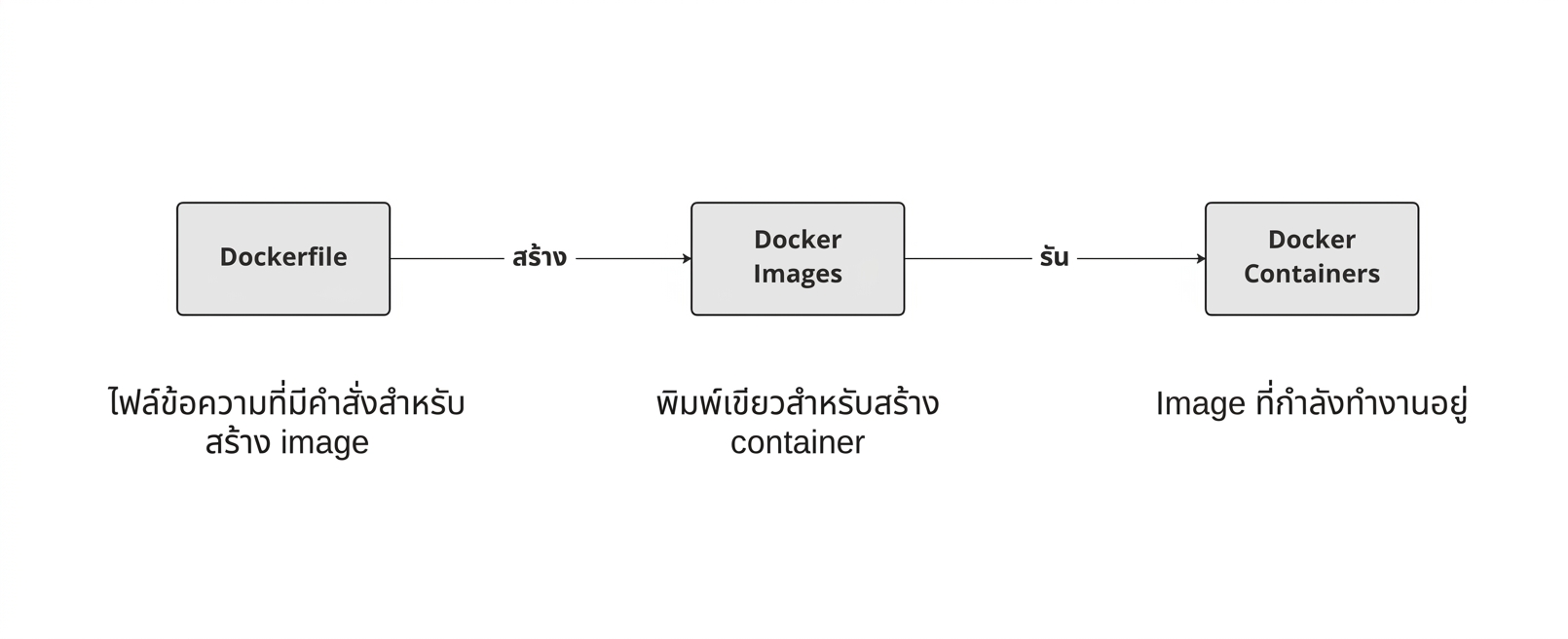
การเริ่มต้น Dockerfile
Dockerfile จะเริ่มต้นจาก image อื่นเสมอ โดยระบุด้วยคำสั่ง FROM
FROM postgres
FROM ubuntu
FROM hello-world
FROM my-custom-data-pipeline
FROM postgres:15.0
FROM ubuntu:22.04
FROM hello-world:latest
FROM my-custom-data-pipeline:v1
การ build Dockerfile
การ build Dockerfile จะสร้าง image ขึ้นมา
docker build /location/to/Dockerfile
docker build .
[+] Building 0.1s (5/5) FINISHED
 => [internal] load build definition from Dockerfile
 => => transferring dockerfile: 54B
...
 => CACHED [1/1] FROM docker.io/library/ubuntu
 => exporting to image
 => => exporting layers
 => => writing image sha256:a67f41b1d127160a7647b6709b3789b1e954710d96df39ccaa21..
การตั้งชื่อ image
ในทางปฏิบัติ เรามักตั้งชื่อ image โดยใช้ flag -t เสมอ
docker build -t first_image .
...
=> => writing image sha256:a67f41b1d127160a7647b6709b3789b1e954710d96df39ccaa21..
=> => naming to docker.io/library/first_image
docker build -t first_image:v0 .
=> => writing image sha256:a67f41b1d127160a7647b6709b3789b1e954710d96df39ccaa21..
=> => naming to docker.io/library/first_image:v0
การปรับแต่ง image
RUN <valid-shell-command>
FROM ubuntu
RUN apt-get update
RUN apt-get install -y python3
ใช้ flag -y เพื่อหลีกเลี่ยง prompt ที่ต้องรอการยืนยัน:
...
After this operation, 22.8 MB of additional disk space will be used.
Do you want to continue? [Y/n]
การ build Dockerfile ที่ซับซ้อน
เมื่อ build image Docker จะรันคำสั่งหลัง RUN จริง ๆ
การที่ Docker รัน RUN apt-get update ใช้เวลาเท่ากับที่เรารันเองเลย!
root@host:/# apt-get update
Get:1 http://ports.ubuntu.com/ubuntu-ports jammy InRelease [270 kB]
...
Get:17 http://ports.ubuntu.com/ubuntu-ports jammy-security/restricted arm64 Pack..
Fetched 23.0 MB in 2s (12.3 MB/s)
Reading package lists... Done
สรุป
| การใช้งาน | คำสั่งใน Dockerfile |
|---|---|
| เริ่มต้น Dockerfile จาก image | FROM <image-name> |
| เพิ่มคำสั่ง shell ลงใน image | RUN <valid-shell-command> |
| ป้องกันไม่ให้คำสั่ง shell รอรับ input จากผู้ใช้ | RUN apt-get install -y python3 |
| การใช้งาน | Shell Command |
|---|---|
| Build image จาก Dockerfile | docker build /location/to/Dockerfile |
| Build image ใน directory ปัจจุบัน | docker build . |
| กำหนดชื่อเมื่อ build image | docker build -t first_image . |
มาฝึกกันเถอะ!
Docker เบื้องต้น

