Hash tables

โครงสร้างข้อมูลและอัลกอริทึมใน Python

Miriam Antona

Software engineer

นิยาม

  • เก็บชุดข้อมูล
  • คู่คีย์-ค่า

      lasagna: 14.75
      moussaka: 21.15
      sushi: 16.05
    
  • เกือบทุกภาษาโปรแกรมมิงมี hash table ในตัว:

    • hashes, hash maps, dictionaries, associative arrays
    • Python: dictionaries
โครงสร้างข้อมูลและอัลกอริทึมใน Python

โครงสร้าง

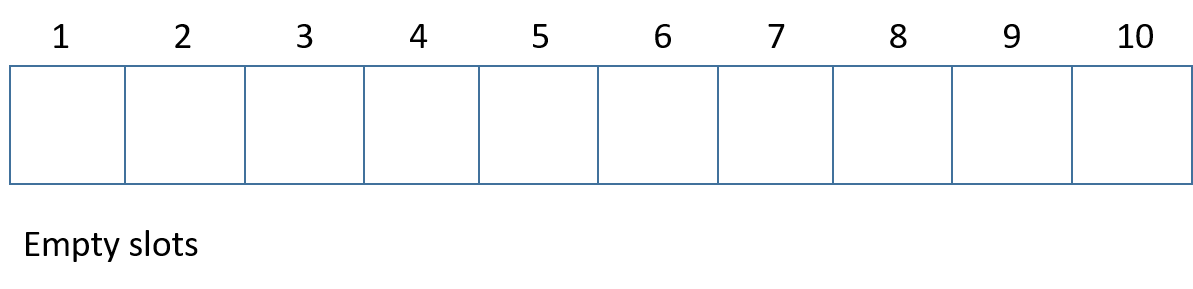
  • แต่ละตำแหน่ง: slot/bucket

แผนภาพแสดง hash table ว่างเปล่า

โครงสร้างข้อมูลและอัลกอริทึมใน Python

Hash functions

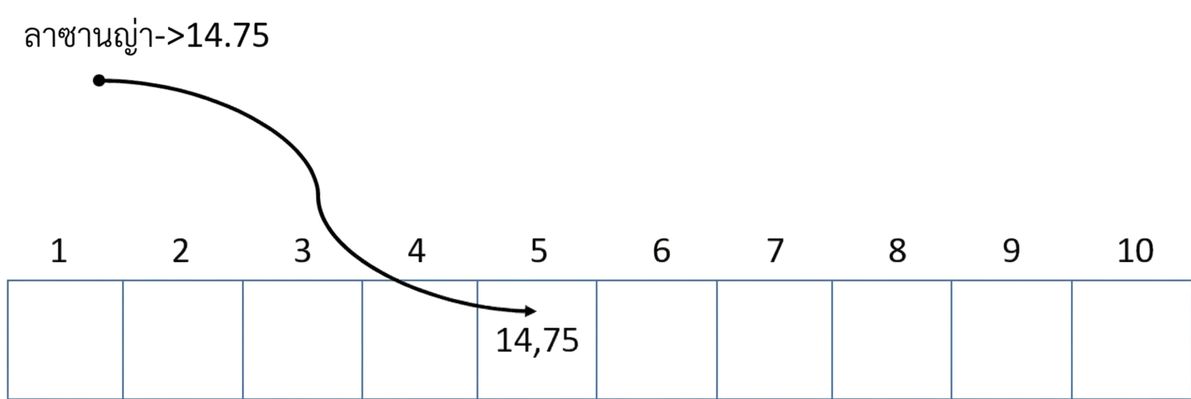
แผนภาพแสดง hash table ว่างเปล่า โดยมีการแทรกราคา lasagna ไว้ที่ตำแหน่งที่ห้า

โครงสร้างข้อมูลและอัลกอริทึมใน Python

Hash functions

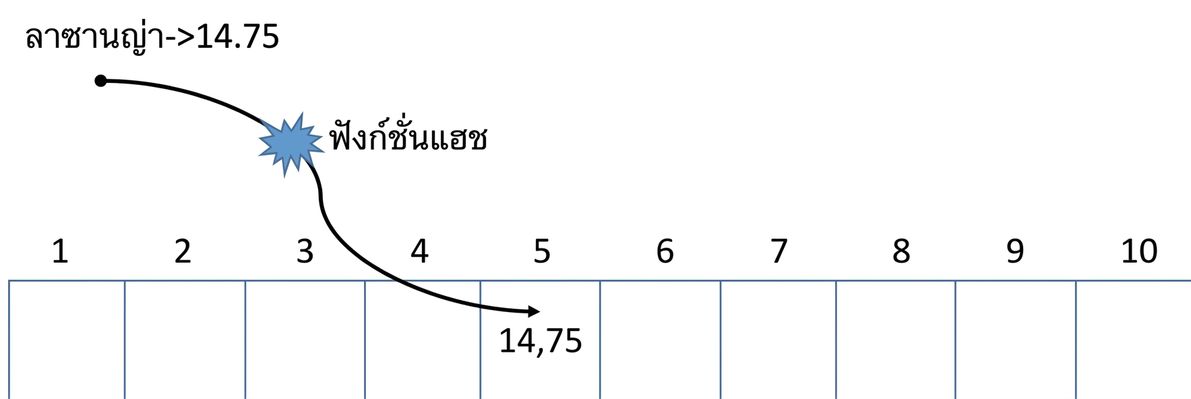
แผนภาพแสดง hash table ที่มีคำว่า "Hash function" อยู่กลางลูกศรที่แมปคำว่า "Lasagna" ไปยังค่าที่ตำแหน่งที่ห้า

  • ทุกครั้งที่เรียกใช้ hash function
    • ต้องคืนค่าเดิมเสมอสำหรับอินพุตเดิม
โครงสร้างข้อมูลและอัลกอริทึมใน Python

การค้นหา

แผนภาพแสดง hash table ที่มีข้อมูลบางส่วน

  • ค้นหา "lasagna"
    • hash("lasagna") -> 5
โครงสร้างข้อมูลและอัลกอริทึมใน Python

การค้นหา

แผนภาพแสดง hash table ที่มีข้อมูลบางส่วน โดยค่าที่ตำแหน่งที่ห้าแสดงเป็นสีเขียว

  • ค้นหา "lasagna"
    • hash("lasagna") -> 5
    • คืนค่า 14,75
  • $O(1)$
โครงสร้างข้อมูลและอัลกอริทึมใน Python

Collisions

  • Hash function อาจคืนค่าเดียวกันสำหรับอินพุตต่างกัน
  • hash("moussaka") -> 1

แผนภาพแสดง hash table ที่มีข้อมูลบางส่วน โดยค่าที่ตำแหน่งที่หนึ่งแสดงเป็นสีเหลือง

  • insert: moussaka -> 21,15
  • Collision!
    • ต้องได้รับการแก้ไข
    • มีหลายเทคนิค
โครงสร้างข้อมูลและอัลกอริทึมใน Python

Python dictionary

  • Dictionary ว่างเปล่า
my_empty_dictionary = {}
  • Dictionary ที่มีข้อมูล
my_menu = {
    'lasagna': 14.75,
    'moussaka': 21.15,
    'sushi': 16.05
}
โครงสร้างข้อมูลและอัลกอริทึมใน Python

Python dictionary - get

print(my_menu['sushi'])
16.05
print(my_menu['paella'])
Traceback (most recent call last):
  File "<stdin>", line 1, in <module>
KeyError: 'paella'
print(my_menu.get('paella'))
None
โครงสร้างข้อมูลและอัลกอริทึมใน Python

Python dictionary - items, keys & values

  • ดึงข้อมูลทั้งหมด
print(my_menu.items())
dict_items([('lasanga', 14.75), 
            ('moussaka', 21.15),
            ('sushi', 16.05)])
  • ดึงคีย์
print(my_menu.keys())
dict_keys(['lasanga', 'moussaka', 'sushi'])
  • ดึงค่า
print(my_menu.values())
dict_values([14.75, 21.15, 16.05])
โครงสร้างข้อมูลและอัลกอริทึมใน Python

Python dictionary - insert

my_menu['samosas'] = 13

print(my_menu.items())
dict_items([('lasanga', 14.75), ('moussaka', 21.15), ('sushi', 16.05), ('samosas', 13)])
โครงสร้างข้อมูลและอัลกอริทึมใน Python

Python dictionary - modify

print(my_menu.get('sushi'))
16.05
my_menu['sushi'] = 20

print(my_menu.get('sushi'))
20
โครงสร้างข้อมูลและอัลกอริทึมใน Python

Python dictionary - remove

  • ลบ dictionary ทั้งหมด
del my_menu
  • ลบคู่คีย์-ค่า
del my_menu["sushi"]
  • ล้างข้อมูลใน dictionary
my_menu.clear()
โครงสร้างข้อมูลและอัลกอริทึมใน Python

Python dictionary - iterate

for key, value in my_menu.items():
  print(f"\nkey: {key}")
  print(f"value: {value}")
key: lasagna
value: 14.75

key: moussaka
value: 21.15

key: sushi
value: 16.05
โครงสร้างข้อมูลและอัลกอริทึมใน Python

Python dictionary - iterate

for dish in my_menu:
  print(dish)
lasagna
moussaka
sushi
for prices in my_menu.values():
  print(prices)
14.75
21.15
16.05
โครงสร้างข้อมูลและอัลกอริทึมใน Python

Python dictionary - nested dictionaries

  • Dictionary ซ้อนกัน
my_menu = {
  'sushi' : {
    'price' : 19.25,
    'best_served' : 'cold'
  },
  'paella' : {
    'price' : 15,
    'best_served' : 'hot'
  }
}
โครงสร้างข้อมูลและอัลกอริทึมใน Python

มาฝึกกันเถอะ!

โครงสร้างข้อมูลและอัลกอริทึมใน Python

Preparing Video For Download...