การวิเคราะห์โค้ดเพื่อวัดรันไทม์

การเขียน Python Code ที่มีประสิทธิภาพ

Logan Thomas

Scientific Software Technical Trainer, Enthought

Code profiling

  • สถิติละเอียดเกี่ยวกับความถี่และระยะเวลาการเรียกฟังก์ชัน
  • วิเคราะห์ทีละบรรทัด
  • แพ็กเกจที่ใช้: line_profiler
pip install line_profiler
การเขียน Python Code ที่มีประสิทธิภาพ

Code profiling: รันไทม์

heroes = ['Batman', 'Superman', 'Wonder Woman']

hts = np.array([188.0, 191.0, 183.0])

wts = np.array([ 95.0, 101.0,  74.0])
การเขียน Python Code ที่มีประสิทธิภาพ
def convert_units(heroes, heights, weights):

    new_hts = [ht * 0.39370  for ht in heights]
    new_wts = [wt * 2.20462  for wt in weights]

    hero_data = {}

    for i,hero in enumerate(heroes):
        hero_data[hero] = (new_hts[i], new_wts[i])

    return hero_data
convert_units(heroes, hts, wts)
{'Batman': (74.0156, 209.4389),
 'Superman': (75.1967, 222.6666),
 'Wonder Woman': (72.0471, 163.1419)}
การเขียน Python Code ที่มีประสิทธิภาพ

Code profiling: รันไทม์

%timeit convert_units(heroes, hts, wts)
3 µs ± 32 ns per loop (mean ± std. dev. of 7 runs, 100000 loops each)
การเขียน Python Code ที่มีประสิทธิภาพ
%timeit new_hts = [ht * 0.39370  for ht in hts]
1.09 µs ± 11 ns per loop (mean ± std. dev. of 7 runs, 1000000 loops each)
%timeit new_wts = [wt * 2.20462  for wt in wts]
1.08 µs ± 6.42 ns per loop (mean ± std. dev. of 7 runs, 1000000 loops each)
%%timeit
hero_data = {}
for i,hero in enumerate(heroes):
    hero_data[hero] = (new_hts[i], new_wts[i])
634 ns ± 9.29 ns per loop (mean ± std. dev. of 7 runs, 1000000 loops each)
การเขียน Python Code ที่มีประสิทธิภาพ

Code profiling: line_profiler

ใช้แพ็กเกจ line_profiler

%load_ext line_profiler

Magic command สำหรับวัดเวลาทีละบรรทัด

%lprun -f
การเขียน Python Code ที่มีประสิทธิภาพ

Code profiling: line_profiler

ใช้แพ็กเกจ line_profiler

%load_ext line_profiler

Magic command สำหรับวัดเวลาทีละบรรทัด

%lprun -f convert_units
การเขียน Python Code ที่มีประสิทธิภาพ

Code profiling: line_profiler

ใช้แพ็กเกจ line_profiler

%load_ext line_profiler

Magic command สำหรับวัดเวลาทีละบรรทัด

%lprun -f convert_units convert_units(heroes, hts, wts)
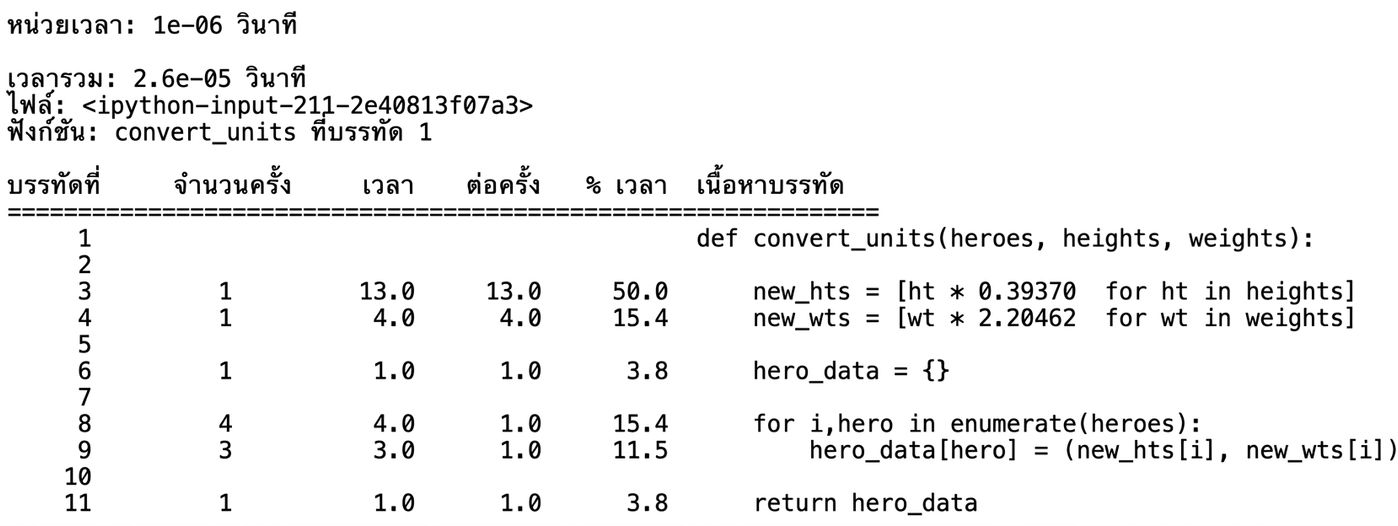
การเขียน Python Code ที่มีประสิทธิภาพ

ผลลัพธ์ %lprun

%lprun -f convert_units convert_units(heroes, hts, wts)
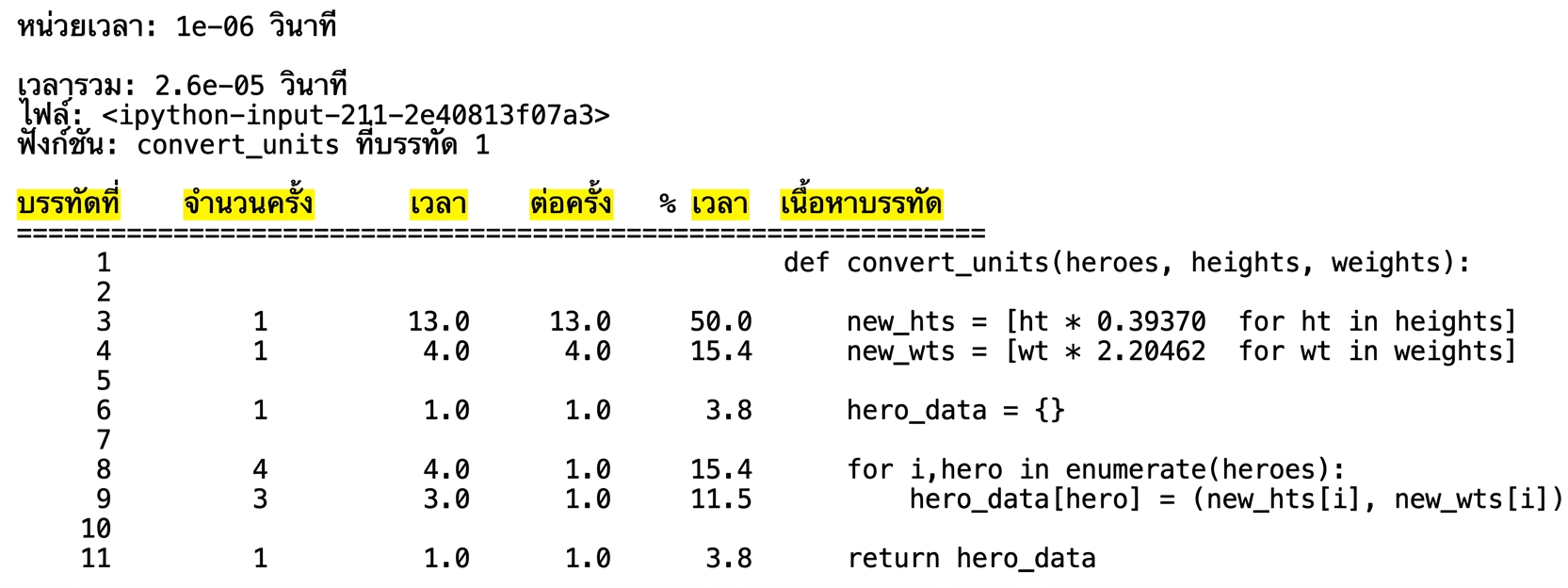
alt="ผลลัพธ์แบบตารางจาก magic command lprun แสดงสถิติการวิเคราะห์รันไทม์"

การเขียน Python Code ที่มีประสิทธิภาพ

ผลลัพธ์ %lprun

%lprun -f convert_units convert_units(heroes, hts, wts)
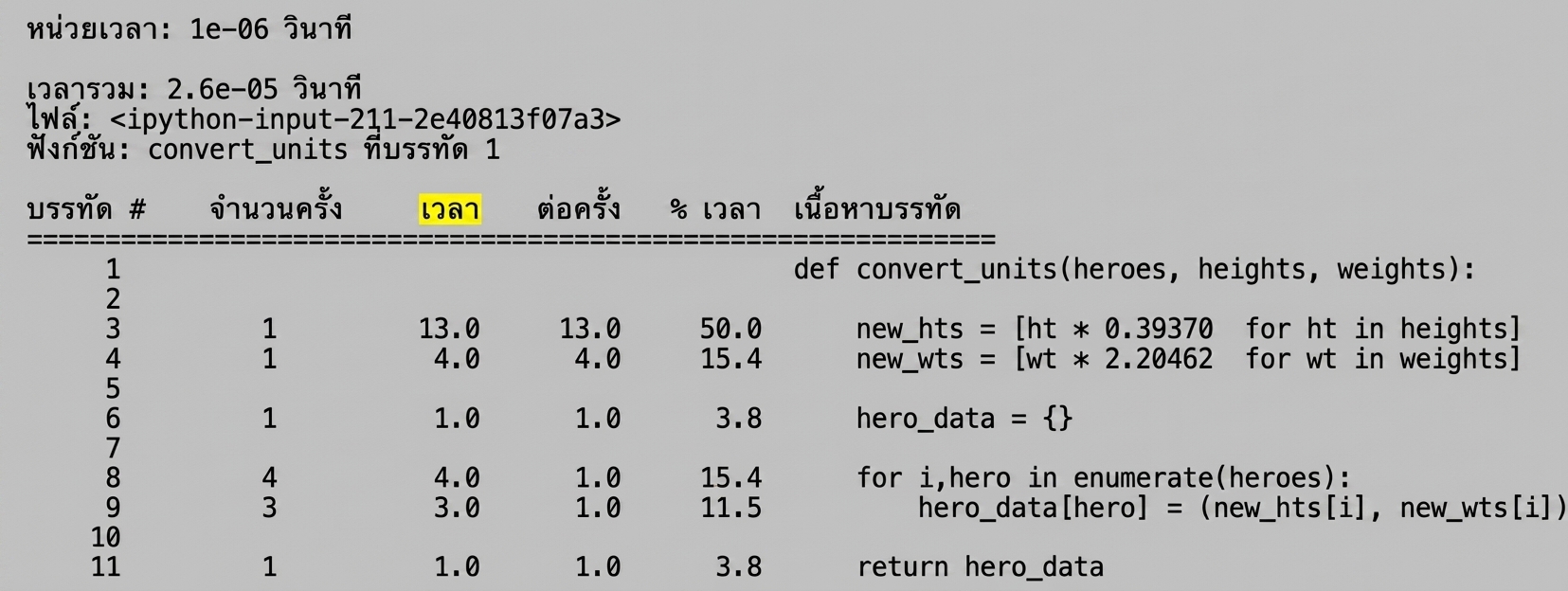
alt="ผลลัพธ์แบบตารางจาก magic command lprun แสดงสถิติการวิเคราะห์รันไทม์ โดยไฮไลต์คอลัมน์ Line # และ Hits"

การเขียน Python Code ที่มีประสิทธิภาพ

ผลลัพธ์ %lprun

%lprun -f convert_units convert_units(heroes, hts, wts)
alt="ผลลัพธ์แบบตารางจาก magic command lprun แสดงสถิติการวิเคราะห์รันไทม์ โดยไฮไลต์คอลัมน์ Time"

การเขียน Python Code ที่มีประสิทธิภาพ

ผลลัพธ์ %lprun

%lprun -f convert_units convert_units(heroes, hts, wts)
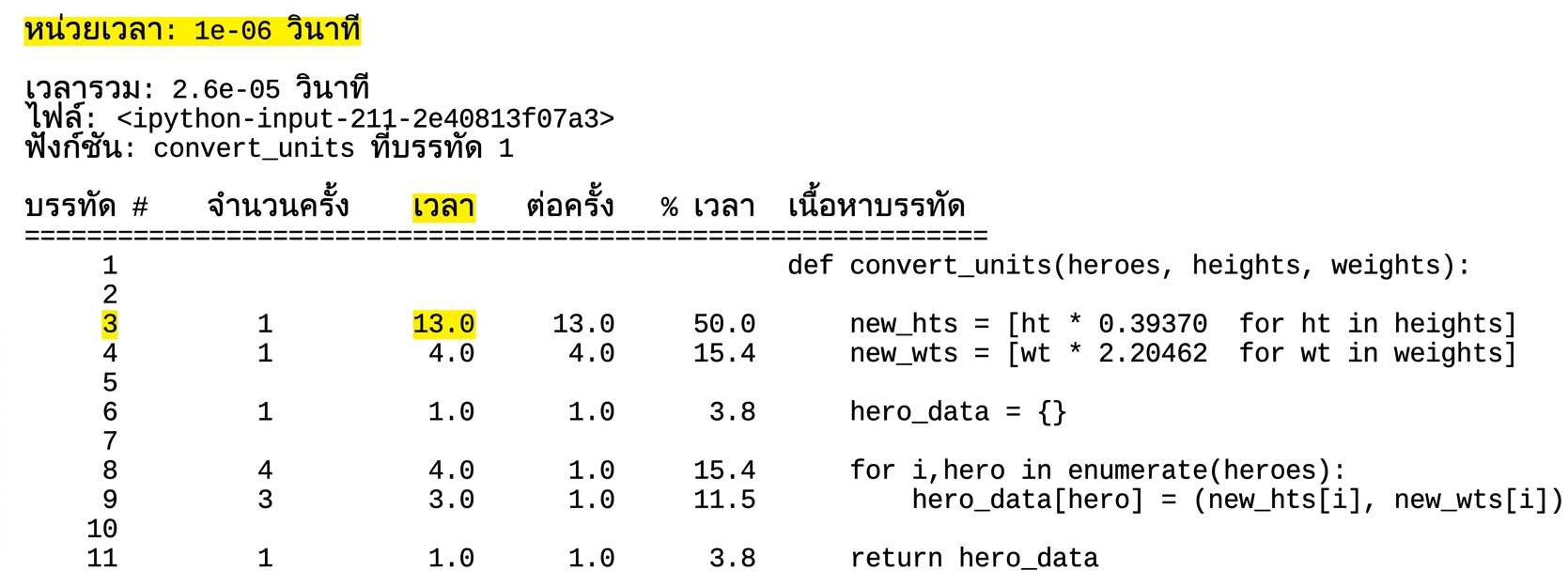
alt="ผลลัพธ์แบบตารางจาก magic command lprun แสดงสถิติการวิเคราะห์รันไทม์ โดยไฮไลต์หน่วยเวลาในบรรทัดแรก"

การเขียน Python Code ที่มีประสิทธิภาพ

ผลลัพธ์ %lprun

%lprun -f convert_units convert_units(heroes, hts, wts)
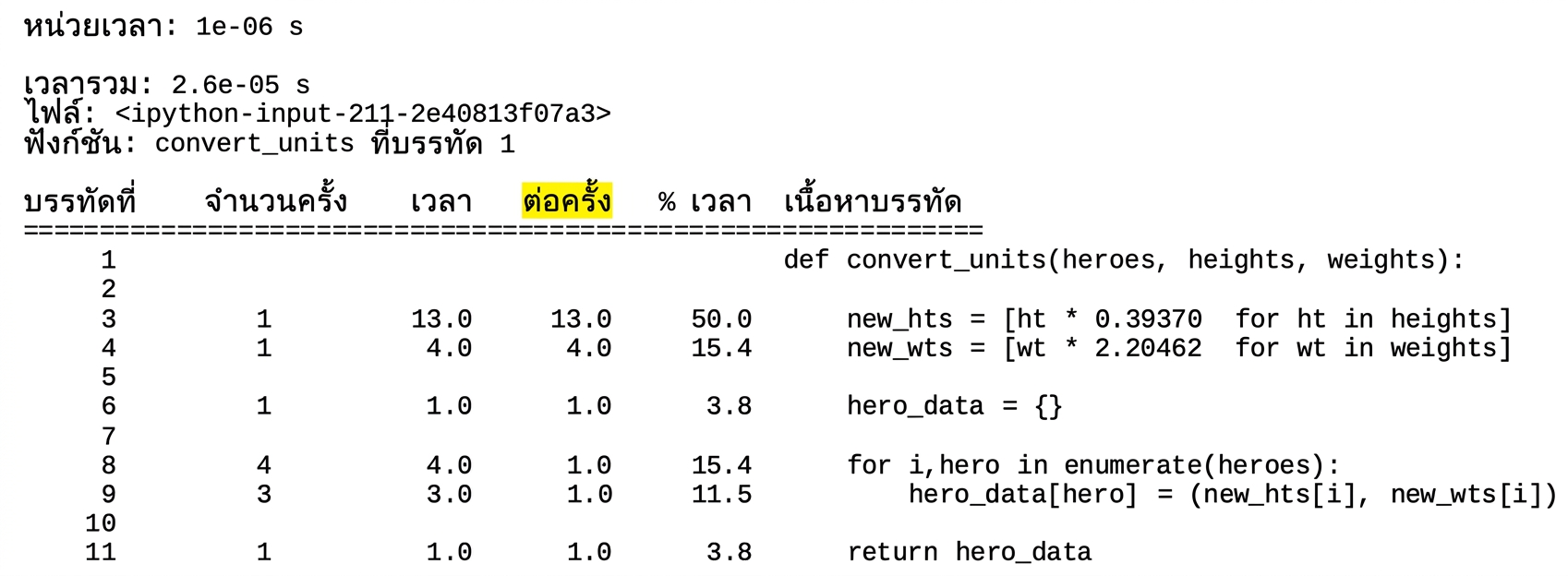
alt="ผลลัพธ์แบบตารางจาก magic command lprun แสดงสถิติการวิเคราะห์รันไทม์ โดยไฮไลต์บรรทัดที่สาม"

การเขียน Python Code ที่มีประสิทธิภาพ

ผลลัพธ์ %lprun

%lprun -f convert_units convert_units(heroes, hts, wts)
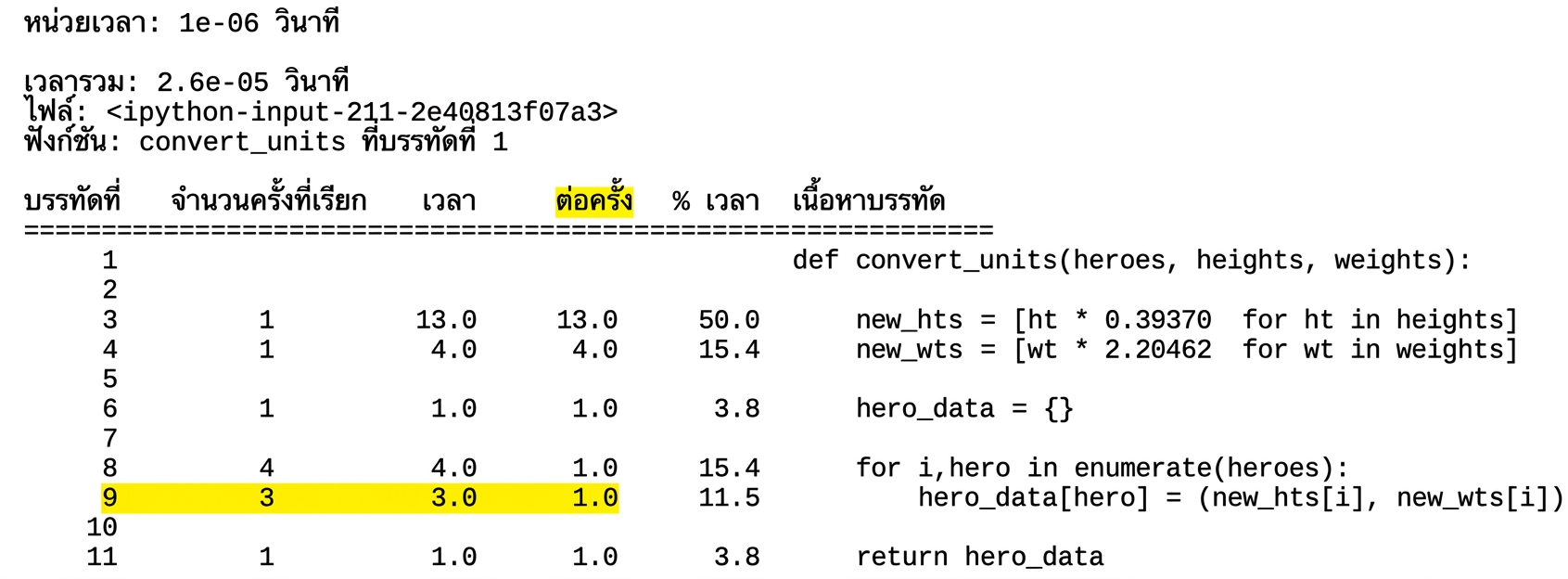
alt="ผลลัพธ์แบบตารางจาก magic command lprun แสดงสถิติการวิเคราะห์รันไทม์ โดยไฮไลต์คอลัมน์ Per Hit"

การเขียน Python Code ที่มีประสิทธิภาพ

ผลลัพธ์ %lprun

%lprun -f convert_units convert_units(heroes, hts, wts)
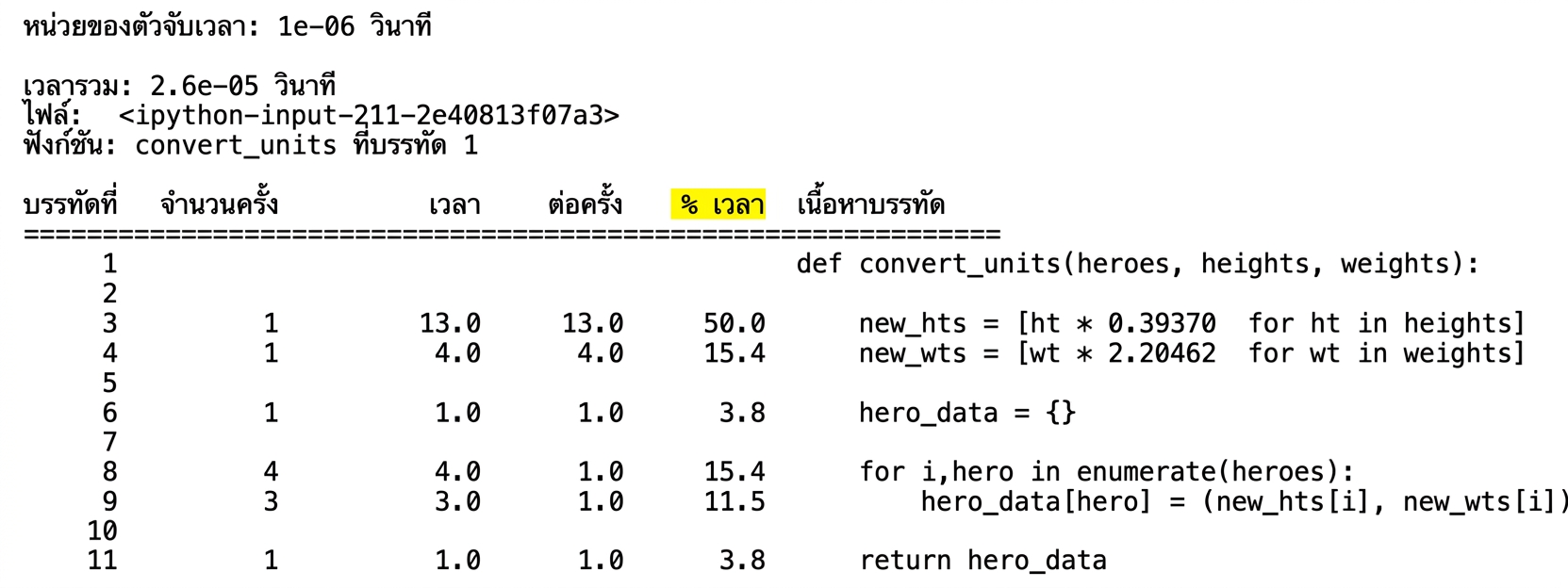
ผลลัพธ์แบบตารางจาก magic command lprun แสดงสถิติการวิเคราะห์รันไทม์ โดยไฮไลต์บรรทัดที่เก้า

การเขียน Python Code ที่มีประสิทธิภาพ

ผลลัพธ์ %lprun

%lprun -f convert_units convert_units(heroes, hts, wts)
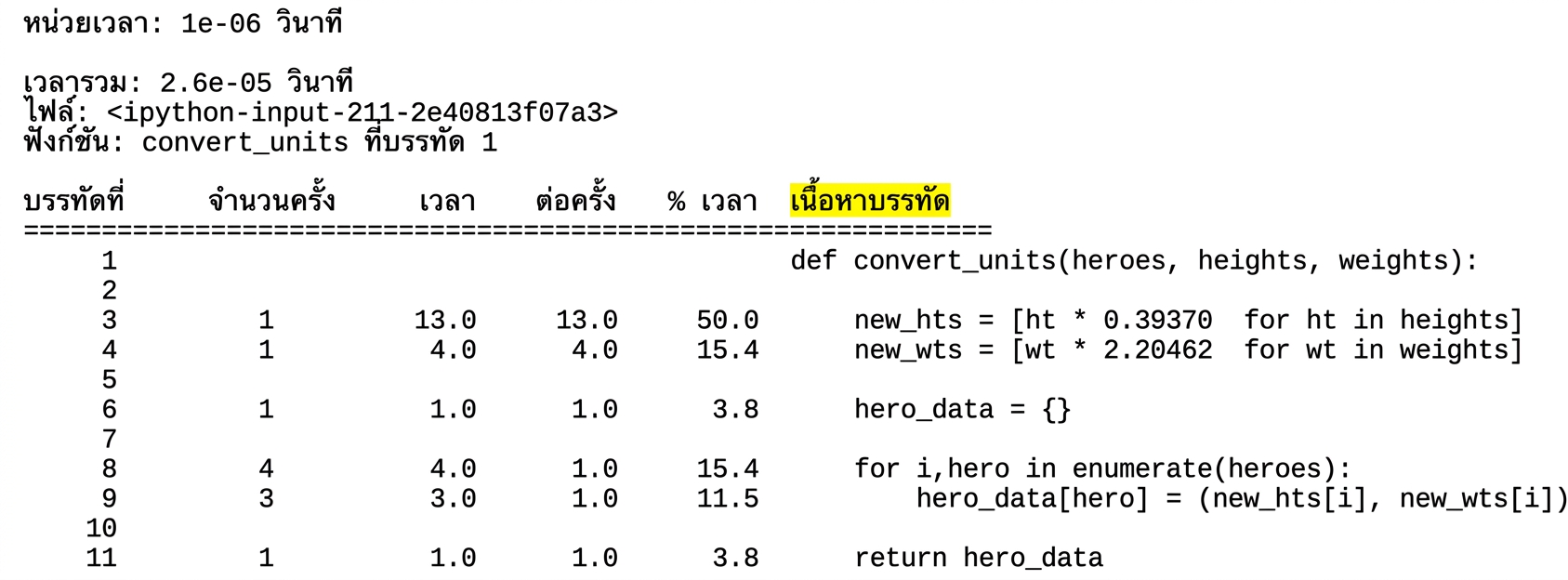
alt="ผลลัพธ์แบบตารางจาก magic command lprun แสดงสถิติการวิเคราะห์รันไทม์ โดยไฮไลต์คอลัมน์ % Time"

การเขียน Python Code ที่มีประสิทธิภาพ

ผลลัพธ์ %lprun

%lprun -f convert_units convert_units(heroes, hts, wts)

alt="ผลลัพธ์แบบตารางจาก magic command lprun แสดงสถิติการวิเคราะห์รันไทม์ โดยไฮไลต์คอลัมน์ Line Contents"

การเขียน Python Code ที่มีประสิทธิภาพ
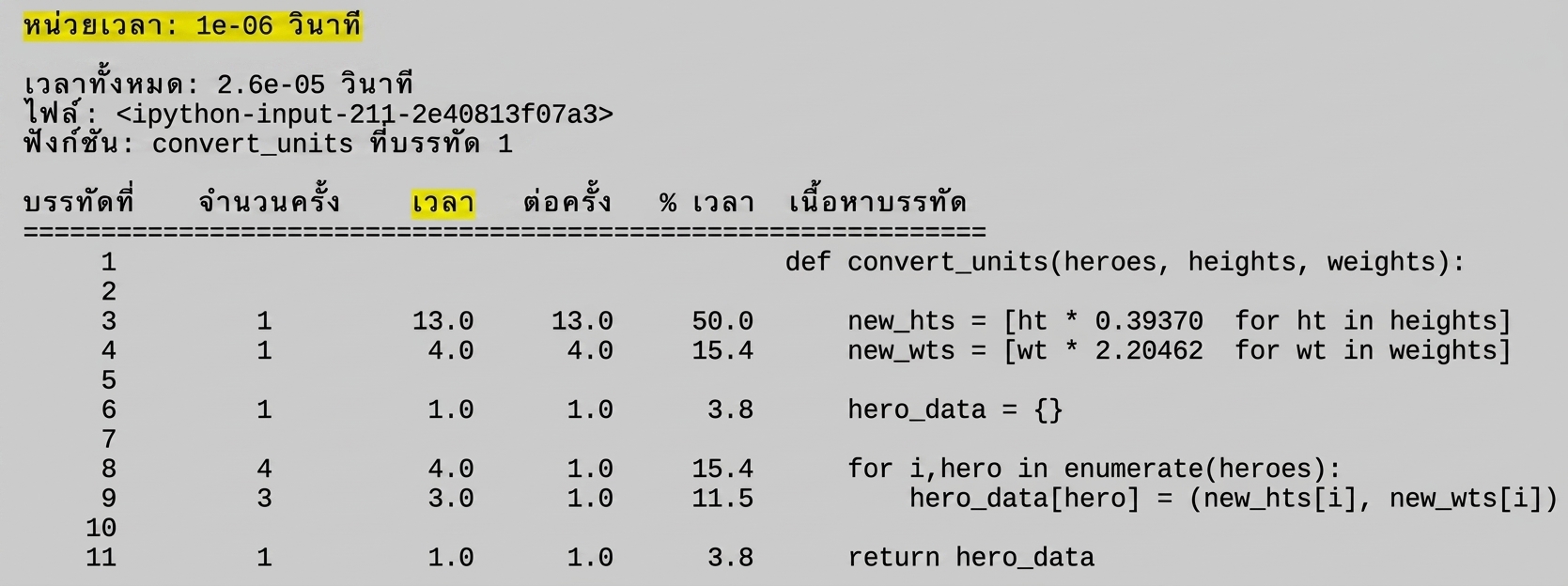
%timeit convert_units convert_units(heroes, hts, wts)
3 µs ± 32 ns per loop (mean ± std. dev. of 7 runs, 100000 loops each)
%lprun -f convert_units convert_units(heroes, hts, wts)

alt="ผลลัพธ์แบบตารางจาก magic command lprun แสดงสถิติการวิเคราะห์รันไทม์ โดยไฮไลต์ Total time ในบรรทัดที่สอง"

การเขียน Python Code ที่มีประสิทธิภาพ

มาฝึกกันเถอะ!

การเขียน Python Code ที่มีประสิทธิภาพ

Preparing Video For Download...