RAG chatbot ด้วย Pinecone และ OpenAI

การสร้างแอปพลิเคชัน AI ด้วย Pinecone

James Chapman

Curriculum Manager, DataCamp

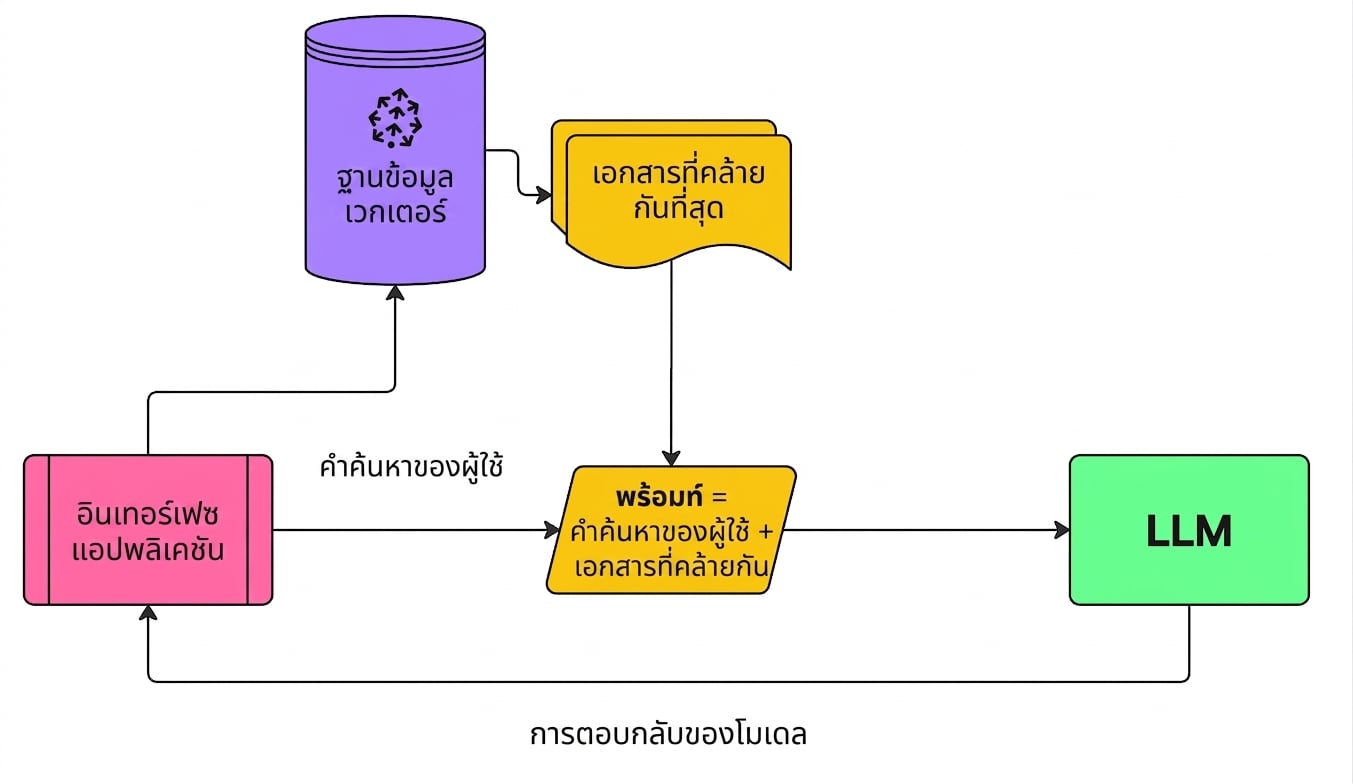
Retrieval Augmented Generation (RAG)

  1. แปลง query ของผู้ใช้เป็น Embedding
  2. ดึงเอกสารที่คล้ายกัน
  3. เพิ่มเอกสารลงใน prompt

Retrieval Augmented Generation

การสร้างแอปพลิเคชัน AI ด้วย Pinecone

เริ่มต้นใช้งาน Pinecone และ OpenAI

from openai import OpenAI
from pinecone import Pinecone
import pandas as pd
from uuid import uuid4


client = OpenAI(api_key="OPENAI_API_KEY") pc = Pinecone(api_key="PINECONE_API_KEY")
index = pc.Index("semantic-search-datacamp")
การสร้างแอปพลิเคชัน AI ด้วย Pinecone

ข้อความถอดเสียงจาก YouTube

youtube_df = pd.read_csv('youtube_rag_data.csv')
| id | blob | channel_id | end | published | start | text | title | url |
|----|------|------------|-----|-----------|-------|------|-------|-----|
|int | dict | str        | int | datetime  | int   | str  | str   | str |
การสร้างแอปพลิเคชัน AI ด้วย Pinecone

การนำเข้าเอกสาร

batch_limit = 100


for batch in np.array_split(youtube_df, len(youtube_df) / batch_limit):
metadatas = [{"text_id": row['id'], "text": row['text'], "title": row['title'], "url": row['url'], "published": row['published']} for _, row in batch.iterrows()]
texts = batch['text'].tolist()
ids = [str(uuid4()) for _ in range(len(texts))]
response = client.embeddings.create(input=texts, model="text-embedding-3-small") embeds = [np.array(x.embedding) for x in response.data]
index.upsert(vectors=zip(ids, embeds, metadatas), namespace='youtube_rag_dataset')
การสร้างแอปพลิเคชัน AI ด้วย Pinecone

ฟังก์ชันดึงข้อมูล

def retrieve(query, top_k, namespace, emb_model):

query_response = client.embeddings.create(input=query, model=emb_model) query_emb = query_response.data[0].embedding
retrieved_docs = [] sources = [] docs = index.query(vector=query_emb, top_k=top_k, namespace='youtube_rag_dataset', include_metadata=True)
for doc in docs['matches']: retrieved_docs.append(doc['metadata']['text']) sources.append((doc['metadata']['title'], doc['metadata']['url']))
return retrieved_docs, sources
การสร้างแอปพลิเคชัน AI ด้วย Pinecone

ผลลัพธ์จากการดึงข้อมูล

query = "How to build next-level Q&A with OpenAI"
documents, sources = retrieve(query, top_k=3, namespace='youtube_rag_dataset',
                              emb_model="text-embedding-3-small")
Document: To use for Open Domain Question Answering. We're going to start...
Source: How to build a Q&A AI in Python [...], https://youtu.be/w1dMEWm7jBc

Document: Over here we have Google and we can ask Google questions...
Source: How to build next-level Q&A with OpenAI, https://youtu.be/coaaSxys5so

Document: We need vector database to enhance the quality of Q&A systems...
Source: How to Build Custom Q&A Transfo [...], https://youtu.be/ZIRmXKHp0-c
การสร้างแอปพลิเคชัน AI ด้วย Pinecone

ฟังก์ชันสร้าง prompt พร้อม context

def prompt_with_context_builder(query, docs):
    delim = '\n\n---\n\n'
    prompt_start = 'Answer the question based on the context below.\n\nContext:\n'
    prompt_end = f'\n\nQuestion: {query}\nAnswer:'

    prompt = prompt_start + delim.join(docs) + prompt_end
    return prompt
การสร้างแอปพลิเคชัน AI ด้วย Pinecone

ผลลัพธ์ของ prompt พร้อม context

query = "How to build next-level Q&A with OpenAI"
context_prompt = prompt_with_context_builder(query, documents)
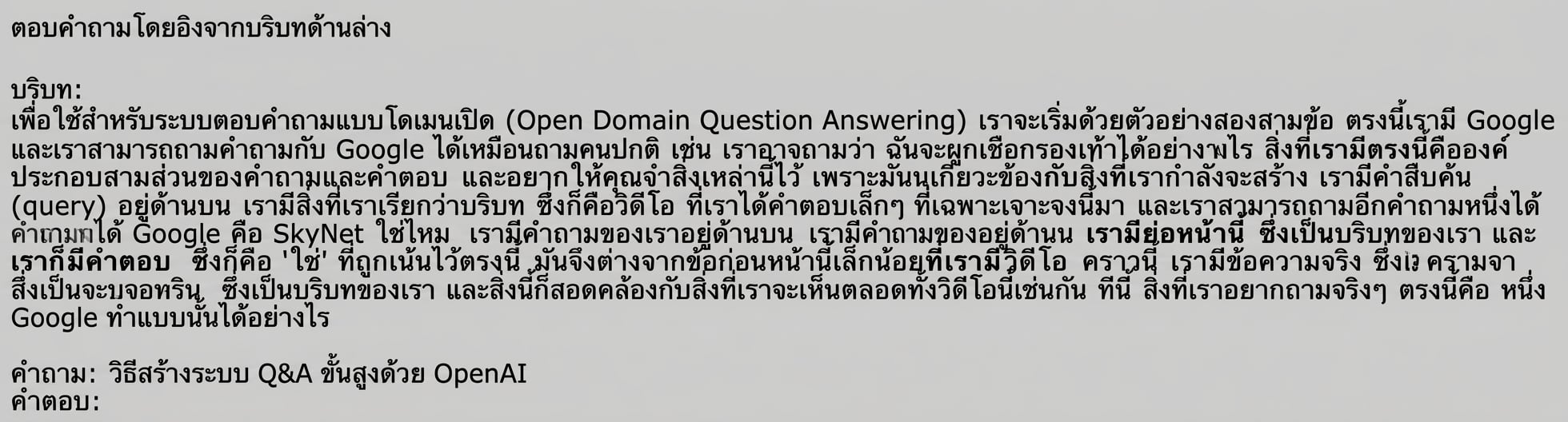
ผลลัพธ์ของฟังก์ชัน prompt_with_context_builder

การสร้างแอปพลิเคชัน AI ด้วย Pinecone

ฟังก์ชันตอบคำถาม

def question_answering(prompt, sources, chat_model):

sys_prompt = "You are a helpful assistant that always answers questions."
res = client.chat.completions.create( model=chat_model, messages=[{"role": "system", "content": sys_prompt}, {"role": "user", "content": prompt} ], temperature=0)
answer = res.choices[0].message.content.strip() answer += "\n\nSources:" for source in sources: answer += "\n" + source[0] + ": " + source[1] return answer
การสร้างแอปพลิเคชัน AI ด้วย Pinecone

ผลลัพธ์การตอบคำถาม

query = "How to build next-level Q&A with OpenAI"
answer = question_answering(prompt_with_context, sources,
                            chat_model='gpt-4o-mini')
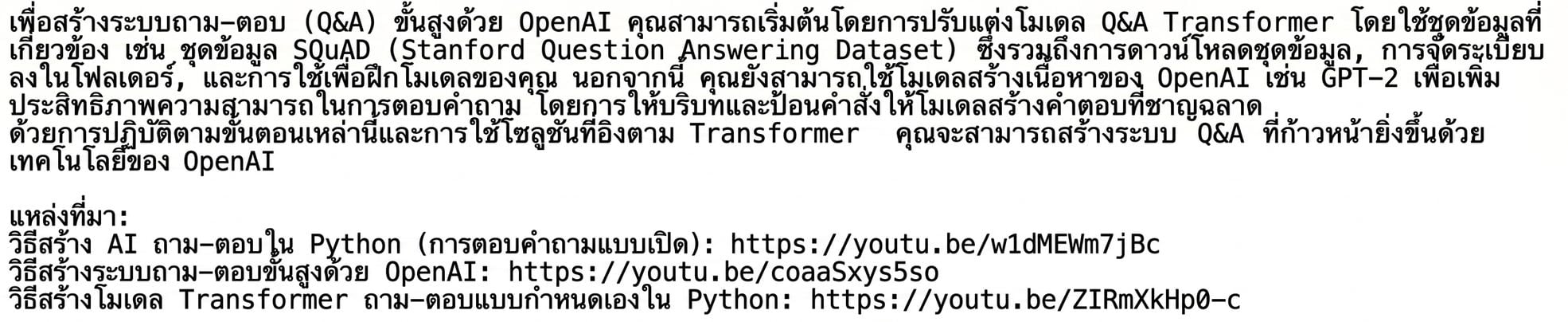
ผลลัพธ์ของฟังก์ชัน question_answering

การสร้างแอปพลิเคชัน AI ด้วย Pinecone

รวมทุกอย่างเข้าด้วยกัน

query = "How to build next-level Q&A with OpenAI"
documents, sources = retrieve(query, top_k=3, 
                              namespace='youtube_rag_dataset', 
                              emb_model="text-embedding-3-small")
prompt_with_context = prompt_with_context_builder(query, documents)
answer = question_answering(prompt_with_context, sources,
                            chat_model='gpt-4o-mini')
การสร้างแอปพลิเคชัน AI ด้วย Pinecone

มาฝึกกันเถอะ!

การสร้างแอปพลิเคชัน AI ด้วย Pinecone

Preparing Video For Download...