การจัดการ index

การสร้างแอปพลิเคชัน AI ด้วย Pinecone

James Chapman

Curriculum Manager, DataCamp

เชื่อมต่อกับ index

pc = Pinecone(api_key="API_KEY")

pc.create_index(
    name='datacamp-index',
    dimension=1536,
    spec=ServerlessSpec(
        cloud='aws', 
        region='us-east-1'
    )
)


index = pc.Index('datacamp-index')
การสร้างแอปพลิเคชัน AI ด้วย Pinecone

เชื่อมต่อกับ index

index = pc.Index('datacamp-first')
...
pinecone.core.client.exceptions.NotFoundException: (404)
Reason: Not Found
HTTP response headers: HTTPHeaderDict({'content-type': 'text/plain; charset=...
HTTP response body: {"error":{"code":"NOT_FOUND","message":"Resource datacamp-first
not found"},"status":404}
การสร้างแอปพลิเคชัน AI ด้วย Pinecone

สถิติของ index

index.describe_index_stats()
{'dimension': 1536,
 'index_fullness': 0.0,
 'namespaces': {},
 'total_vector_count': 0}
การสร้างแอปพลิเคชัน AI ด้วย Pinecone

Namespace


  • คอนเทนเนอร์สำหรับ แบ่งพาร์ทิชัน index
    • แยกชุดข้อมูล
    • จัดการเวอร์ชันของข้อมูล
    • แยกกลุ่มข้อมูล


ในตอนนี้ให้มุ่งเน้นที่กรณี namespace เดียวก่อน

index ที่มี namespace หลายรายการอยู่ภายใน

การสร้างแอปพลิเคชัน AI ด้วย Pinecone

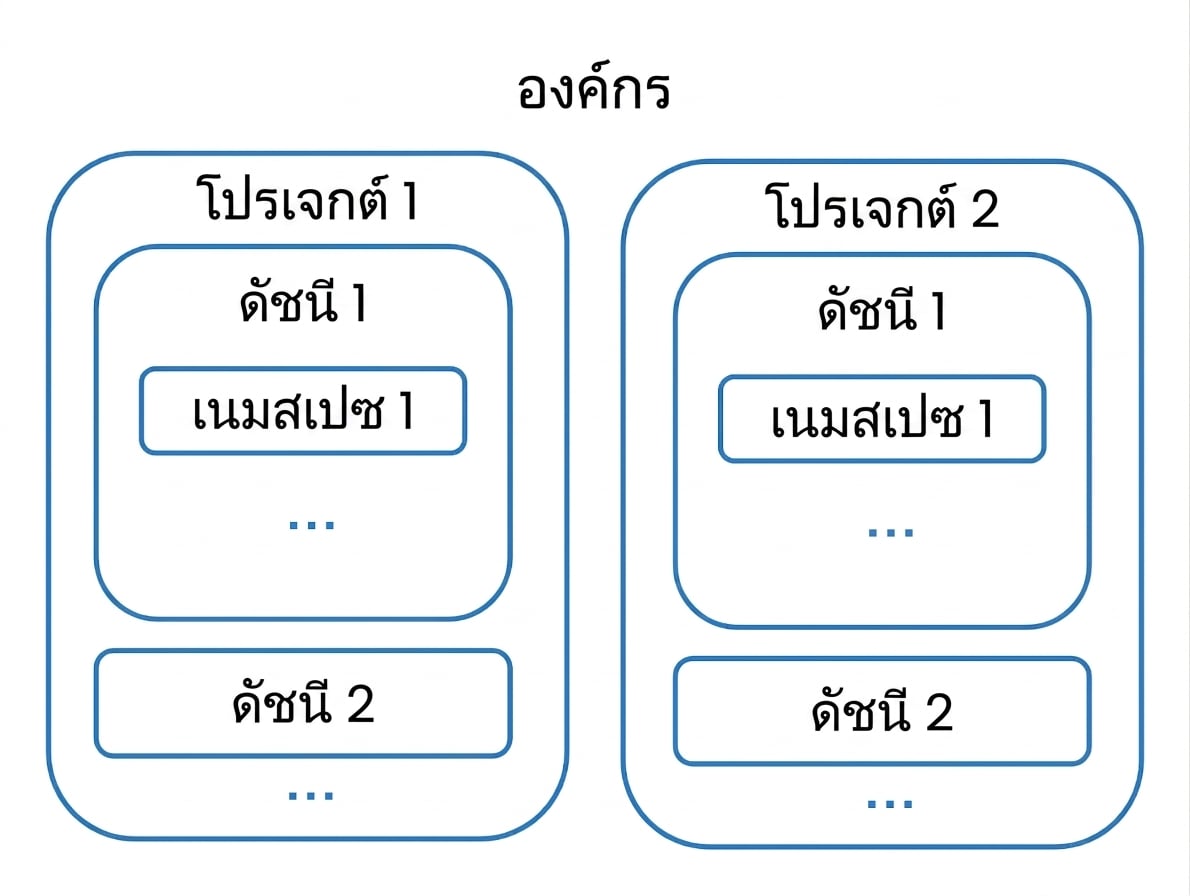
องค์กร

องค์กรที่มีสองโปรเจกต์ แต่ละโปรเจกต์มี index เป็นของตัวเอง

การสร้างแอปพลิเคชัน AI ด้วย Pinecone

องค์กร

กลุ่มเจ้าขององค์กร

  • สิทธิ์ครอบคลุมทั้งองค์กร
  • จัดการการเรียกเก็บเงิน ผู้ใช้ และ ทุก โปรเจกต์

เจ้าของที่มีผู้ใช้หลายคนอยู่ใต้บังคับบัญชา

  • สิทธิ์ระดับองค์กรแบบ จำกัด
  • ได้รับเชิญให้เข้า โปรเจกต์เฉพาะ
  • กลายเป็นเจ้าของของโปรเจกต์นั้น
การสร้างแอปพลิเคชัน AI ด้วย Pinecone

การลบ index

pc.delete_index('datacamp-index')


pc.list_indexes()
{'indexes': []}
การสร้างแอปพลิเคชัน AI ด้วย Pinecone

มาฝึกกันเถอะ!

การสร้างแอปพลิเคชัน AI ด้วย Pinecone

Preparing Video For Download...