Bash 脚本入门
Alex Scriven
Data Scientist
与 R、Python 等多数 REPL(控制台)不同,Shell 并不原生支持数字。
在 Python 或 R 中可以:
>>> 1 + 4
5
会直接返回结果。
Shell 不原生支持数字:
(在终端中)
1 + 4
bash: 1: command not found
expr 是个有用的实用程序(如 cat、grep)。
现在这样做(在终端)可行:
expr 1 + 4
5
不错!
expr 不能原生处理小数:
(在终端)
expr 1 + 2.5
expr: not a decimal number: '2.5'
别担心!有解法。
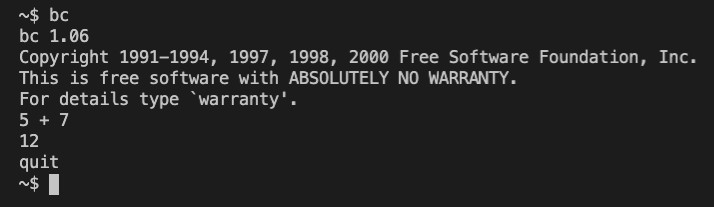
bc(basic calculator)是命令行计算器。
可在终端中进入并计算:

无需打开计算器,可用管道调用 bc:
echo "5 + 7.5" | bc
12.5
bc 还有 scale 参数用于设置小数位数。
echo "10 / 3" | bc
3
echo "scale=3; 10 / 3" | bc
注意用 ; 分隔终端中的"行"。
3.333
可像字符串变量一样赋值数值变量:
dog_name='Roger' dog_age=6echo "My dog's name is $dog_name and he is $dog_age years old"
注意:dog_age="6" 也能用,但类型是字符串!
My dog's name is Roger and he is 6 years old
数值变量的单括号变体表示法:
expr 5 + 7
echo $((5 + 7))
12
12
注意此法用的是 expr,不是 bc(不支持小数)。
还记得上一课如何在 shell 中调用子 shell 吗?
对数值变量很有用:
model1=87.65 model2=89.20echo "The total score is $(echo "$model1 + $model2" | bc)"echo "The average score is $(echo "($model1 + $model2) / 2" | bc)"
The total score is 176.85
The average score is 88
Bash 脚本入门