监控与日志

使用 FastAPI 在生产环境中部署 AI

Matt Eckerle

Software and Data Engineering Leader

为何进行监控与日志?


  • 生产环境无法调试
  • 进程管理器需要简单的健康检查
  • 随时间记录关键指标

监控与日志软件

使用 FastAPI 在生产环境中部署 AI

设置自定义日志


  • 加载 uvicorn 错误记录器


  • 在应用启动时添加自定义日志


  • 在端点添加自定义日志
from fastapi import FastAPI
import logging

logger = logging.getLogger(
    'uvicorn.error'
)

app = FastAPI() logger.info("App is running!")
@app.get('/') async def main(): logger.debug('GET /') return 'ok'
使用 FastAPI 在生产环境中部署 AI

加载模型时记录日志

from fastapi import FastAPI
import logging
import joblib 

logger = logging.getLogger('uvicorn.error')

model = joblib.load('penguin_classifier.pkl') logger.info("Penguin classifier loaded successfully.") app = FastAPI()
使用 FastAPI 在生产环境中部署 AI

用中间件记录处理时长

from fastapi import FastAPI, Request
import logging
import time
logger = logging.getLogger('uvicorn.error')
app = FastAPI()

@app.middleware("http")
async def log_process_time(request: Request, call_next):
    start_time = time.perf_counter()
    response = await call_next(request)
    process_time = time.perf_counter() - start_time
    logger.info(f"Process time was {process_time} seconds.")
    return response
1 https://fastapi.tiangolo.com/tutorial/middleware/
使用 FastAPI 在生产环境中部署 AI

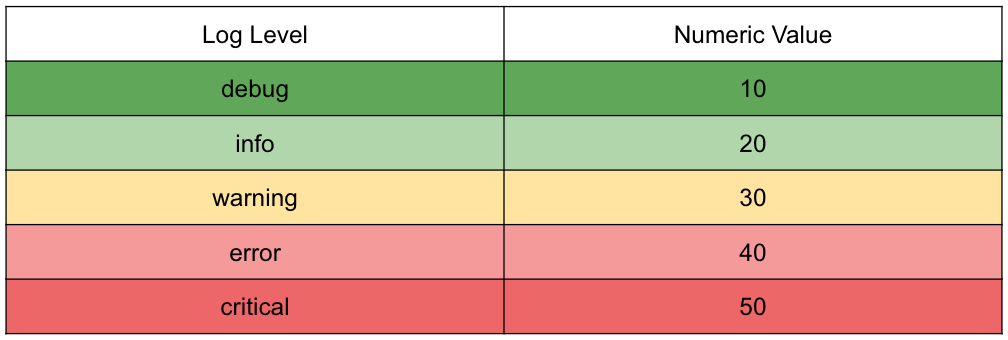
设置日志级别


Python 日志级别

uvicorn main:app --log-level debug
使用 FastAPI 在生产环境中部署 AI

监控


from fastapi import FastAPI

app = FastAPI()

@app.get("/health") async def get_health(): return {"status": "OK"}


  • "我没事!"
使用 FastAPI 在生产环境中部署 AI

通过监控共享模型参数

from fastapi import FastAPI
import joblib

model = joblib.load(
    'penguin_classifier.pkl'
)
app = FastAPI()

@app.get("/health") async def get_health(): params = model.get_params() return {"status": "OK", "params": params}


  • "我没事!"
  • "这里有一些关于我的信息!"
使用 FastAPI 在生产环境中部署 AI

开始练习!

使用 FastAPI 在生产环境中部署 AI

Preparing Video For Download...