Python 中的超参数调优

Python 中的超参数调优

Alex Scriven

Data Scientist

介绍


为何学习本课程?

  • 新且复杂的算法,超参数众多
  • 调参可能很耗时
  • 帮助深入理解默认设置之外的内容

您可能会对"引擎盖下"的发现感到惊讶!

Python 中的超参数调优

数据集


该数据集与信用卡违约有关。

包含台湾部分用户的财务历史变量。共有 30,000 名用户、24 个特征。

建模目标:是否发生贷款违约

数据已预处理;为讲解概念,部分环节会使用更小样本

更多信息见:

https://archive.ics.uci.edu/ml/datasets/default+of+credit+card+clients

Python 中的超参数调优

参数概述


什么是参数?

  • 建模过程中学习得到的模型组成部分
  • 您不需要(也无法)手动设置
  • 算法会为您自动求得
Python 中的超参数调优

逻辑回归中的参数

一个简单的逻辑回归模型:

log_reg_clf = LogisticRegression() 
log_reg_clf.fit(X_train, y_train)

print(log_reg_clf.coef_)
array([[-2.88651273e-06, -8.23168511e-03,  7.50857018e-04,
         3.94375060e-04,  3.79423562e-04,  4.34612046e-04,
         4.37561467e-04,  4.12107102e-04, -6.41089138e-06,
        -4.39364494e-06,  cont... ]])
Python 中的超参数调优

逻辑回归中的参数

整理系数:

# 获取原始变量名
original_variables = list(X_train.columns)

# 将名称与系数配对 zipped_together = list(zip(original_variables, log_reg_clf.coef_[0])) coefs = [list(x) for x in zipped_together]
# 放入带列名的 DataFrame coefs = pd.DataFrame(coefs, columns=["Variable", "Coefficient"])
Python 中的超参数调优

逻辑回归中的参数


现在对系数排序并打印前三个

coefs.sort_values(by=["Coefficient"], axis=0, inplace=True, ascending=False)
print(coefs.head(3))
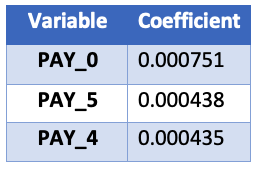
系数表

Python 中的超参数调优

在哪里查找参数


查找参数需要:

  1. 了解一点算法原理
  2. 查阅 Scikit-Learn 文档

参数位于"Attributes"部分,而非"parameters"部分!

Python 中的超参数调优

随机森林中的参数

树模型如何处理?

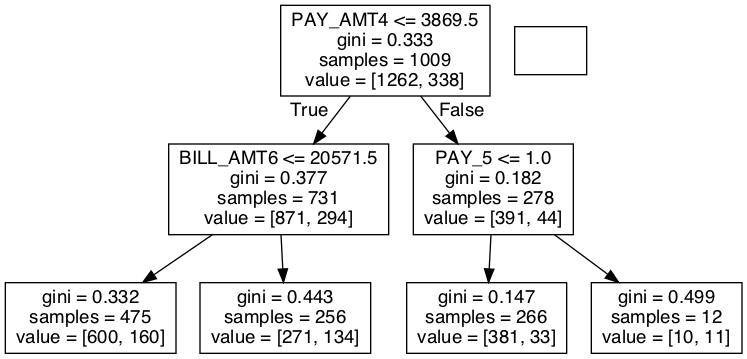
随机森林没有系数,只有节点决策(按何特征、何阈值划分)。

# 一个简单的随机森林分类器
rf_clf = RandomForestClassifier(max_depth=2)
rf_clf.fit(X_train, y_train)

# 从森林中取出一棵树 chosen_tree = rf_clf.estimators_[7]

为简洁起见我们仅展示决策树的最终图像。欢迎自行探索所用包(graphviz 与 pydotplus)。

Python 中的超参数调优

随机森林单棵树的决策流程图

Python 中的超参数调优

提取节点决策

我们可提取左侧倒数第二层节点的细节:

# 获取划分所用列
split_column = chosen_tree.tree_.feature[1]
split_column_name = X_train.columns[split_column]

# 获取划分阈值 split_value = chosen_tree.tree_.threshold[1]
print("This node split on feature {}, at a value of {}" .format(split_column_name, split_value))

"该节点在特征 PAY_0 上按阈值 1.5 划分"

Python 中的超参数调优

¡Vamos a practicar!

Python 中的超参数调优

Preparing Video For Download...