超参数取值

Python 中的超参数调优

Alex Scriven

Data Scientist

超参数取值


有些超参数更值得优先调。

但应尝试哪些超参数的取值?

  • 取决于具体算法和超参数
  • 也有一些最佳实践与提示

来看一些要点提示!

Python 中的超参数调优

互相冲突的超参数选择

注意互相冲突的超参数选择。

  • LogisticRegression()solverpenalty 存在冲突选项。
The 'newton-cg', 'sag' and 'lbfgs' solvers support only l2 penalties.

有些不显式报错,只是被"忽略"(如 ElasticNetnormalize 超参数):

This parameter is ignored when fit_intercept is set to False

请查阅 Scikit-Learn 文档!

Python 中的超参数调优

不合理的超参数取值


警惕为不同算法设置"不合理"的取值:

  • 随机森林的树太少
    • 只有 2 棵树还能叫"森林"吗?
  • KNN 的邻居数为 1
    • 只"投票"1人并不稳健!
  • 将某超参数仅微小增加

花时间记录各超参数的合理范围很有价值。

Python 中的超参数调优

自动化选择超参数


在上个练习中,我们这样构建模型:

knn_5 =  KNeighborsClassifier(n_neighbors=5)
knn_10 = KNeighborsClassifier(n_neighbors=10)
knn_20  = KNeighborsClassifier(n_neighbors=20)

这很低效。能更好些吗?

Python 中的超参数调优

自动化超参数调优

用 for 循环遍历选项:

neighbors_list = [3,5,10,20,50,75]

accuracy_list = []
for test_number in neighbors_list: model = KNeighborsClassifier(n_neighbors=test_number) predictions = model.fit(X_train, y_train).predict(X_test)
accuracy = accuracy_score(y_test, predictions) accuracy_list.append(accuracy)
Python 中的超参数调优

自动化超参数调优

我们可将结果存入 DataFrame 查看:

results_df = pd.DataFrame({'neighbors':neighbors_list, 'accuracy':accuracy_list})
print(results_df)

邻居数的准确率表

Python 中的超参数调优

学习曲线

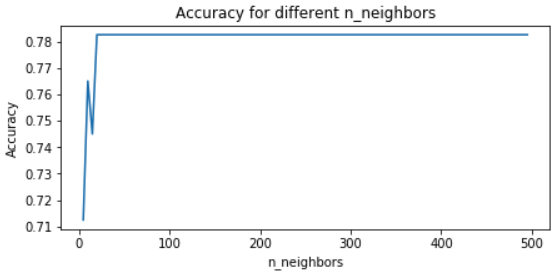
创建学习曲线图

这次测试更多取值

neighbors_list = list(range(5,500, 5))

accuracy_list = [] for test_number in neighbors_list: model = KNeighborsClassifier(n_neighbors=test_number) predictions = model.fit(X_train, y_train).predict(X_test) accuracy = accuracy_score(y_test, predictions) accuracy_list.append(accuracy) results_df = pd.DataFrame({'neighbors':neighbors_list, 'accuracy':accuracy_list})
Python 中的超参数调优

学习曲线

绘制更大的 DataFrame:

plt.plot(results_df['neighbors'], 
    results_df['accuracy'])

# 添加标签和标题 plt.gca().set(xlabel='n_neighbors', ylabel='Accuracy', title='Accuracy for different n_neighbors') plt.show()
Python 中的超参数调优

学习曲线

我们的图:

KNN 中准确率 vs 邻居数的学习曲线

Python 中的超参数调优

生成取值的实用技巧

Python 的 range 不支持小数步长。

一个好用的技巧是 NumPy 的 np.linspace(start, end, num)

  • 在给定区间(start, end)内生成 num 个等间距值。
print(np.linspace(1,2,5))
[1.   1.25 1.5  1.75 2.  ]
Python 中的超参数调优

Passons à la pratique !

Python 中的超参数调优

Preparing Video For Download...