回顾:dbt 案例研究

案例研究:使用 dbt 构建电商数据模型

Susan Sun

Freelance Data Scientist

第 1 章:设置 dbt

  1. 设置:

    • 检查安装:dbt --versionswhich dbt
    • 初始化 dbt:dbt init
  2. 加载数据:

    • 加载 dbt 种子文件(如配送中心):dbt seed
    • 加载 dbt 源文件。例如:{{ source('looker_ecommerce', 'orders') }}
  3. 回顾 dbt 子命令:dbt rundbt testdbt build

  4. 查看 dbt 项目文件与文件夹结构

案例研究:使用 dbt 构建电商数据模型

第 2 章:构建 dbt 模型

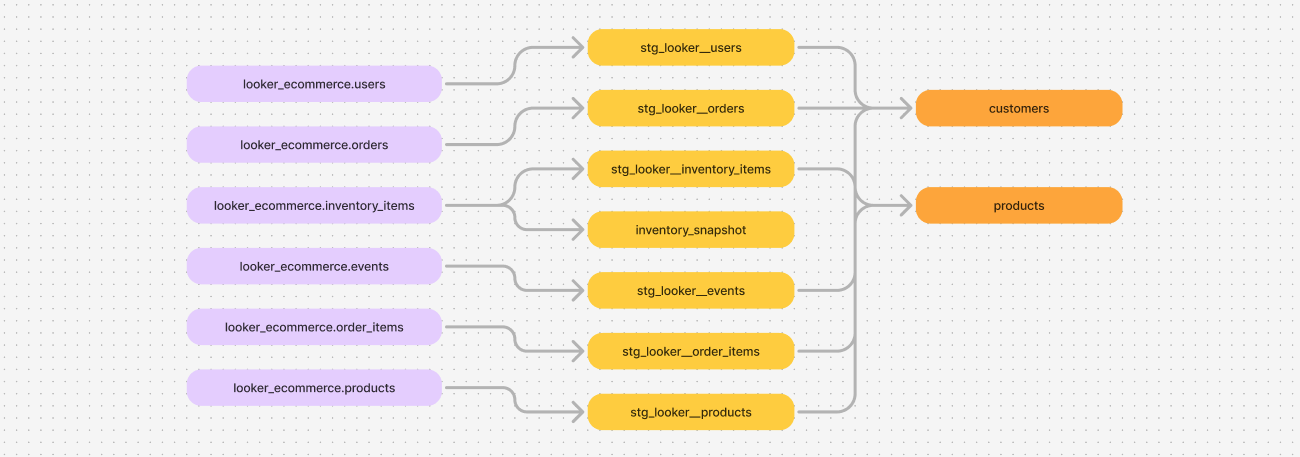
  1. 构建 dbt 分层(staging)、数据集市(mart)与快照(snapshot)模型
  2. 添加表/列文档与 dbt 数据测试

一个有向无环图,展示所有 dbt 源和模型及其相互关系。源为绿色,模型与数据集市为蓝色。

案例研究:使用 dbt 构建电商数据模型

第 3 章:在 dbt 中使用 Jinja

  1. 用 Jinja 表达式减少重复代码:setloopmacros
  2. 使用 dbt compile 与空白符管理进行开发
{%- set order_statuses = ['Shipped', 'Complete', 'Processing'] -%}

SELECT 
    user_id,
    {%- for order_status in order_statuses %}
        COUNT(DISTINCT CASE WHEN status = '{{ order_status }}' THEN order_id END) 
        AS num_orders_{{ order_status }}
    {%- endfor %}
FROM {{ ref('stg_looker__orders') }}
GROUP BY 1
案例研究:使用 dbt 构建电商数据模型

恭喜您!

案例研究:使用 dbt 构建电商数据模型

Preparing Video For Download...