情感分析

在 Python 中分析社交媒体数据

Alex Hanna

Computational Social Scientist

理解情感分析

  • 方法
    • 统计文档中的正/负面词
    • 评估整篇文档的正负倾向
  • 用途
    • 分析对公司、产品、政治人物或政策的反应
在 Python 中分析社交媒体数据

情感分析工具

  • VADER SentimentIntensityAnalyzer()
    • 自然语言工具包(nltk)的一部分
    • 适合推文等短文本
    • 衡量特定词的情感(如 angry、happy)
    • 也考虑表情符号(😀)和大小写(Nice vs NICE)
在 Python 中分析社交媒体数据

实现情感分析

from nltk.sentiment.vader import SentimentIntensityAnalyzer

sid = SentimentIntensityAnalyzer()
sentiment_scores = tweets['text'].apply(sid.polarity_scores)
在 Python 中分析社交媒体数据

解读情感得分

  • 阅读推文作为验证环节
    • 是否具有表面效度?(即是否符合我们对正负面的直观判断?)
在 Python 中分析社交媒体数据

解读情感得分

tweet1 = 'RT @jeffrey_heer: Thanks for inviting me, and thanks 
for the lovely visualization of the talk! ...'
print(sid.polarity_scores(tweet1))
{'neg': 0.0, 'neu': 0.496, 'pos': 0.504, 'compound': 0.9041}
tweet2 = 'i am having problems with google play music'
print(sid.polarity_scores(tweet2)
{'neg': 0.267, 'neu': 0.495, 'pos': 0.238, 'compound': -0.0772}
在 Python 中分析社交媒体数据

生成情感均值

sentiment = sentiment_scores.apply(lambda x: x['compound'])

sentiment_fb = sentiment[check_word_in_tweet('facebook', tweets)] .resample('1 min').mean() sentiment_gg = sentiment[check_word_in_tweet('google', tweets)] .resample('1 min').mean()
在 Python 中分析社交媒体数据

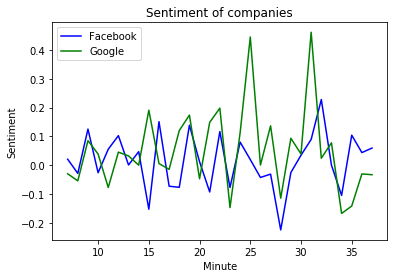
绘制情感得分

plt.plot(
    sentiment_fb.index.minute, 
    sentiment_fb, color = 'blue'
    )
plt.plot(
    sentiment_g.index.minute, 
    sentiment_gg, color = 'green'
    )   
plt.xlabel('Minute')
plt.ylabel('Sentiment')
plt.title('Sentiment of companies')
plt.legend(('Facebook', 'Google'))
plt.show()

Facebook 与 Google 的情感对比

在 Python 中分析社交媒体数据

Passons à la pratique !

在 Python 中分析社交媒体数据

Preparing Video For Download...