准备合并表格

面向表格用户的 Python

Chris Cardillo

Data Scientist

表合并
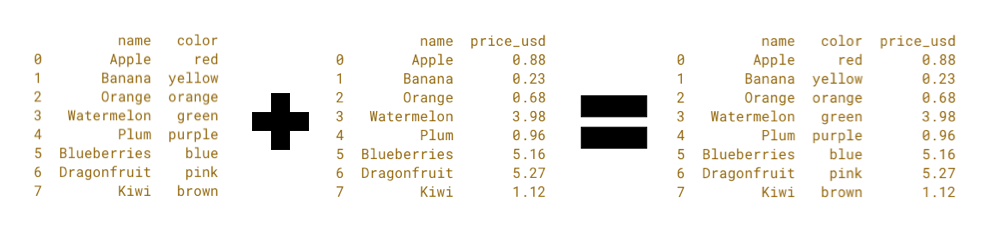
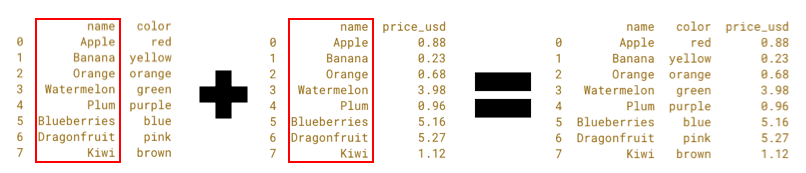
表合并.png

面向表格用户的 Python

表合并

表合并 名称高亮.png

面向表格用户的 Python

合并:数据科学的 VLOOKUP

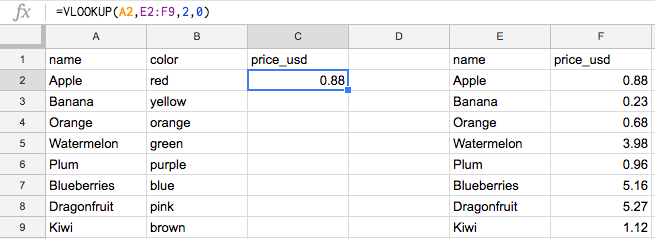
水果 VLOOKUP.png

面向表格用户的 Python

合并:数据科学的 VLOOKUP

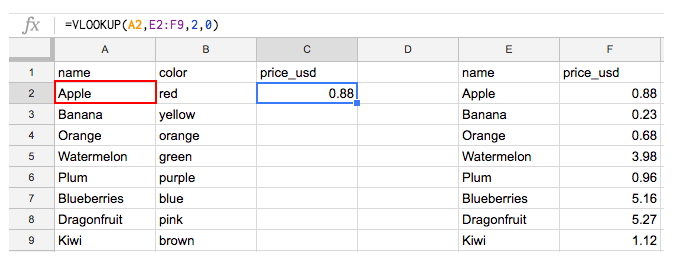
水果 VLOOKUP 键在左侧.png

面向表格用户的 Python

合并:数据科学的 VLOOKUP

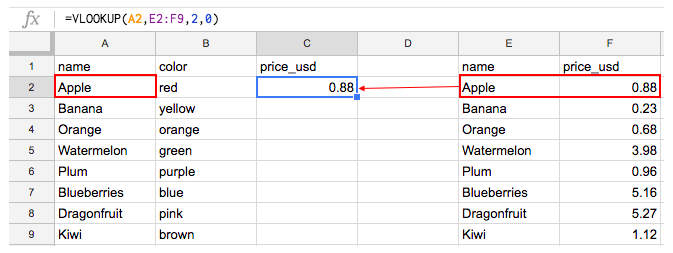
水果 VLOOKUP 右侧匹配.png

面向表格用户的 Python

在 Python 中合并

  • Python 区分大小写!
    • 'Apple' != 'apple'
面向表格用户的 Python

在 Python 中合并

  • Python 区分大小写!
    • 'Apple' != 'apple'
  • Python 对空白严格!
    • 'Apple' != ' Apple '
面向表格用户的 Python

在 Python 中合并

  • Python 区分大小写!
    • 'Apple' != 'apple'
  • Python 严格匹配!
    • 'Apple' != ' Apple '
  • Python 合并整张表!
    • AB + ACD = ABCD,即使我们只要 ABC
    • 因此需删除列 D。
面向表格用户的 Python

处理大小写敏感

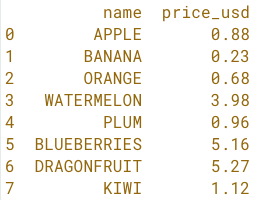
fruit_Price - 名称全大写

水果价格 全大写.png

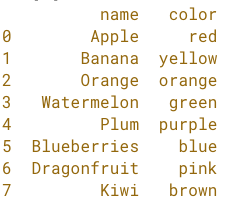
fruit_Color - 名称标题格式

水果颜色 控制台.png

面向表格用户的 Python

.str.title() 方法

fruit_price['name'].str.title()
面向表格用户的 Python

.str.title() 方法

fruit_price['name'] = fruit_price['name'].str.title()

print(fruit_price)
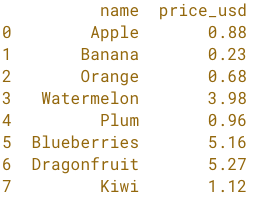
水果价格 控制台.png

面向表格用户的 Python

.str.upper() 方法

fruit_price['name'] = fruit_price['name'].str.upper()

print(fruit_price)

水果价格 全大写.png

面向表格用户的 Python

.str.lower() 方法

fruit_price['name'] = fruit_price['name'].str.lower()

print(fruit_price)
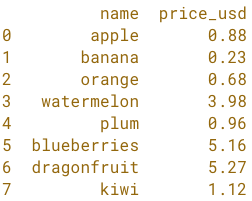
水果价格 全小写.png

面向表格用户的 Python

.str.title() 方法

fruit_price['name'] = fruit_price['name'].str.title()

print(fruit_price)

水果价格 控制台.png

面向表格用户的 Python

用 .str.strip() 处理空白

fruit_price['name'] = fruit_price['name'].str.strip()

print(fruit_price)

水果价格 控制台.png

面向表格用户的 Python

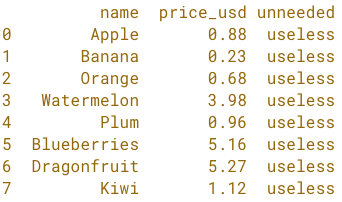
选择与删除列

含多余列的水果表.png

面向表格用户的 Python

选择列

选择列
fruit_price[['name', 'price_usd']]

水果价格 控制台.png

面向表格用户的 Python

选择列

选择列
fruit_price = fruit_price[['name', 'price_usd']]

水果价格 控制台.png

面向表格用户的 Python

用 .drop() 删除列

删除列
fruit_price.drop('unneeded', axis=1)

水果价格 控制台.png

面向表格用户的 Python

删除列

删除列
fruit_price = fruit_price.drop('unneeded', axis=1)

水果价格 控制台.png

面向表格用户的 Python

轮到您了!

面向表格用户的 Python

Preparing Video For Download...