data.table 语法

在 R 中使用 data.table 进行数据表连接

Scott Ritchie

Postdoctoral Researcher in Systems Genomics

data.table 语法回顾

data.table 语法通用形式

DT[i, j, by]
   |  |  |
   |  |  --> 按什么分组?
   |  -----> 做什么?
   --------> 哪些行?
在 R 中使用 data.table 进行数据表连接

连接

连接的通用形式

DT[i, on]
   |   |
   |   ----> 连接键列
   --------> 要连接到哪个 data.table?
在 R 中使用 data.table 进行数据表连接

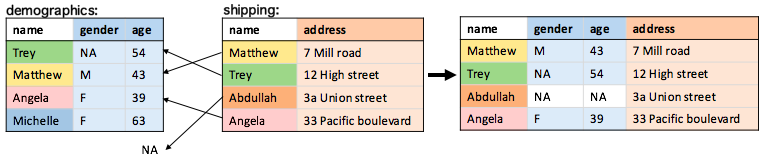
右连接

默认连接为右连接

demographics[shipping, on = .(name)]
在 R 中使用 data.table 进行数据表连接

on 参数

list().() 中的变量会在两个 data.table 的列名中查找

shipping[demographics, on = list(name)]
shipping[demographics, on = .(name)]

也可使用字符向量

join_key <- c("name")
shipping[demographics, on = join_key]
在 R 中使用 data.table 进行数据表连接

左连接

请记住,左连接等同于交换顺序的右连接:

shipping[demographics, on = .(name)]

在 R 中使用 data.table 进行数据表连接

内连接

nomatch = 0 设为内连接:

shipping[demographics, on = .(name), nomatch = 0]

在 R 中使用 data.table 进行数据表连接

全连接

data.table 语法不支持,使用 merge()

merge(demographics, shipping, by = "name", all = TRUE)

在 R 中使用 data.table 进行数据表连接

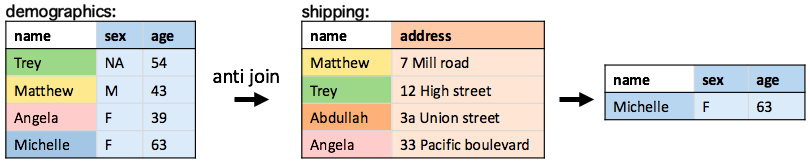
反连接

筛选在另一张 data.table 中无匹配的行

demographics[!shipping, on = .(name)]
在 R 中使用 data.table 进行数据表连接

开始练习!

在 R 中使用 data.table 进行数据表连接

Preparing Video For Download...