Crearea dashboardurilor cu Dash și Plotly
Alex Scriven
Data Scientist
$$
Majoritatea site-urilor au fișiere CSS;
style
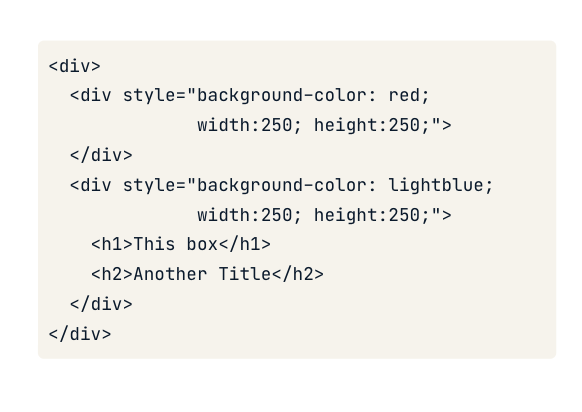
CSS poate fi aplicat și pe un element HTML
style a unui tag"property:value; property:value;"

<h1>Welcome to the website!</h1>
<h2 style="font-size:50px;color:red">
Enjoy your stay!
</h2>

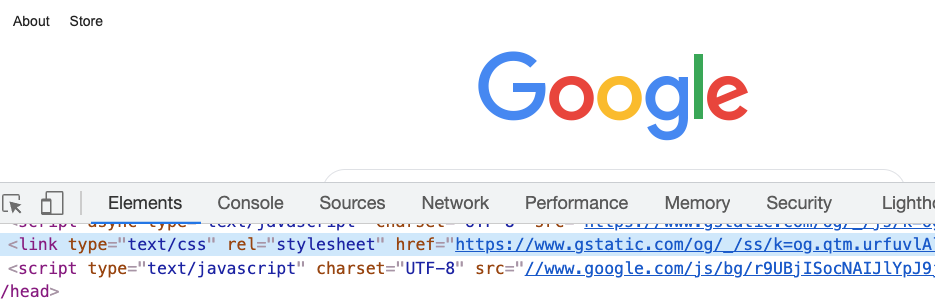
Putem edita CSS pe un site live

Argumentul style al componentelor Dash
Cod anterior într-o componentă Dash:
app.layout = [
html.H1('Welcome to the website!'),
html.H2('Text',
style={'font-size':'50px',
'color':'red'})
]
CSS poate seta:
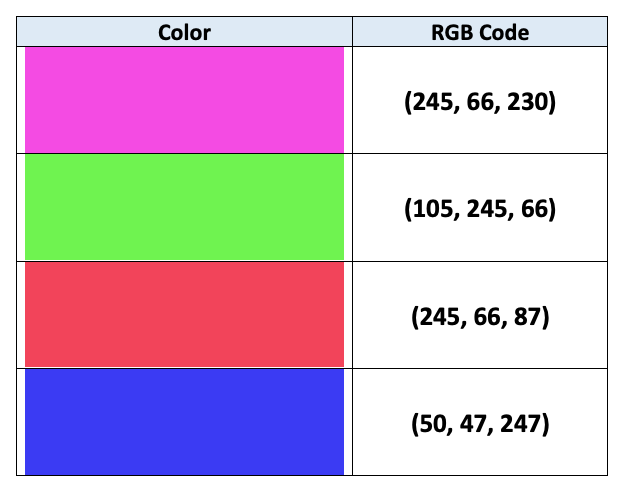
background-color)color)
Ambele metode acceptă șiruri (ex., 'red') sau coduri RGB (ex., 'rgb(0,0,255)' înseamnă albastru!)

CSS poate seta dimensiunea prin proprietățile width și height
app.layout = [
# Add & resize the company logo
html.Img(src=logo_link,
style={'width':'250px', 'height':'250px'})
]
app.layout = [
# Add & resize the company logo
html.Img(src=logo_link,
style={'width':'50%', 'height':'50%'})
]
Crearea dashboardurilor cu Dash și Plotly