MCP und LLMs: Prompts und Ressourcen

Einführung in das Model Context Protocol (MCP)

James Chapman

AI Curriculum Manager, DataCamp

Ressourcen und Prompts im LLM‑Flow
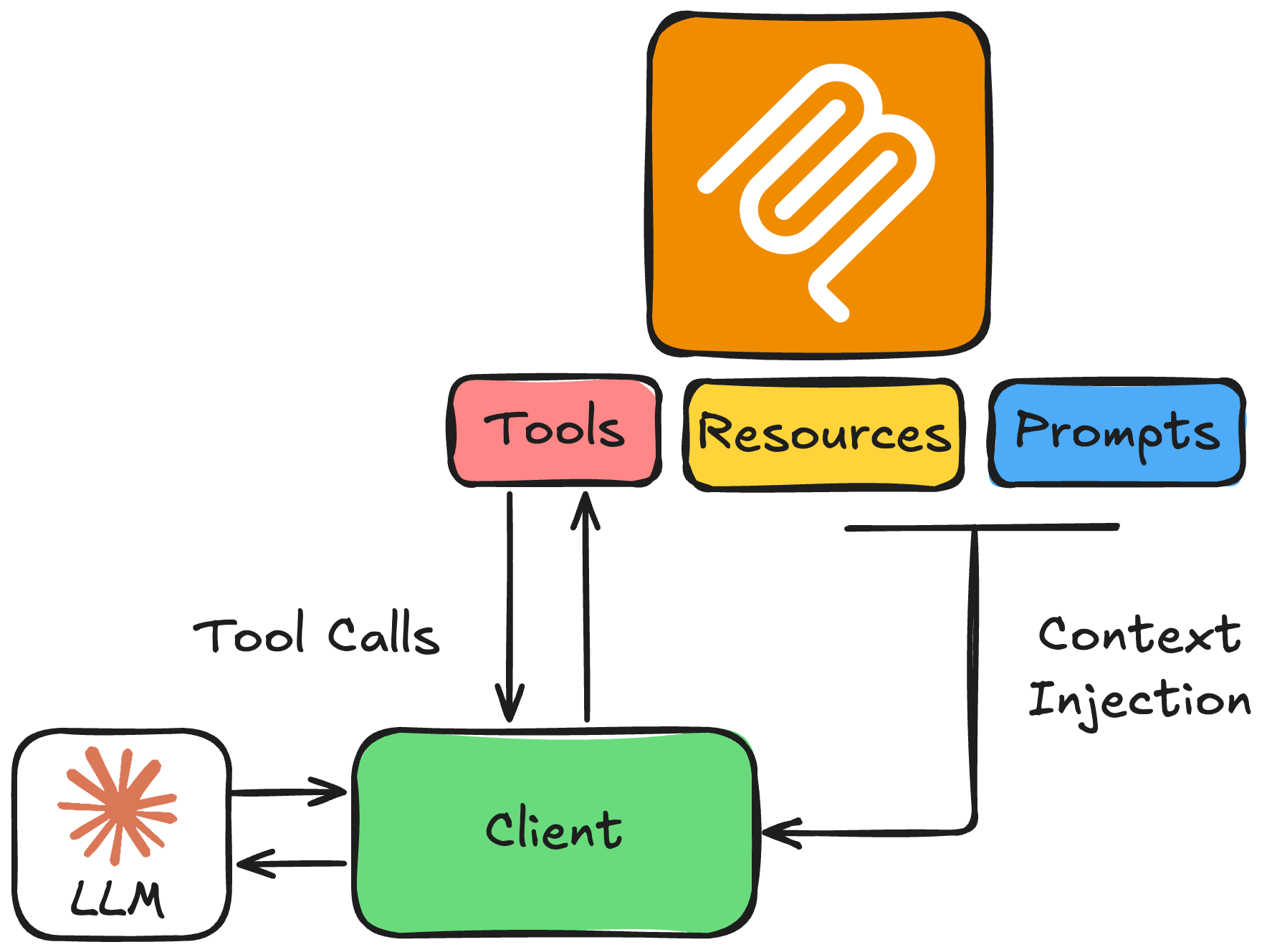
 

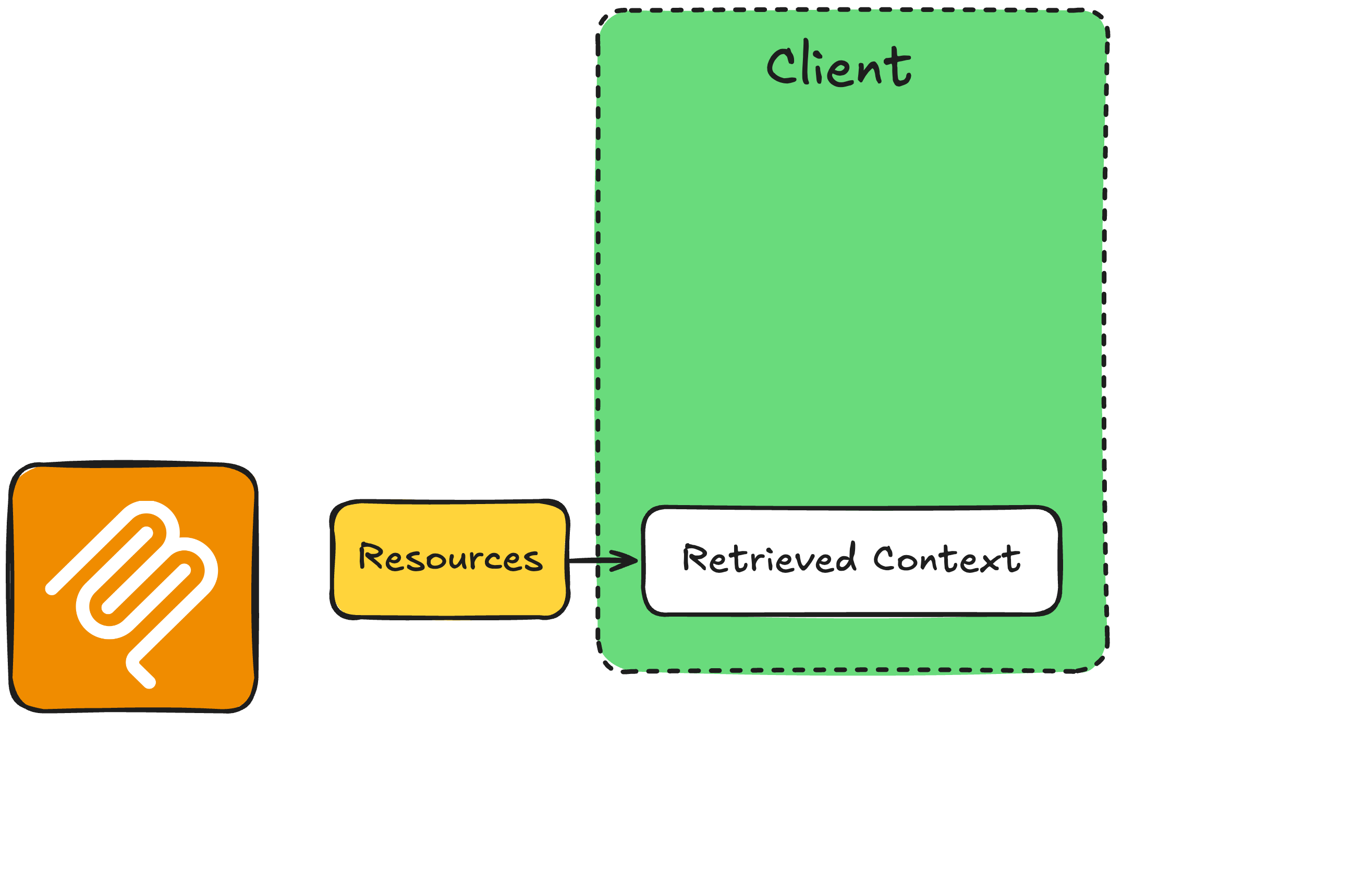
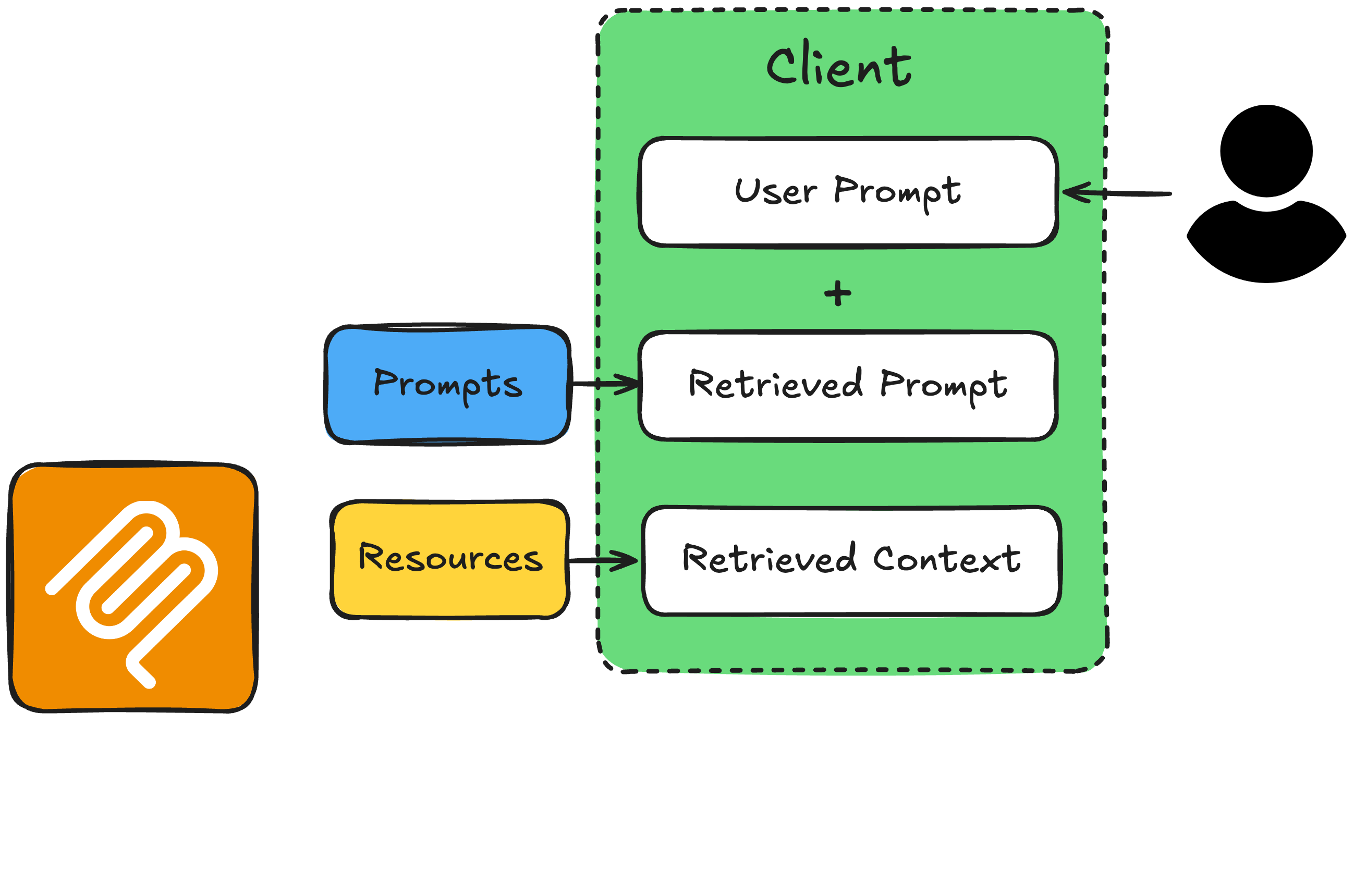
  • Ressourcen: schreibgeschützter Kontext
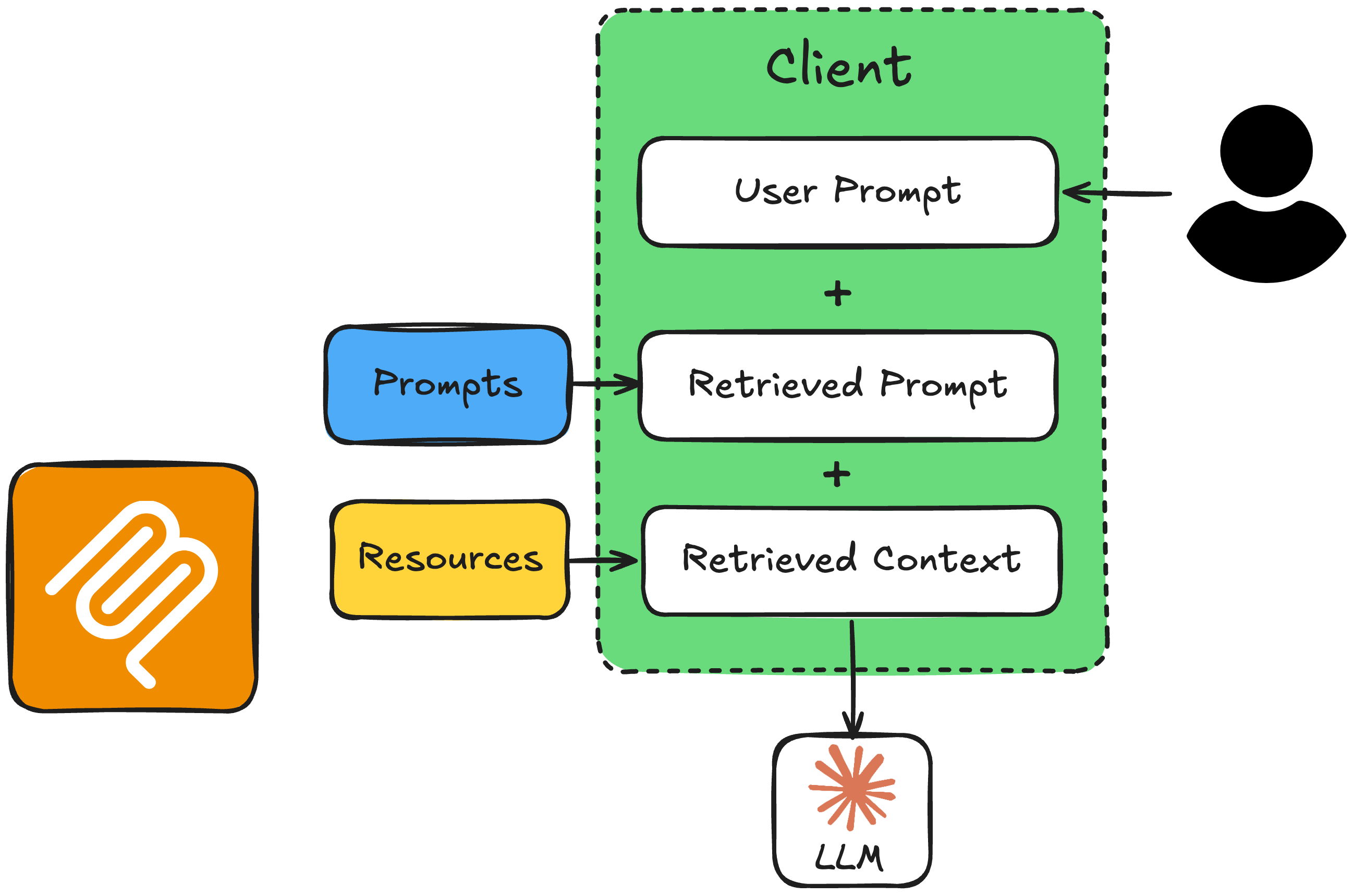
  • Prompts: Anweisungsvorlagen, um Verhalten zu setzen und das Modell für die Aufgabe zu optimieren


→ Weiter mit der Anthropic Messages API


LLM‑Grundbausteine

Einführung in das Model Context Protocol (MCP)

Der Prompt‑Ressourcen‑Workflow


Ablauf: Prompt und Ressource

Einführung in das Model Context Protocol (MCP)

Der Prompt‑Ressourcen‑Workflow


Ablauf: Prompt und Ressource

Einführung in das Model Context Protocol (MCP)

Der Prompt‑Ressourcen‑Workflow


Ablauf: Prompt und Ressource

Einführung in das Model Context Protocol (MCP)

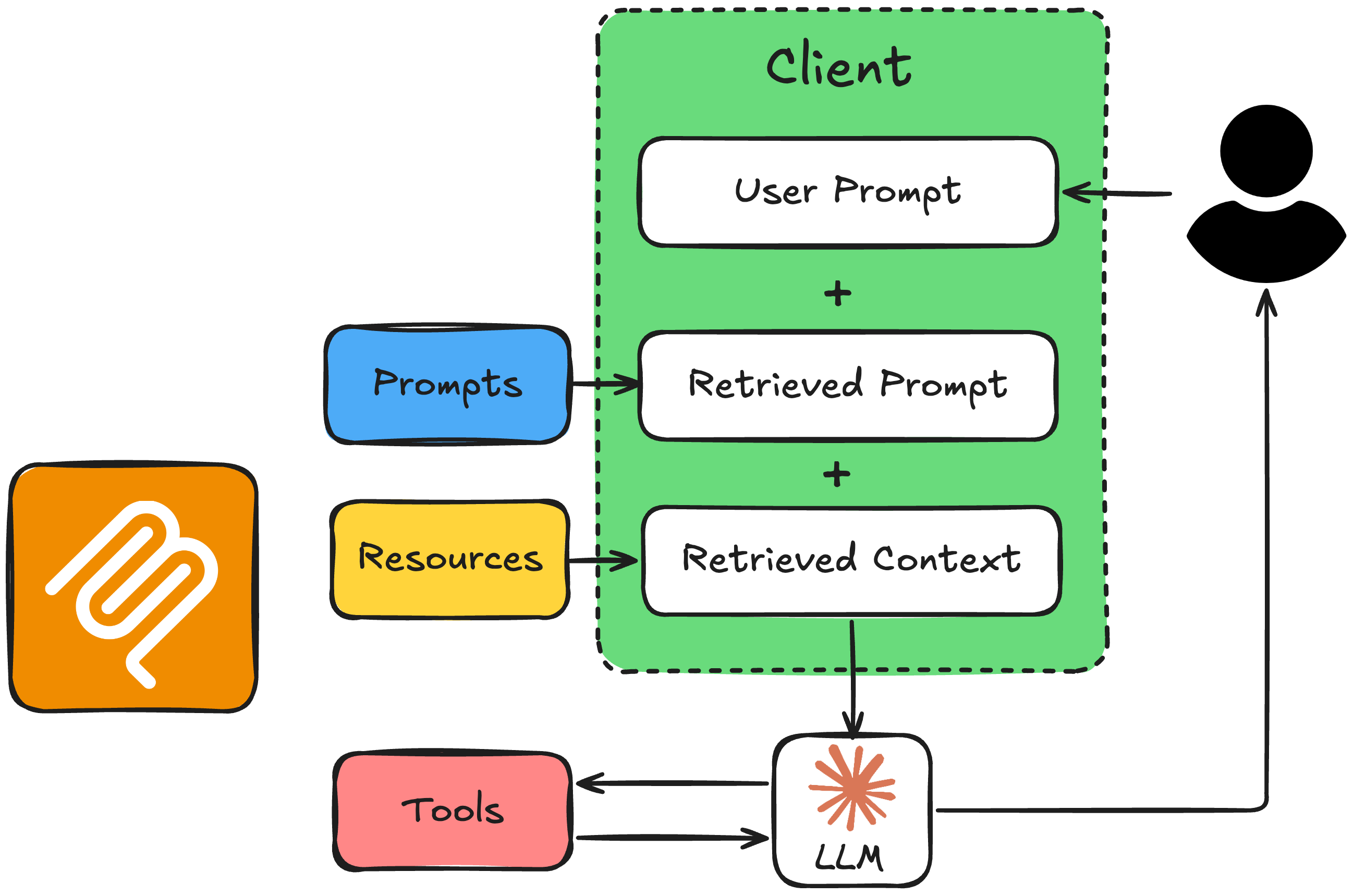
Der Prompt‑Ressourcen‑Workflow


Ablauf: Prompt und Ressource

Einführung in das Model Context Protocol (MCP)
from mcp.server.fastmcp import FastMCP

mcp = FastMCP("Timezone Converter")

@mcp.tool()
def convert_timezone(date_time: str, from_timezone: str, to_timezone: str) -> str:
    # ...

@mcp.resource("file://locations.txt")
def get_locations() -> str:
    # ...

@mcp.prompt(title="Timezone Conversion")
def convert_timezone_prompt(timezone_request: str) -> str:
    # ...

if __name__ == "__main__":
    mcp.run(transport="stdio")
Einführung in das Model Context Protocol (MCP)

Client‑Hilfsfunktionen


  • read_resource(resource_uri): ruft Inhalte einer Ressource per URI ab
  • read_prompt(prompt_name, user_input): holt die Prompt‑Vorlage mit der Anfrage der Nutzenden
Einführung in das Model Context Protocol (MCP)

1. Ressource und Prompt abrufen

async def get_context_from_mcp(user_query: str) -> tuple[str, str]:
    """Fetch resource content and prompt text from the MCP server."""
    params = StdioServerParameters(command=sys.executable, args=["timezone_server.py"])

    async with stdio_client(params) as (reader, writer):
        async with ClientSession(reader, writer) as session:
            await session.initialize()

# Get the resource (supported locations) resource_result = await session.read_resource("file://locations.txt") resource_text = resource_result.contents[0].text
# Get the prompt with the user's query prompt_result = await session.get_prompt("convert_timezone_prompt", arguments={"timezone_request": user_query}) prompt_text = prompt_result.messages[0].content.text
return resource_text, prompt_text
Einführung in das Model Context Protocol (MCP)

2. Systemnachricht bauen und LLM aufrufen

async def call_llm_with_context(user_query: str):
    """Call the LLM with resource and prompt context from MCP."""

resource_text, prompt_text = await get_context_from_mcp(user_query)
# Combine prompt (task + rules + user request) with resource (supported locations) full_prompt = prompt_text + "\n\nSupported locations:\n" + resource_text
client = AsyncAnthropic(api_key="<ANTHROPIC_API_TOKEN>") response = await client.messages.create( model="claude-sonnet-4-6", max_tokens=1024, messages=[{"role": "user", "content": full_prompt}], tools=anthropic_tools, # from get_tools_from_mcp(), formatted for Anthropic )
Einführung in das Model Context Protocol (MCP)

3. Antwort verarbeiten

    if response.stop_reason == "end_turn":
        text = next((b.text for b in response.content if b.type == "text"), ""),
        print(f"\nAssistant: {text}")
        return str(text)

if response.stop_reason == "tool_use": tool_use = next(b for b in response.content if b.type == "tool_use") result = await call_mcp_tool( tool_use.name, tool_use.input) # ... send the tool_result back in a follow-up # request, then print the reply, as before
Einführung in das Model Context Protocol (MCP)

Beispiel: Mehrdeutige Anfrage

if __name__ == "__main__":
    asyncio.run(call_llm_with_context("What time is it in Canada?"))
Assistant: Kanada hat mehrere Zeitzonen. Welche Stadt oder Region meinst du?
Zum Beispiel Toronto, Vancouver oder Halifax?
Einführung in das Model Context Protocol (MCP)

Beispiel: Klare Anfrage

if __name__ == "__main__":
    asyncio.run(call_llm_with_context("It is 9:50 AM in the UK in January. What
        time is it in Lisbon, Portugal?"))
Assistant: In Lissabon ist es ebenfalls 9:50 Uhr.
Einführung in das Model Context Protocol (MCP)

Recap: Ressourcen und Prompts mit dem LLM


Ablauf: Prompt und Ressource

Einführung in das Model Context Protocol (MCP)

Lass uns üben!

Einführung in das Model Context Protocol (MCP)

Preparing Video For Download...