Interrogare con l'agente Databricks SQL

Databricks con il Python SDK

Avi Steinberg

Senior Software Engineer

Databricks Unity Catalog
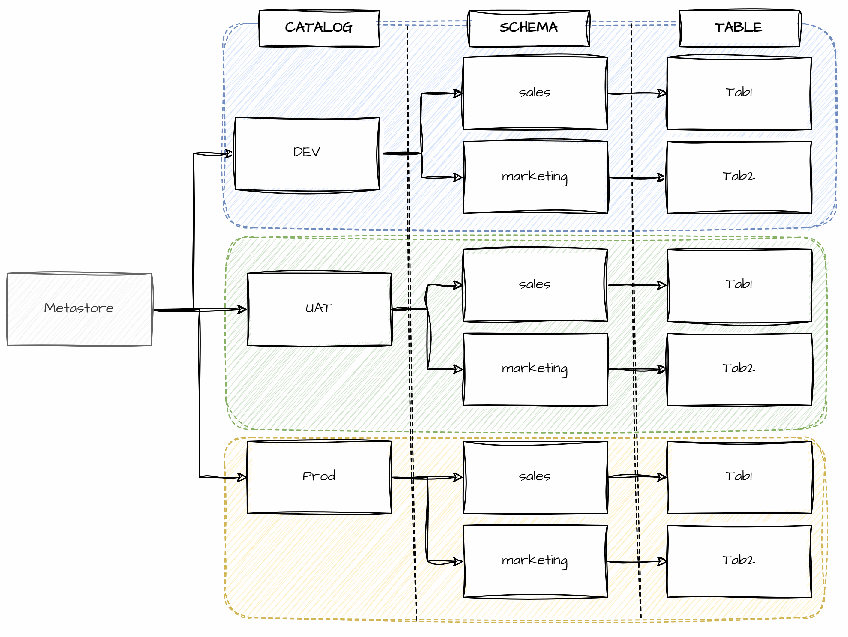
  • Metodo principale per archiviare dati in Databricks
  • Contiene schemi, che possono includere più tabelle
  • Crea tabelle nello schema da molteplici sorgenti
  • Più schemi open source nel catalogo samples

Databricks Unity Catalog

1 https://docs.databricks.com/aws/en/catalogs/
Databricks con il Python SDK

LangChain

  • Libreria per creare e distribuire applicazioni LLM
  • Consente di creare agenti AI che usano SQL per interrogare i dati LangChain
Databricks con il Python SDK

Dipendenze Python per LangChain

Installa le dipendenze Python:

pip install --upgrade databricks-langchain langchain-community langchain 
                      databricks-sql-connector databricks-sqlalchemy

Importa le librerie:

from langchain_community.agent_toolkits import create_sql_agent
from langchain_community.agent_toolkits import SQLDatabaseToolkit
from langchain_community.utilities import SQLDatabase
from databricks_langchain import ChatDatabricks
Databricks con il Python SDK

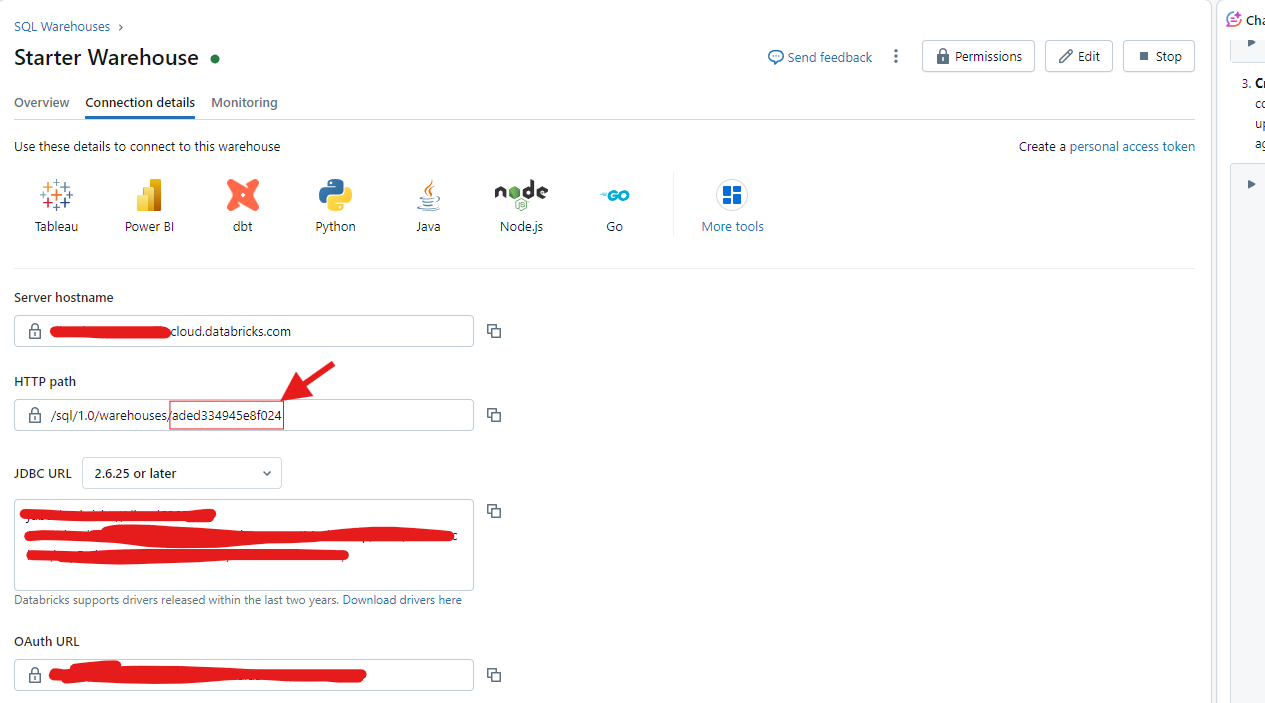
ID del Databricks SQL Warehouse

Dettagli connessione Databricks SQL Warehouse

Databricks con il Python SDK

Autentica LangChain al workspace Databricks

Esporta le variabili d'ambiente:

os.environ["DATABRICKS_TOKEN"] = "<Your-Access-Token>"
os.environ["DATABRICKS_HOST"] = "<your-workspace-id>.cloud.databricks.com"
Databricks con il Python SDK

Agente Databricks SQL

  • Fai domande a un agente AI sui dati in uno schema del catalogo Databricks
  • L'agente AI può rispondere a domande sui dati che richiedono SQL
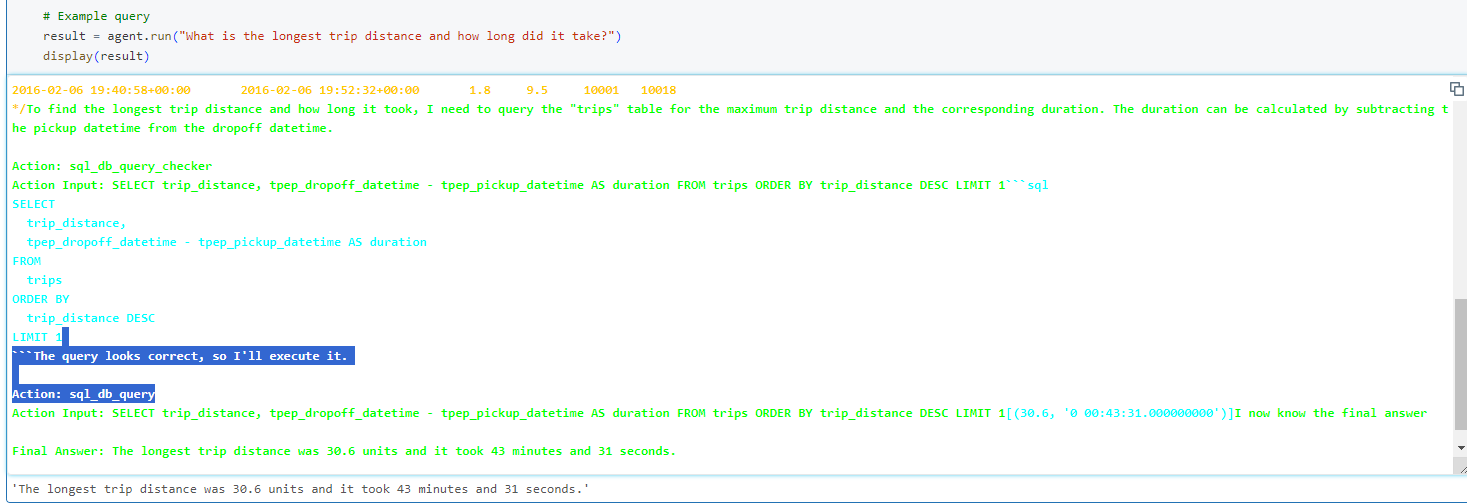
  • Imposta verbose=True per vedere i passaggi dell'agente

Output query LangChain

Databricks con il Python SDK

Usa l'agente Databricks SQL per interrogare il Catalog

db = SQLDatabase.from_databricks(
    catalog="samples", 
    schema="nyctaxi",
    warehouse_id=warehouse_id)
llm = ChatDatabricks(
    endpoint="databricks-meta-llama-3-3-70b-instruct",
    temperature=0.1,
    max_tokens=100)
toolkit = SQLDatabaseToolkit(db=db, llm=llm)
agent = create_sql_agent(llm=llm, toolkit=toolkit, verbose=True)
# Query the Databricks SQL Agent
result = agent.run("What's the time and distance of the longest trip?")
print(result)
1 https://docs.databricks.com/aws/en/large-language-models/langchain#databricks-sql-agent
Databricks con il Python SDK

Crea un database SQL LangChain da un Catalog Databricks

db = SQLDatabase.from_databricks(
    catalog="samples", 
    schema="nyctaxi",
    warehouse_id="<your-warehouse-id>"
)
1 api.python.langchain.com/en/latest/utilities/langchain_community.utilities.sql_database.SQLDatabase.html
Databricks con il Python SDK

Crea un LLM LangChain con un modello base

llm = ChatDatabricks(

endpoint="databricks-meta-llama-3-3-70b-instruct",
temperature=0.1, max_tokens=100, )
  • temperature: float tra 0 e 1 che controlla la casualità delle risposte
  • max_tokens: numero massimo di token nella risposta
1 https://docs.databricks.com/aws/en/large-language-models/langchain
Databricks con il Python SDK

Crea un toolkit database SQL LangChain

toolkit = SQLDatabaseToolkit(db=db, llm=llm)
1 https://docs.databricks.com/aws/en/large-language-models/langchain
Databricks con il Python SDK

Crea un agente Databricks SQL

agent = create_sql_agent(llm=llm, toolkit=toolkit, verbose=True)

result = agent.run("What's the time and distance of the longest trip?") display(result)
The average trip takes approximately 15 minutes.
1 https://docs.databricks.com/aws/en/large-language-models/langchain
Databricks con il Python SDK

Interroghiamo i dati in Databricks!

Databricks con il Python SDK

Preparing Video For Download...