Упаковка ML-моделей

Разработка моделей машинного обучения для продакшена

Sinan Ozdemir

Data Scientist, Entrepreneur, and Author

Зачем нужна упаковка

  • Оптимизация производительности
  • Обеспечение совместимости
  • Упрощение развёртывания моделей

Методы упаковки

  • Сериализация: простой, лёгкий и не зависящий от языка подход
  • Упаковка среды: фиксация полной программной среды
  • Контейнеризация: портативная, воспроизводимая и изолированная среда
Разработка моделей машинного обучения для продакшена

Как упаковывать ML-модели

  • Сериализация — сохранение и загрузка ML-модели

  • Упаковка среды — согласованная и воспроизводимая среда для ML-модели

  • Контейнеризация — упаковка модели, зависимостей и среды в единый «контейнер»

Разработка моделей машинного обучения для продакшена

Сериализация моделей scikit-learn

Сериализация модели sklearn с помощью pickle:

import pickle

model = ...  # Train the scikit-learn model

# Serialize the model to a file
with open('model.pkl', 'wb') as f:
    pickle.dump(model, f)

# Load the serialized model from the file
with open('model.pkl', 'rb') as f:
    model = pickle.load(f)

Сериализация модели sklearn в формате HDF5:

import h5py
import numpy as np
from sklearn.externals import joblib

model = ...  # Train the scikit-learn model

# Serialize the model to an HDF5 file
with h5py.File('model.h5', 'w') as f:
    f.create_dataset('model_weights',
    data=joblib.dump(model))

# Load the serialized model from the HDF5 file
with h5py.File('model.h5', 'r') as f:
    model = joblib.load(f['model_weights'][:])
Разработка моделей машинного обучения для продакшена

Сериализация моделей PyTorch и TensorFlow

Сериализация модели PyTorch:

import torch

# Train a PyTorch model and store it in a variable
trained_model = ...

# Serialize the trained model to a file
serialized_model_path = 'model.pt'
torch.save(trained_model.state_dict(), serialized_model_path)

# Load the serialized model from a file
loaded_model = ... # Initialize the model
loaded_model.load_state_dict(
    torch.load(serialized_model_path))

Сериализация модели TensorFlow:

import tensorflow as tf

# Train a Tensorflow model
trained_model = ...

# Save the trained model to a directory 
saved_model_directory = 'model/'
tf.saved_model.save
    (trained_model, saved_model_directory)

# Load the saved model from the directory 
loaded_model = tf.saved_model.load(
    saved_model_directory)
Разработка моделей машинного обучения для продакшена

Упаковка среды ML с помощью Docker

  • Среда должна обеспечивать корректную работу модели
  • virtualenv и аналоги создают согласованные и воспроизводимые среды
  • Контейнеры Docker — самодостаточные и легко развёртываемые единицы

docker

Разработка моделей машинного обучения для продакшена

Пример Dockerfile

# Use an existing image as the base image
FROM python:3.8-slim

# Set the working directory
WORKDIR /app

# Copy the requirements file to the image
COPY requirements.txt .

# Install the required dependencies
RUN pip install -r requirements.txt

# Copy the ML model and its dependencies to the image
COPY model/ .

# Set the entrypoint to run the model
ENTRYPOINT ["python", "run_model.py"]

<---- Use Python 3.8 base image


<---- Set the working directory


<---- Copy the requirmentes.txt file


<---- Install the model's dependent packages


<---- Copy the model into the continer


<---- Tell the container how to start up
Разработка моделей машинного обучения для продакшена

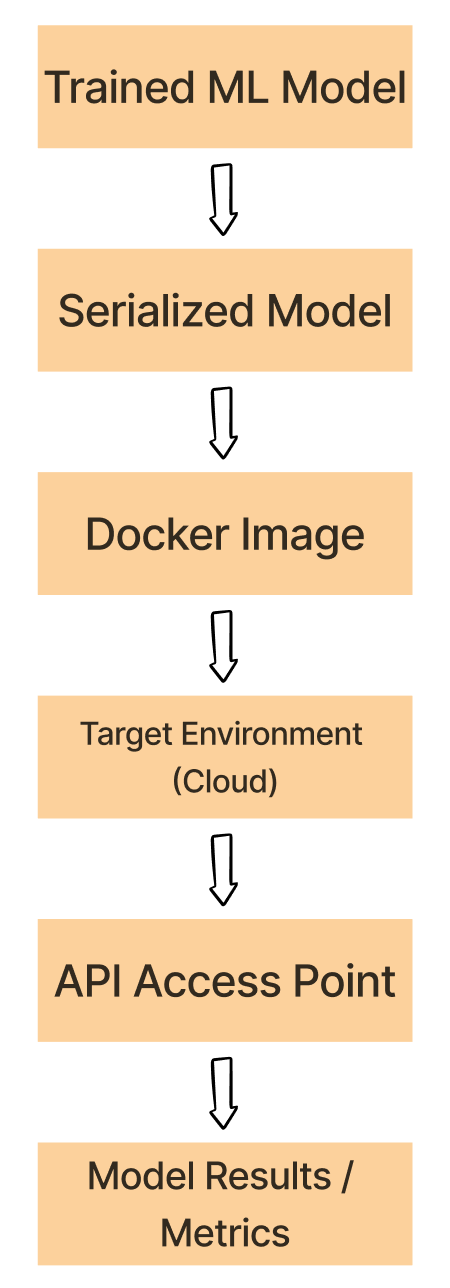
Эксперимент → рабочий процесс Docker

  1. Сериализуйте обученную ML-модель в формате pickle, HDF5 или PyTorch.

  2. Контейнеризируйте сериализованную ML-модель вместе с зависимостями и средой

  3. Разверните образ Docker в целевой среде, например на облачной платформе

  4. Запустите контейнер Docker из развёрнутого образа и выполните ML-модель.

  5. Обращайтесь к модели внутри контейнера через API или другую точку доступа.

Рабочий процесс Docker

Разработка моделей машинного обучения для продакшена

Давайте потренируемся!

Разработка моделей машинного обучения для продакшена

Preparing Video For Download...