Exécuter des projets MLflow
Introduction à MLflow

Weston Bassler
Senior MLOps Engineer
API et ligne de commande
API Projects
mlflow.projects
mlflow.projects.run()
uri- URI du fichier MLprojectentry_point- Point d'entrée à lancer depuis MLprojectexperiment_name- Expérience pour suivre l'entraînementenv_manager- Gestionnaire d'environnement Python :localouvirtualenv
# Exécuter un projet MLflow mlflow.projects.run(uri='./',entry_point='main',experiment_name='My Experiment',env_manager='virtualenv')
MLproject
name: salary_model
python_env: python_env.yaml
entry_points:
  main:
    command: "python train_model.py"
train_model.py
# Importer les bibliothèques et modules import mlflow import mlflow.sklearn import pandas as pd from sklearn.linear_model import LinearRegression from sklearn.model_selection import train_test_split# Données d'entraînement df = pd.read_csv('Salary_predict.csv') X = df[["experience", "age", "interview_score"]] y = df[["Salary"]]
train_model.py
# Séparation entraînement/test X_train, X_test, y_train, y_test = train_test_split(X, y, train_size=0.7, random_state=0)# Activer la consignation automatique pour l'édition Scikit-learn mlflow.sklearn.autolog() # Entraîner le modèle lr = LinearRegression() lr.fit(X_train, y_train)
Exécution de projets
# Importer le module MLflow import mlflow# Exécuter le projet local mlflow.projects.run(uri='./', entry_point='main', experiment_name='Salary Model')
Sortie d'exécution
# Exécuter le projet local
mlflow.projects.run(uri='./', entry_point='main',
                    experiment_name='Salary Model')
2023/04/02 14:33:23 INFO mlflow.projects: 'Salary Model' does not exist. Creating a new experiment2023/04/02 14:33:23 INFO mlflow.utils.virtualenv: Installing python 3.10.8 if it does not exist 2023/04/02 14:33:23 INFO mlflow.utils.virtualenv: Creating a new environment /.mlflow/envs/mlflow-44f5094bba686a8d4a5c772 created virtual environment CPython3.10.8.final.0-64 in 236ms 2023/04/02 14:33:23 INFO mlflow.utils.virtualenv: Installing dependencies
Sortie d'exécution
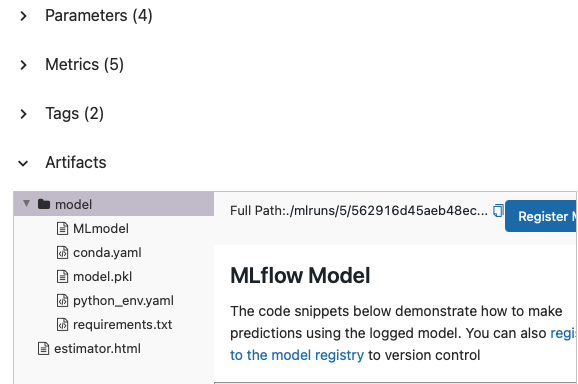
2023/04/02 14:33:59 INFO mlflow.projects.backend.local: === Running command 'source /.mlflow/envs/mlflow-44f5094bba686a8d4a5c772/bin/activate && python train_model.py' in run with ID '562916d45aeb48ec84c1c393d6e3f5b6' ===2023/04/02 14:34:34 INFO mlflow.projects: === Run (ID '562916d45aeb48ec84c1c393d6e3f5b6') succeeded ===
Suivi MLflow
Ligne de commande
mlflow run
--entry-point- Point d'entrée à lancer depuis MLproject--experiment-name- Expérience pour suivre l'entraînement--env-manager- Gestionnaire d'environnement Python :localouvirtualenvURI- URI du fichier MLproject
Commande d'exécution
# Exécuter le point d'entrée main de l'expérience Salary Model
mlflow run --entry-point main --experiment-name "Salary Model" ./
2023/04/02 15:23:34 INFO mlflow.utils.virtualenv: Installing python 3.10.8 if it does not exist 2023/04/02 15:23:34 INFO mlflow.utils.virtualenv: Environment /.mlflow/envs/mlflow-44f5094bba686a8d4a5c772 already exists2023/04/02 15:23:34 INFO mlflow.projects.backend.local: === Running command 'source /Users/weston/.mlflow/envs/mlflow-44f5094bba686a8d4a5c772/bin/activate && python train_model.py' in run with ID 'da5b37b6f53245e5bca59ba8ed6d7dc1' ===2023/04/02 15:23:38 INFO mlflow.projects: === Run (ID 'da5b37b6f53245e5bca59ba8ed6d7dc1') succeeded ===
Passons à la pratique !
Introduction à MLflow

