Entraînement du modèle avec GitHub Actions

CI/CD pour le Machine Learning

Ravi Bhadauria

Machine Learning Engineer

Jeu de données : prévision météo en Australie

  • Classification binaire
    • Prédit la pluie demain
  • 5 variables catégorielles
    • Location
    • WindGustDir
    • WindDir9am
    • WindDir3pm
    • RainToday
  • 17 variables numériques
    • MinTemp
    • MaxTemp
    • Rainfall
    • Evaporation
    • ...
    • WindGustSpeed
    • Cloud3pm
    • Temp9am
    • RISK_MM
1 https://www.kaggle.com/datasets/rever3nd/weather-data
CI/CD pour le Machine Learning

Flux de modélisation

  • Prétraitement des données
    • Convertir les variables catégorielles en numériques
    • Remplacer les valeurs manquantes
    • Mettre à l'échelle les variables
  • Classifieur Random Forest
    • max_depth = 2, n_estimators = 50
  • Mesures standard sur les données de test
    • Graphiques de performance
      • Matrice de confusion
CI/CD pour le Machine Learning

Préparation des données : encodage ciblé

def target_encode_categorical_features(
    df: pd.DataFrame, categorical_columns: List[str], target_column: str
) -> pd.DataFrame:
    encoded_data = df.copy()

    # Iterate through categorical columns
    for col in categorical_columns:
        # Calculate mean target value for each category
        encoding_map = df.groupby(col)[target_column].mean().to_dict()

        # Apply target encoding
        encoded_data[col] = encoded_data[col].map(encoding_map)

    return encoded_data
1 https://maxhalford.github.io/blog/target-encoding/
CI/CD pour le Machine Learning

Imputation et mise à l'échelle

def impute_and_scale_data(df_features: pd.DataFrame) -> pd.DataFrame:
    # Impute data with mean strategy
    imputer = SimpleImputer(strategy="mean")
    X_preprocessed = imputer.fit_transform(df_features.values)

    # Scale and fit with zero mean and unit variance
    scaler = StandardScaler()
    X_preprocessed = scaler.fit_transform(X_preprocessed)

    return pd.DataFrame(X_preprocessed, columns=df_features.columns)
CI/CD pour le Machine Learning

Entraînement

  • Découpage entraînement/test
from sklearn.model_selection import train_test_split

X_train, X_test, y_train, y_test = train_test_split(
  data.drop(TARGET_COLUMN), data[TARGET_COLUMN], random_state=1993)
  • Classifieur Random Forest
from sklearn.ensemble import RandomForestClassifier

clf = RandomForestClassifier(
  max_depth=2, n_estimators=50, random_state=1993)
clf.fit(X_train, y_train)
CI/CD pour le Machine Learning

Mesures

from sklearn.metrics import accuracy_score, f1_score, precision_score, recall_score

# Calculate predictions
y_pred = model.predict(X_test)

# Calculate accuracy accuracy = accuracy_score(y_test, y_pred)
# Calculate precision precision = precision_score(y_test, y_pred)
# Calculate recall recall = recall_score(y_test, y_pred)
# Calculate f1 score f1 = f1_score(y_test, y_pred)
1 https://scikit-learn.org/stable/modules/model_evaluation.html#classification-metrics
CI/CD pour le Machine Learning

Graphiques

from sklearn.metrics import ConfusionMatrixDisplay
ConfusionMatrixDisplay.from_estimator(model, X_test, y_test,cmap=plt.cm.Blues)
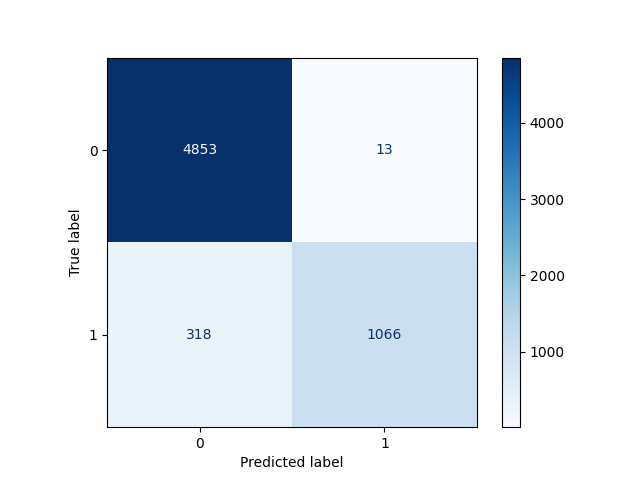
Graphique de la matrice de confusion calculée sur l'ensemble de test

CI/CD pour le Machine Learning

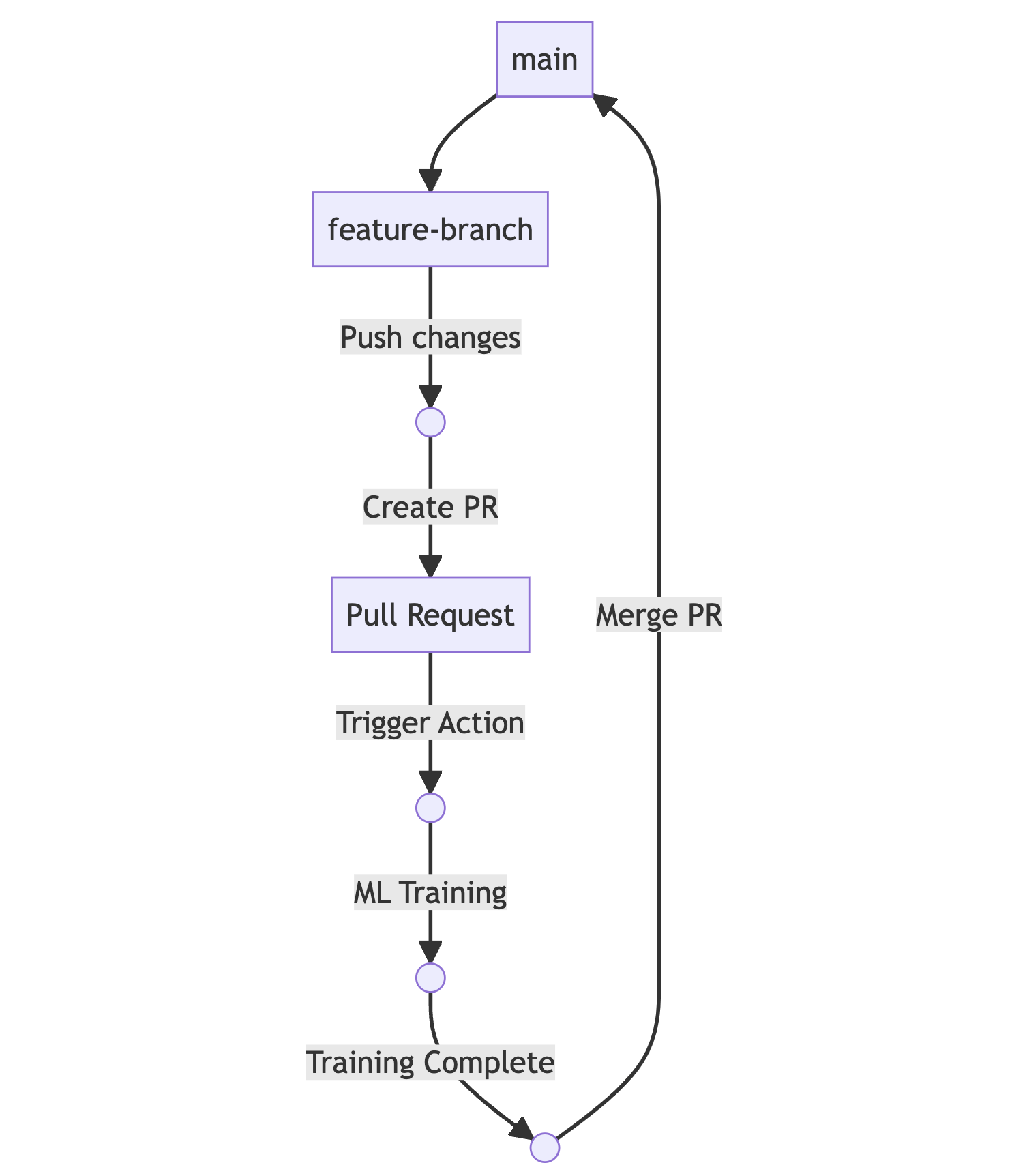
Flux GitHub Actions

Schéma du flux d'intégration continue pour l'entraînement du modèle

  • Continuous Machine Learning (CML)
    • Outil CI/CD pour le Machine Learning
    • Intégration à GitHub Actions
      • Mettre à disposition des machines d'entraînement
      • Effectuer l'entraînement et l'évaluation
      • Comparer les expériences
      • Surveiller les ensembles de données
      • Rapports visuels
1 https://cml.dev/ 2 https://martinfowler.com/bliki/FeatureBranch.html
CI/CD pour le Machine Learning

Commandes CML

# Enable setup-cml action to be used later
- uses: iterative/setup-cml@v1
- name: Train model
  run: |
    # Your ML workflow goes here
    pip install -r requirements.txt
    python3 train.py
1 https://www.markdownguide.org/basic-syntax/#images
CI/CD pour le Machine Learning

Commandes CML

- name: Write CML report
  run: |
    # Add results and plots to markdown
    cat results.txt >> report.md
    echo "![training graph](./graph.png)" >> report.md

# Create comment from markdown report cml comment create report.md
env: REPO_TOKEN: ${{ secrets.GITHUB_TOKEN }}
CI/CD pour le Machine Learning

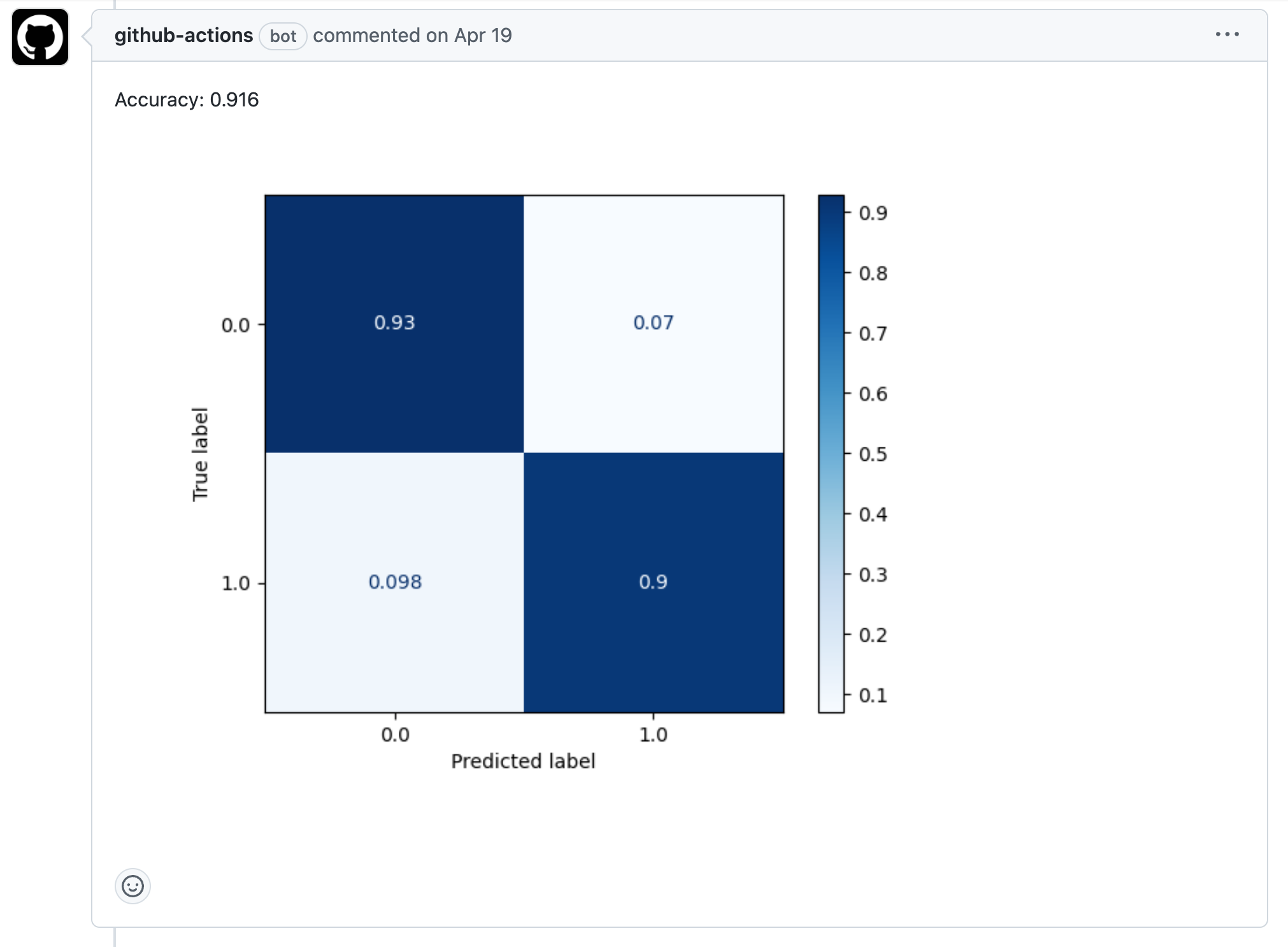
Résultat

Capture d'écran de la page de demande de tirage affichant un commentaire généré par CML

CI/CD pour le Machine Learning

Passons à la pratique !

CI/CD pour le Machine Learning

Preparing Video For Download...