Opérations avancées

Introduction à TensorFlow en Python

Isaiah Hull

Visiting Associate Professor of Finance, BI Norwegian Business School

Aperçu des opérations avancées

  • Nous avons vu les opérations de base dans TensorFlow
    • add(), multiply(), matmul() et reduce_sum()
  • Dans cette leçon, voyons des opérations avancées
    • gradient(), reshape() et random()
Introduction à TensorFlow en Python

Aperçu des opérations avancées

Opération Usage
gradient() Calcule la pente d'une fonction en un point
reshape() Redimensionne un tenseur (p. ex. 10x10 vers 100x1)
random() Remplit un tenseur avec des valeurs tirées d'une loi de probabilité
Introduction à TensorFlow en Python

Trouver l'optimum

  • Dans bien des problèmes, on cherche l'optimum d'une fonction.

    • Minimum : valeur la plus basse d'une fonction de perte.
    • Maximum : valeur la plus haute d'une fonction objectif.
  • On peut y arriver avec l'opération gradient().

    • Optimum : point où le gradient = 0.
    • Minimum : variation du gradient > 0
    • Maximum : variation du gradient < 0
Introduction à TensorFlow en Python

Calculer le gradient

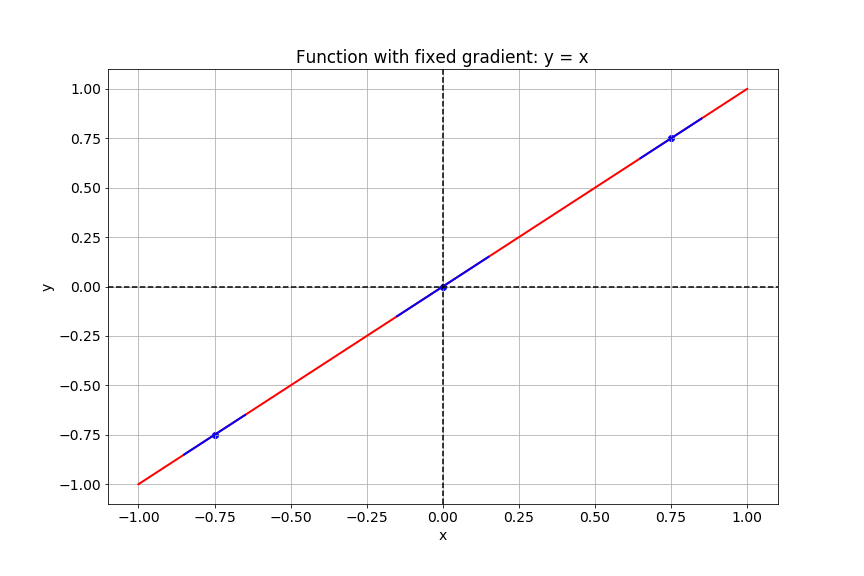
Cette diapo montre le tracé de la fonction y égal x.

Introduction à TensorFlow en Python

Calculer le gradient

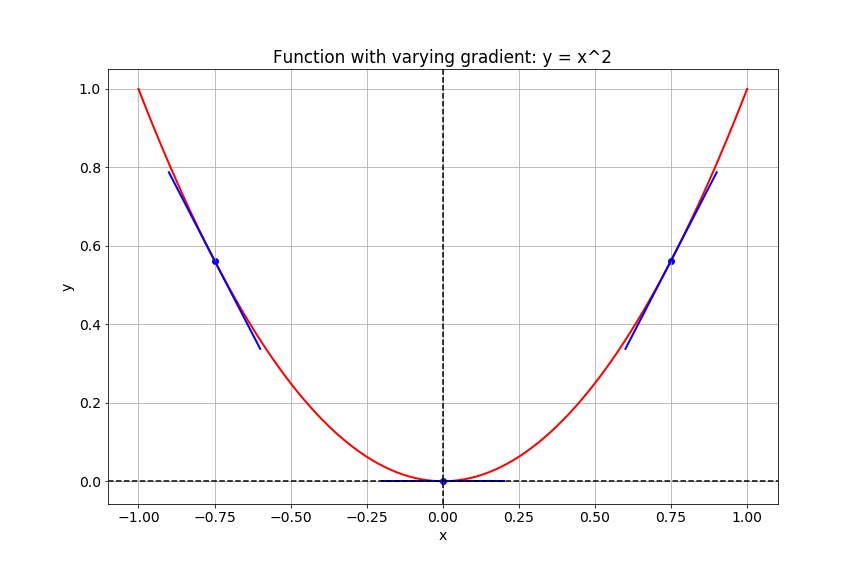
Cette diapo montre le tracé de la fonction y égal x au carré.

Introduction à TensorFlow en Python

Gradients dans TensorFlow

# Import tensorflow under the alias tf
import tensorflow as tf

# Define x
x = tf.Variable(-1.0)
# Define y within instance of GradientTape
with tf.GradientTape() as tape:
    tape.watch(x)
    y = tf.multiply(x, x)
# Evaluate the gradient of y at x = -1
g = tape.gradient(y, x)
print(g.numpy())
-2.0
Introduction à TensorFlow en Python

Images comme tenseurs

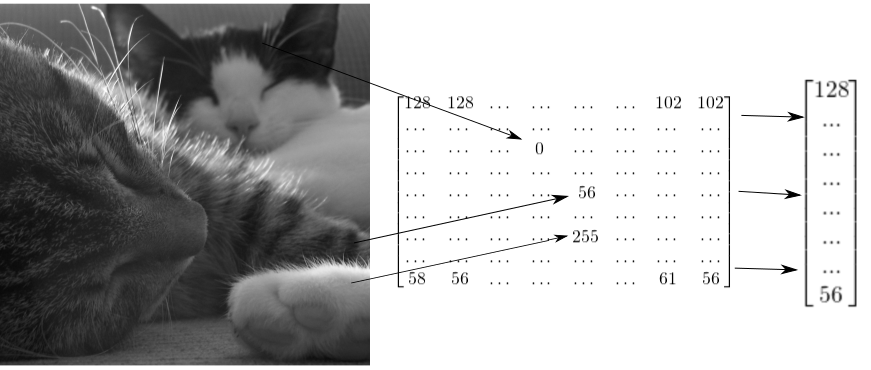
La diapo illustre comment une image de deux chats peut être représentée par un tenseur 2D, puis remodelée en vecteur 1D.

Introduction à TensorFlow en Python

Remodeler une image en niveaux de gris

# Import tensorflow as alias tf
import tensorflow as tf

# Generate grayscale image
gray = tf.random.uniform([2, 2], maxval=255, dtype='int32')

# Reshape grayscale image
gray = tf.reshape(gray, [2*2, 1])
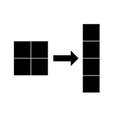
L'image montre une image en niveaux de gris 2 par 2 remodelée en vecteur 4 par 1.

Introduction à TensorFlow en Python

Remodeler une image couleur

# Import tensorflow as alias tf
import tensorflow as tf

# Generate color image
color = tf.random.uniform([2, 2, 3], maxval=255, dtype='int32')

# Reshape color image
color = tf.reshape(color, [2*2, 3])
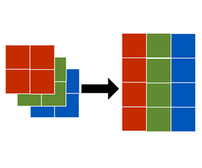
La figure montre une image couleur 2 par 2 par 3 remodelée en matrice 2 par 3.

Introduction à TensorFlow en Python

Passons à la pratique !

Introduction à TensorFlow en Python

Preparing Video For Download...