एक्सट्रैक्ट

Introduction to Data Engineering

Vincent Vankrunkelsven

Data Engineer @ DataCamp

डेटा निकालना: इसका मतलब क्या है?
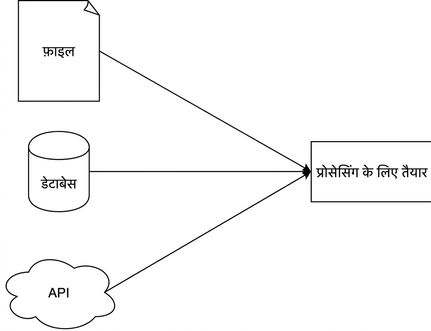
साधारण extract फेज़ का डायग्राम

Introduction to Data Engineering

टेक्स्ट फाइलों से एक्सट्रैक्ट

Unstructured

  • साधारण टेक्स्ट
  • जैसे, किताब का एक अध्याय


Call me Ishmael. Some years ago—never 
mind how long precisely—having little or
no money in my purse, and nothing particular
to interest me on shore, I thought ....

Flat files

  • Row = record
  • Column = attribute
  • जैसे .tsv या .csv


Year,Make,Model,Price
1997,Ford,E350,3000.00
1999,Chevy,"Venture Extended Edition",4900.00
1999,Chevy,"Venture Extended Edition",5000.00
1996,Jeep,Grand Cherokee,4799.00
Introduction to Data Engineering

JSON

  • JavaScript Object Notation
  • सेमी-स्ट्रक्चर्ड
  • एटॉमिक
    • number
    • string
    • boolean
    • null
  • कॉम्पोज़िट
    • array
    • object
{
  "an_object": {
    "nested": [
      "one",
      "two",
      "three",
      {
        "key": "four"
      }
    ]
  }
}
import json

result = json.loads('{"key_1": "value_1", "key_2":"value_2"}') print(result["key_1"])
value_1
Introduction to Data Engineering

वेब पर डेटा

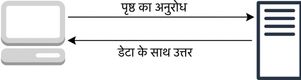
रिक्वेस्ट्स

रिक्वेस्ट-रेस्पॉन्स मॉडल का डायग्राम

उदाहरण

  1. Google ब्राउज़ करें
  2. Google सर्वर को रिक्वेस्ट
  3. Google वेब पेज के साथ जवाब देता है
Introduction to Data Engineering

APIs के जरिए वेब पर डेटा

  • डेटा JSON फॉर्मेट में भेजें
  • API: application programming interface
  • उदाहरण
    • Twitter API
{ "statuses": [{ "created_at": "Mon May 06 20:01:29 +0000 2019", "text": "this is a tweet"}] }
  • Hackernews API
import requests

response = requests.get("https://hacker-news.firebaseio.com/v0/item/16222426.json") print(response.json())
{'by': 'neis', 'descendants': 0, 'id': 16222426, 'score': 17, 'time': 1516800333, 'title': .... }
Introduction to Data Engineering

डेटाबेस में डेटा

एप्लिकेशन डेटाबेस

  • ट्रांज़ैक्शंस
  • इन्सर्ट या बदलाव
  • OLTP
  • रो-ओरिएंटेड

एनालिटिकल डेटाबेस

  • OLAP
  • कॉलम-ओरिएंटेड
Introduction to Data Engineering

डेटाबेस से एक्सट्रैक्शन

कनेक्शन स्ट्रिंग/URI

postgresql://[user[:password]@][host][:port]

Python में उपयोग

import sqlalchemy
connection_uri = "postgresql://repl:password@localhost:5432/pagila" 
db_engine = sqlalchemy.create_engine(connection_uri)

import pandas as pd pd.read_sql("SELECT * FROM customer", db_engine)
Introduction to Data Engineering

अभ्यास करते हैं!

Introduction to Data Engineering

Preparing Video For Download...