Word Count Representation
Python में मशीन लर्निंग के लिए फीचर इंजीनियरिंग

Robert O'Callaghan
Director of Data Science, Ordergroove
टेक्स्ट को कॉलम में बदलें
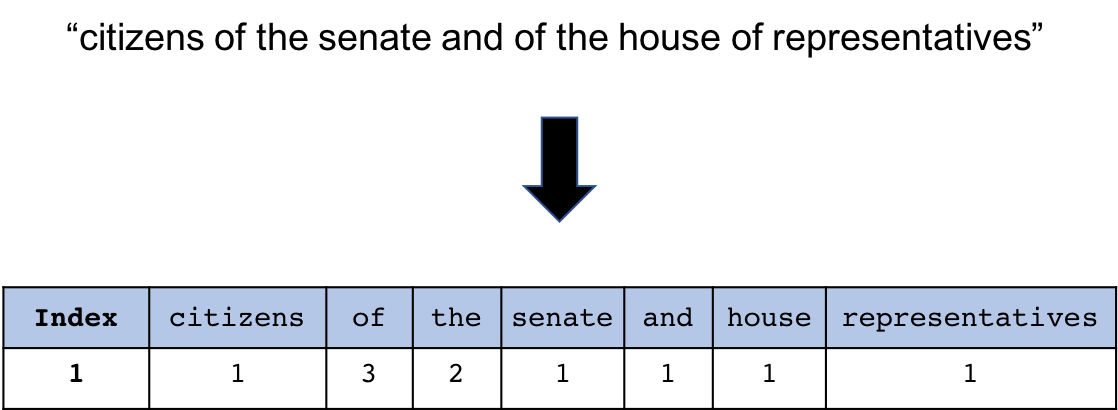
वेक्टराइज़र इनिशियलाइज़ करना
from sklearn.feature_extraction.text import CountVectorizer
cv = CountVectorizer()
print(cv)
CountVectorizer(analyzer=u'word', binary=False,
        decode_error=u'strict',
        dtype=<type 'numpy.int64'>,
        encoding=u'utf-8', input=u'content',
        lowercase=True, max_df=1.0, max_features=None,
        min_df=1,ngram_range=(1, 1), preprocessor=None,
        stop_words=None, strip_accents=None,
        token_pattern=u'(?u)\\b\\w\\w+\\b',
        tokenizer=None, vocabulary=None
वेक्टराइज़र के पैरामीटर सेट करें
from sklearn.feature_extraction.text import CountVectorizer

cv = CountVectorizer(min_df=0.1, max_df=0.9)
min_df: वह न्यूनतम डॉक्यूमेंट-अंश जिसमें शब्द आना चाहिए
max_df: वह अधिकतम डॉक्यूमेंट-अंश जिसमें शब्द आ सकता है
वेक्टराइज़र फिट करें
cv.fit(speech_df['text_clean'])
अपना टेक्स्ट ट्रांसफ़ॉर्म करें
cv_transformed = cv.transform(speech_df['text_clean'])
print(cv_transformed)
<58x8839 sparse matrix of type '<type 'numpy.int64'>'
अपना टेक्स्ट ट्रांसफ़ॉर्म करें
cv_transformed.toarray()
फ़ीचर नाम प्राप्त करना
feature_names = cv.get_feature_names()
print(feature_names)
[u'abandon', u'abandoned', u'abandonment', u'abate',
u'abdicated', u'abeyance', u'abhorring', u'abide',
u'abiding', u'abilities', u'ability', u'abject'...
फिट और ट्रांसफ़ॉर्म साथ में
cv_transformed = cv.fit_transform(speech_df['text_clean'])
print(cv_transformed)
<58x8839 sparse matrix of type '<type 'numpy.int64'>'
सभी चरण एक साथ
cv_df = pd.DataFrame(cv_transformed.toarray(),
                     columns=cv.get_feature_names())\
                               .add_prefix('Counts_')
print(cv_df.head())
     Counts_aback    Counts_abandoned    Counts_a...
0               1                   0        ...
1               0                   0        ...
2               0                   1        ...
3               0                   1        ...
4               0                   0        ...
1 ```out Counts_aback Counts_abandon Counts_abandonment 0 1 0 0 1 0 0 1 2 0 1 0 3 0 1 0 4 0 0 0 ```
अपने DataFrame को अपडेट करें
speech_df = pd.concat([speech_df, cv_df],
                      axis=1, sort=False)
print(speech_df.shape)
(58, 8845)
अभ्यास करते हैं!
Python में मशीन लर्निंग के लिए फीचर इंजीनियरिंग

