Alteryx में फ़ॉर्मूला लागू करना

Alteryx में Data Preparation

Deanna Sanchez

Alteryx ACE and Owner, Nova Geographica LLC

कई तरह के फ़ॉर्मूला उपलब्ध हैं
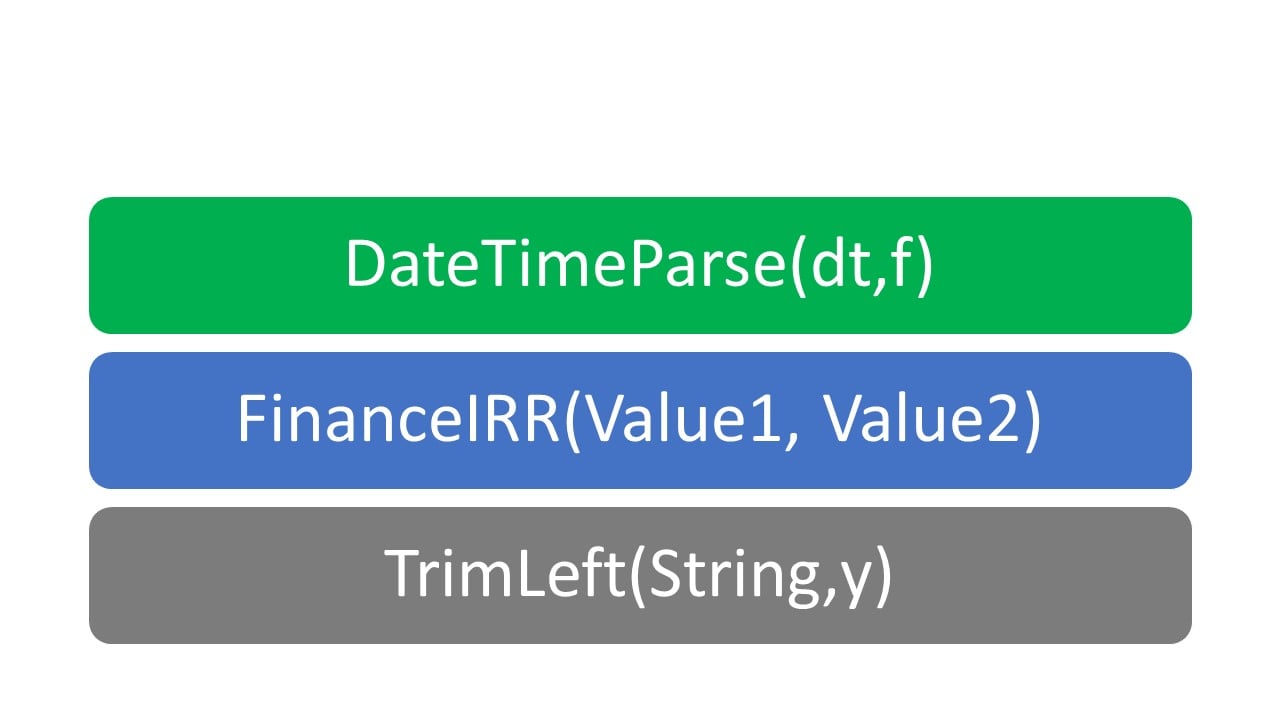
श्रेणीवार संगठित और तैयार!

  • Conditional
  • DateTime
  • Finance
  • Operators
  • String
  • और भी बहुत कुछ

फ़ॉर्मूला सूची के उदाहरण की छवि

Alteryx में Data Preparation

फ़ॉर्मूला expression बिल्डर

Filter टूल के custom filter जैसी ही फ़ॉर्मूला और सिंटैक्स का उपयोग करता है.

  • सिंटैक्स सही होने पर expression रंग से हाइलाइट होगा.
  • Data Preview पहले रिकॉर्ड का परिणाम दिखाएगा.


कलर कोडिंग उदाहरण की छवि

Alteryx में Data Preparation

Data types महत्त्वपूर्ण हैं

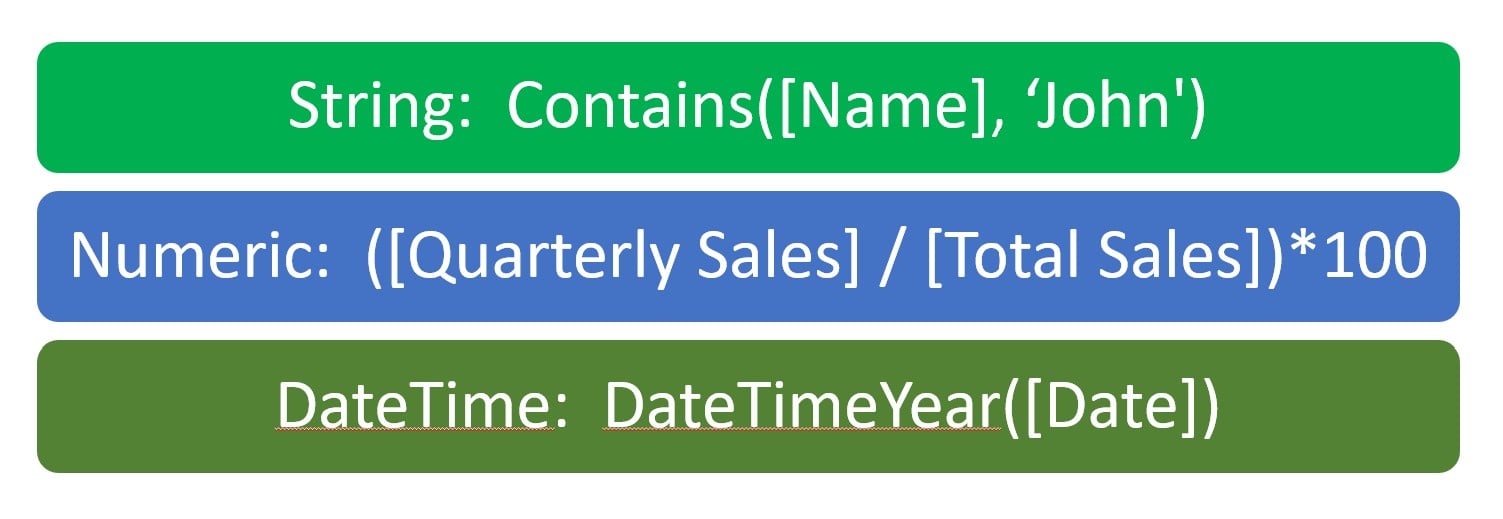
  • String criteria में quotes चाहिए
  • Numeric criteria में quotes नहीं चाहिए
  • सुनिश्चित करें फ़ॉर्मूला सही data type वाले फील्ड्स उपयोग करे

विभिन्न डेटा टाइप फ़ॉर्मूला उदाहरण

Alteryx में Data Preparation

String फ़ॉर्मूला उदाहरण

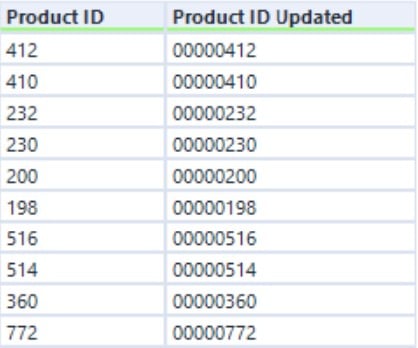
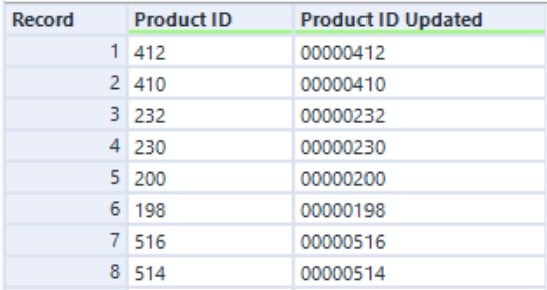
PadLeft string फील्ड्स में शुरुआत में zero जोड़ता है.

  • Syntax: PadLeft(String, len, char)
  • Example: PadLeft([Product ID], 8, '0')

Business Case:

  • Product SKU या ID में शुरुआत के zero जोड़ें.

PadLeft string फ़ॉर्मूला उदाहरण

Alteryx में Data Preparation

String फ़ॉर्मूला उदाहरण

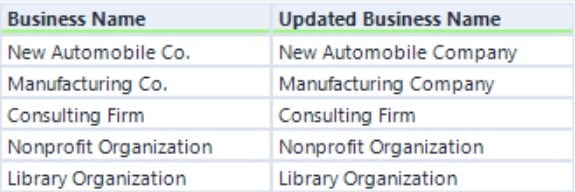
Replace फ़ॉर्मूला विशेष characters को string टेक्स्ट से बदलता है.

  • Syntax: Replace(String, Target, Replacement)
  • Example: Replace([Business Name], 'Co.', 'Company')

Business Case:

  • संक्षेपों को पूरी विवरण से बदलें.

Replace string फ़ॉर्मूला उदाहरण

Alteryx में Data Preparation

Contains फ़ॉर्मूला से फ्लैग करना

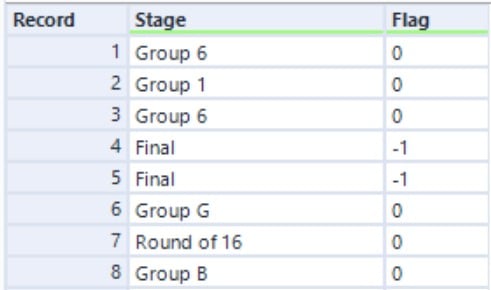
Contains फ़ॉर्मूला 0 या -1 आउटपुट देता है और उपयोग हो सकता है यह फ्लैग करने के लिए कि कोई फील्ड में criteria है या नहीं.

  • Syntax: Contains(String, Target)
  • Example: Contains([Stage], 'Final')

Business Case:

  • रिकॉर्ड्स में विशेष टेक्स्ट वैल्यू हो तो फ्लैग करें.

Contains string फ़ॉर्मूला उदाहरण

Alteryx में Data Preparation

Length-आधारित vs Position-आधारित string फ़ॉर्मूला

  • Length-आधारित 1 से गिनती शुरू होती है

    • Example Syntax: Left([Field], 3)
  • Position-आधारित 0 से गिनती शुरू होती है

    • Example Syntax: GetWord([Field], 1)
Alteryx में Data Preparation

Length-आधारित फ़ॉर्मूला

  • Length-आधारित फ़ॉर्मूला 1 से गिनती शुरू करते हैं.
  • Left([Field], 3) का परिणाम "ALT" होता है.


लेंथ-आधारित काउंट का एनीमेशन

Alteryx में Data Preparation

Length-आधारित फ़ॉर्मूला

  • Length-आधारित फ़ॉर्मूला 1 से गिनती शुरू करते हैं.
  • Left([Field], 3) का परिणाम "ALT" होता है.


Length Alteryx Example 2.jpg

Alteryx में Data Preparation

Length-आधारित फ़ॉर्मूला

  • Length-आधारित फ़ॉर्मूला 1 से गिनती शुरू करते हैं.
  • Left([Field], 3) का परिणाम "ALT" होता है.


Length Alteryx Example.jpg

Alteryx में Data Preparation

Position-आधारित फ़ॉर्मूला

  • Position-आधारित फ़ॉर्मूला 0 से गिनती शुरू करते हैं
  • GetWord([Field], 1) का परिणाम "Preparation" होता है


पोज़िशन-आधारित काउंट का एनीमेशन

Alteryx में Data Preparation

Position-आधारित फ़ॉर्मूला

  • Position-आधारित फ़ॉर्मूला 0 से गिनती शुरू करते हैं.
  • GetWord([Field], 1) का परिणाम "Preparation" होता है.


Position Alteryx Example 1.jpg

Alteryx में Data Preparation

Position-आधारित फ़ॉर्मूला

  • Position-आधारित फ़ॉर्मूला 0 से गिनती शुरू करते हैं.
  • GetWord([Field], 1) का परिणाम "Preparation" होता है.


Position Alteryx Example 2.jpg

Alteryx में Data Preparation

Position-आधारित फ़ॉर्मूला

  • Position-आधारित फ़ॉर्मूला 0 से गिनती शुरू करते हैं.
  • GetWord([Field], 1) का परिणाम "Preparation" होता है.


Position Alteryx Example.jpg

Alteryx में Data Preparation

Numeric फ़ॉर्मूला उदाहरण

Numeric फ़ॉर्मूला से आप ये गणनाएँ कर सकते हैं:

  • Addition, division, Finance फ़ॉर्मूला, Math फ़ॉर्मूला, आदि


Business Case:

  • कुल बिक्री में से quarterly sales का प्रतिशत निकालें.
  • Example: ([Quarterly Sales] / [Total Sales])*100
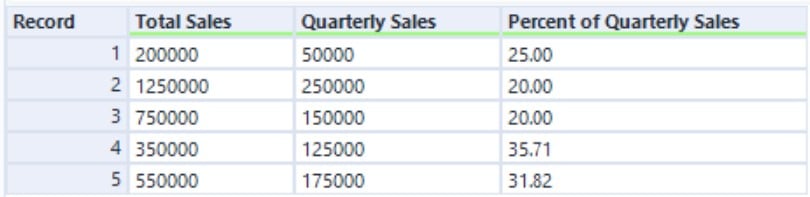


Numeric फ़ॉर्मूला उदाहरण

Alteryx में Data Preparation

Fixed decimals

Fixed decimal data types में आउटपुट की Precision और Scale बदलने के विकल्प होते हैं.

  • डिफ़ॉल्ट precision 19 और scale 6 है.


Precision बनाम Scale छवि

Alteryx में Data Preparation

Fixed decimals

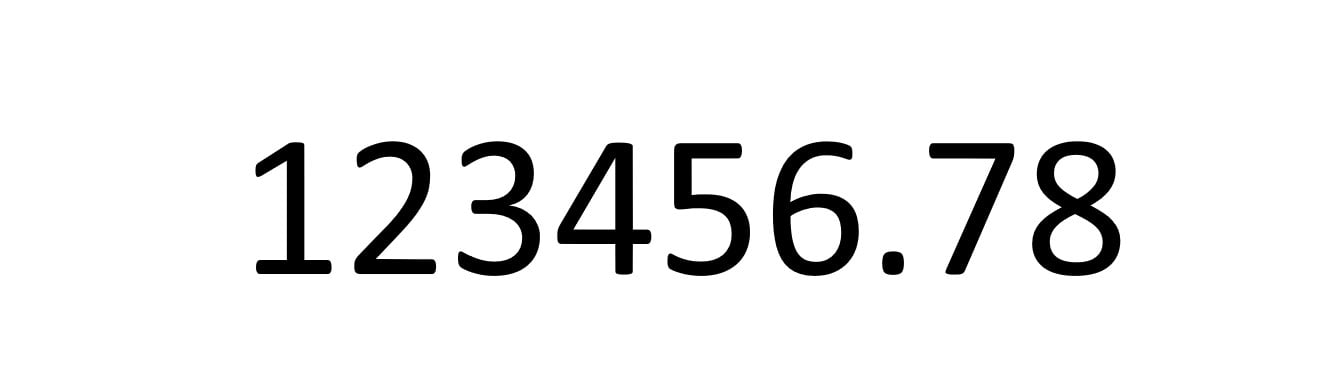
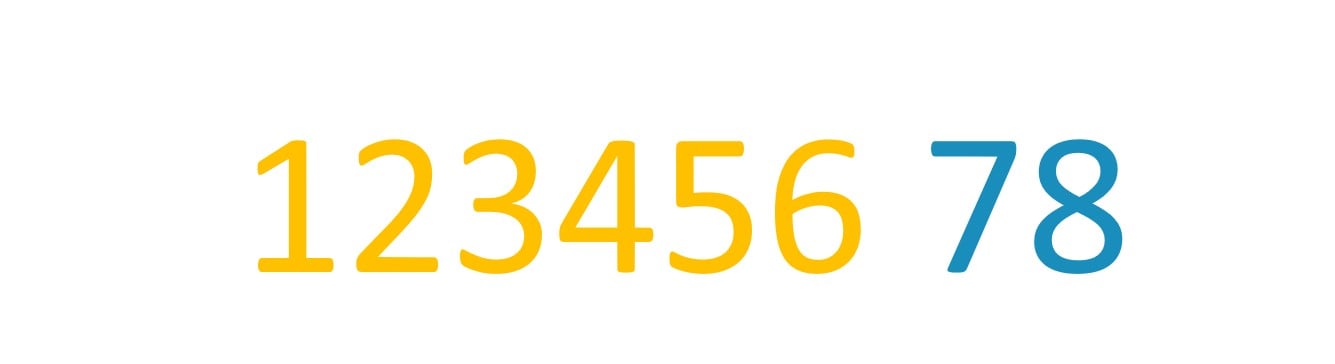
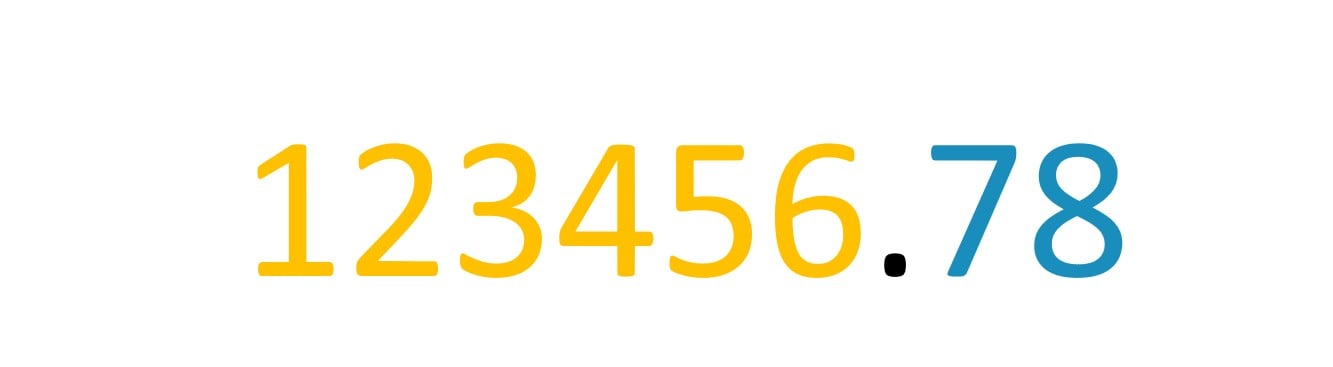
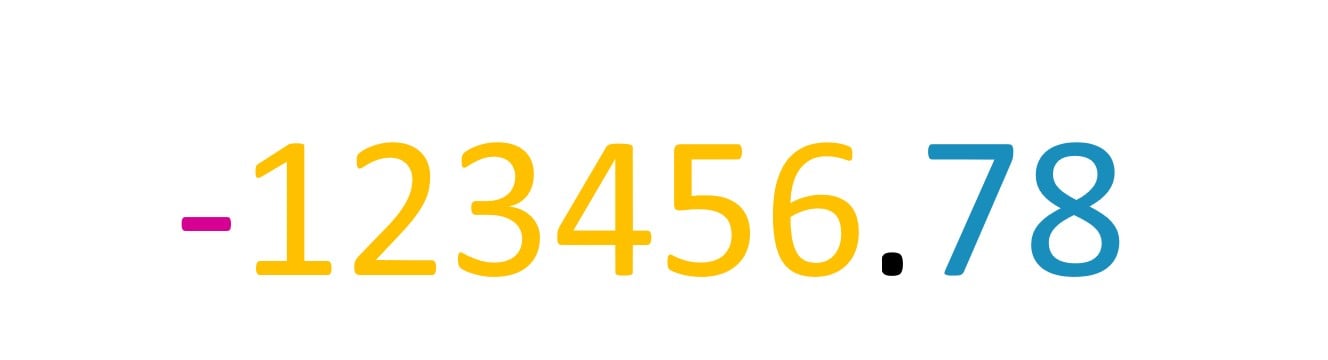
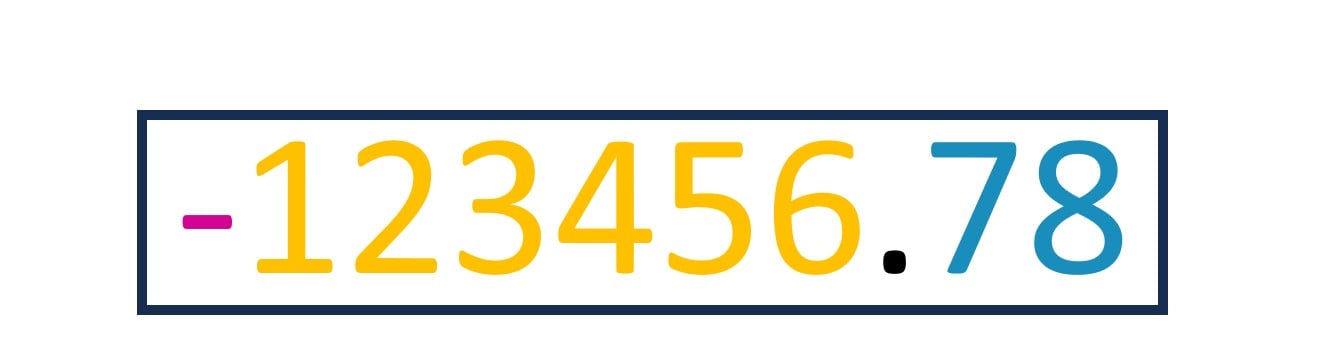
Precision पूरे आउटपुट नंबर के characters की लंबाई है.

Precision अवधारणा का एनीमेशन

1 https://help.alteryx.com/current/en/designer/file-types-support/data-types.html#idm45521464713616
Alteryx में Data Preparation

Fixed decimals

Precision पूरे आउटपुट नंबर के characters की लंबाई है.

  • character काउंट में शामिल हैं:
    • decimal से पहले के सभी अंक

Animate Precision 1.jpg

1 https://help.alteryx.com/current/en/designer/file-types-support/data-types.html#idm45521464713616
Alteryx में Data Preparation

Fixed decimals

Precision पूरे आउटपुट नंबर के characters की लंबाई है.

  • character काउंट में शामिल हैं:
    • decimal से पहले के सभी अंक
    • decimal के बाद के सभी अंक

Animate Precision 2.jpg

1 https://help.alteryx.com/current/en/designer/file-types-support/data-types.html#idm45521464713616
Alteryx में Data Preparation

Fixed decimals

Precision पूरे आउटपुट नंबर के characters की लंबाई है.

  • character काउंट में शामिल हैं:
    • decimal से पहले के सभी अंक
    • decimal के बाद के सभी अंक
    • decimal point

Animate Precision 3.jpg

1 https://help.alteryx.com/current/en/designer/file-types-support/data-types.html#idm45521464713616
Alteryx में Data Preparation

Fixed decimals

Precision पूरे आउटपुट नंबर के characters की लंबाई है.

  • character काउंट में शामिल हैं:
    • decimal से पहले के सभी अंक
    • decimal के बाद के सभी अंक
    • decimal point
    • आवश्यकता हो तो negative sign

Animate Precision Total.jpg

1 https://help.alteryx.com/current/en/designer/file-types-support/data-types.html#idm45521464713616
Alteryx में Data Preparation

Fixed decimals

Precision पूरे आउटपुट नंबर के characters की लंबाई है.

  • character काउंट में शामिल हैं:
    • decimal से पहले के सभी अंक
    • decimal के बाद के सभी अंक
    • decimal point
    • आवश्यकता हो तो negative sign
    • Example: Precision 10

Animate Precision Total 2.jpg

Alteryx में Data Preparation

Fixed decimals

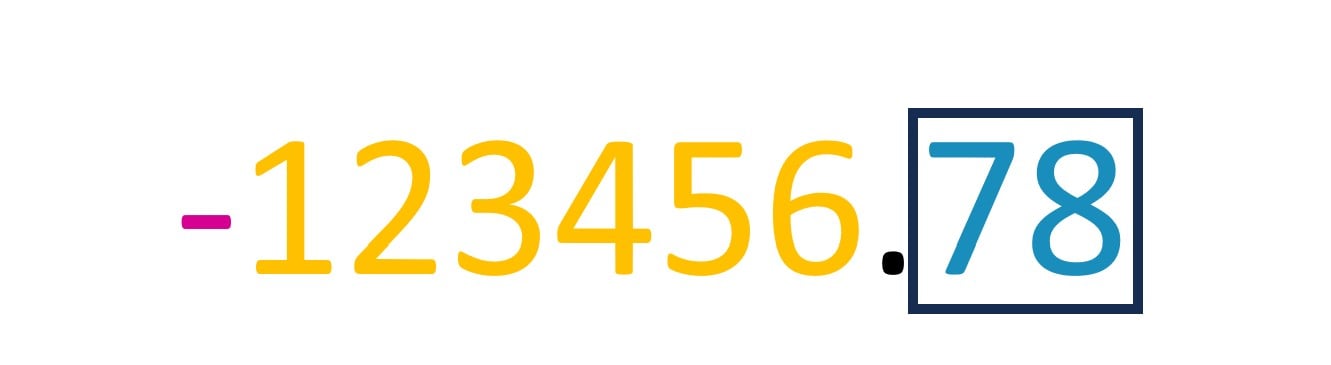
Scale decimal point के बाद के characters की संख्या है.

Scale अवधारणा का एनीमेशन

Alteryx में Data Preparation

Fixed decimals

Scale decimal point के बाद के characters की संख्या है.

  • Example: Scale 2

Animate Scale 2.jpg

Alteryx में Data Preparation

फील्ड्स अपडेट करना और नए बनाना

मौजूदा फील्ड्स अपडेट करना

  • फ़ॉर्मूला मौजूदा फील्ड्स पर लागू हो सकते हैं
  • Data types बदले नहीं जा सकते

  PadLeft फ़ॉर्मूला परिणाम उदाहरण

नए फील्ड्स बनाना

  • "Add Column" उपयोग करके नया फील्ड बनाएँ
  • Data types मैन्युअली सेट कर सकते हैं

Contains फ़ॉर्मूला परिणाम उदाहरण

Alteryx में Data Preparation

Formula टूल में फ़ॉर्मूला स्टैक करना

  • एक टूल में कई फ़ॉर्मूला स्टैक करने के लिए plus आइकन क्लिक करें
  • उसी Formula टूल में बने सभी नए फील्ड्स आगे की फ़ॉर्मूलाज़ में उपलब्ध होंगे

ऊपर-नीचे रखे समान आकार के कई ब्लॉक्स का कार्टून चित्र

Alteryx में Data Preparation

अभ्यास करते हैं!

Alteryx में Data Preparation

Preparing Video For Download...