रेट लिमिटिंग

FastAPI के साथ प्रोडक्शन में AI डिप्लॉय करना

Matt Eckerle

Software and Data Engineering Leader

रेट लिमिटिंग का परिचय

एक ट्रैफिक लाइट


  • उद्देश्य: API रिक्वेस्ट की आवृत्ति नियंत्रित करता है।
  • प्रतिक्रिया: सीमा पार होने पर HTTP 429 ("Too Many Requests") लौटाता है।
FastAPI के साथ प्रोडक्शन में AI डिप्लॉय करना

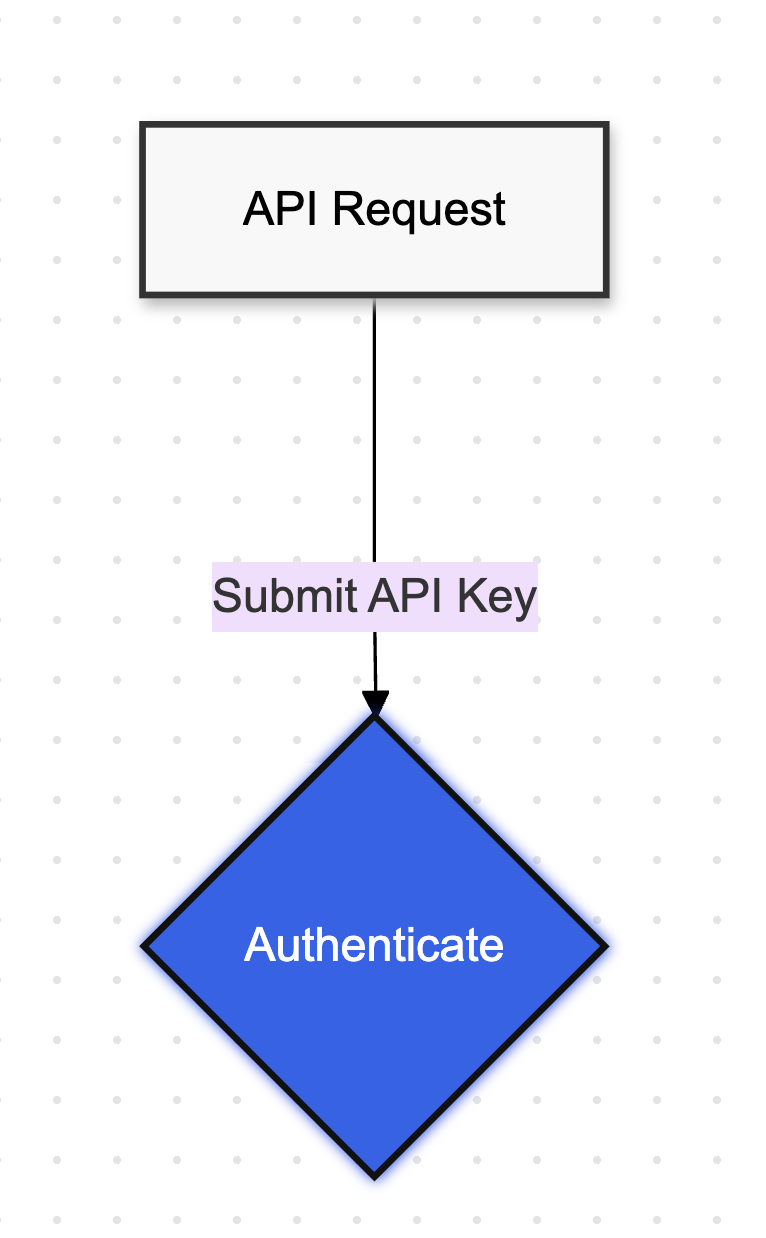
रेट लिमिटिंग कैसे काम करता है

रेट लिमिटिंग समझाने वाले फ़्लो डायग्राम का भाग 1

FastAPI के साथ प्रोडक्शन में AI डिप्लॉय करना

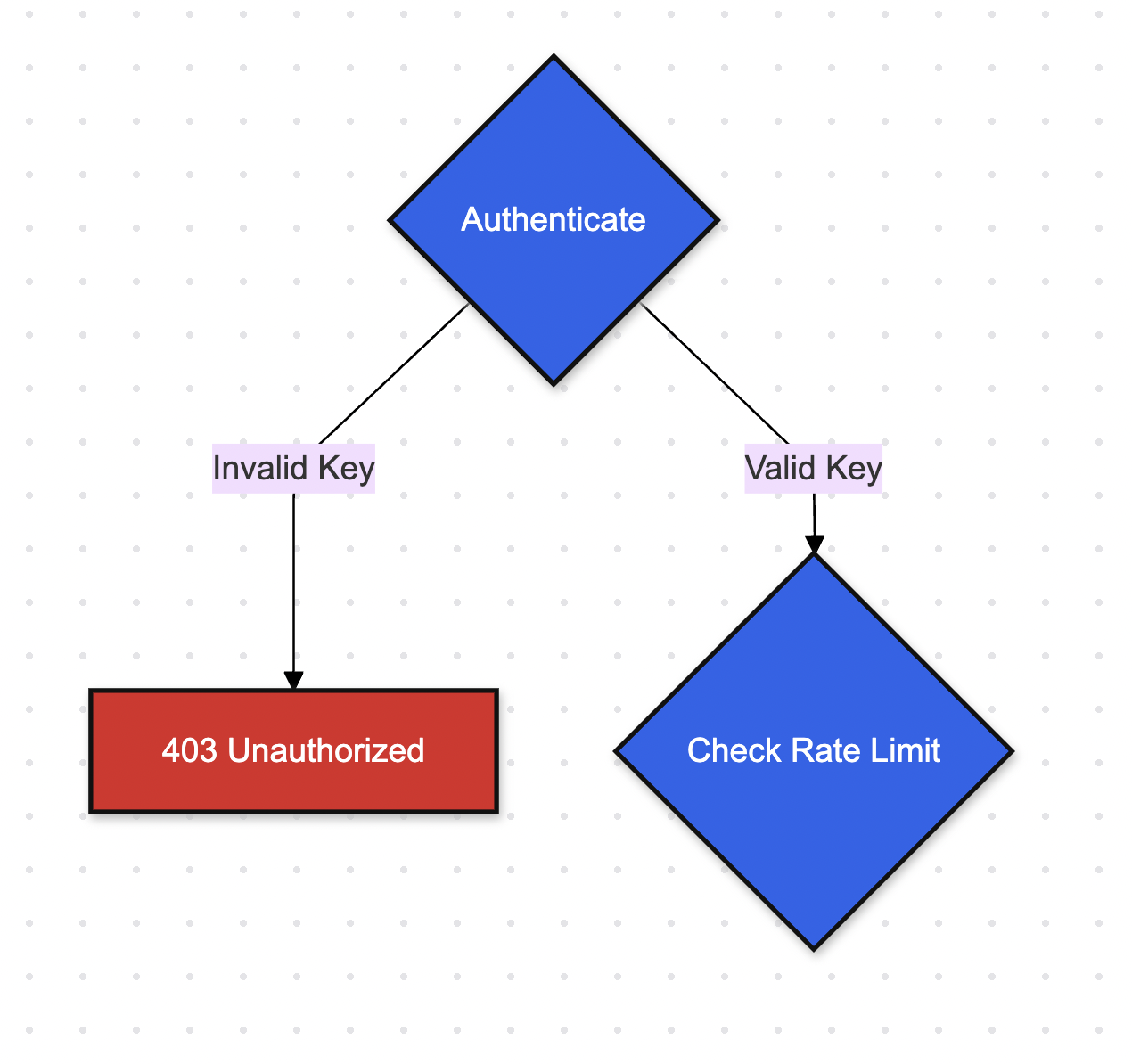
इनकमिंग क्रेडेंशियल्स का ऑथेंटिकेशन

रेट लिमिटिंग समझाने वाले फ़्लो डायग्राम का भाग 2

FastAPI के साथ प्रोडक्शन में AI डिप्लॉय करना

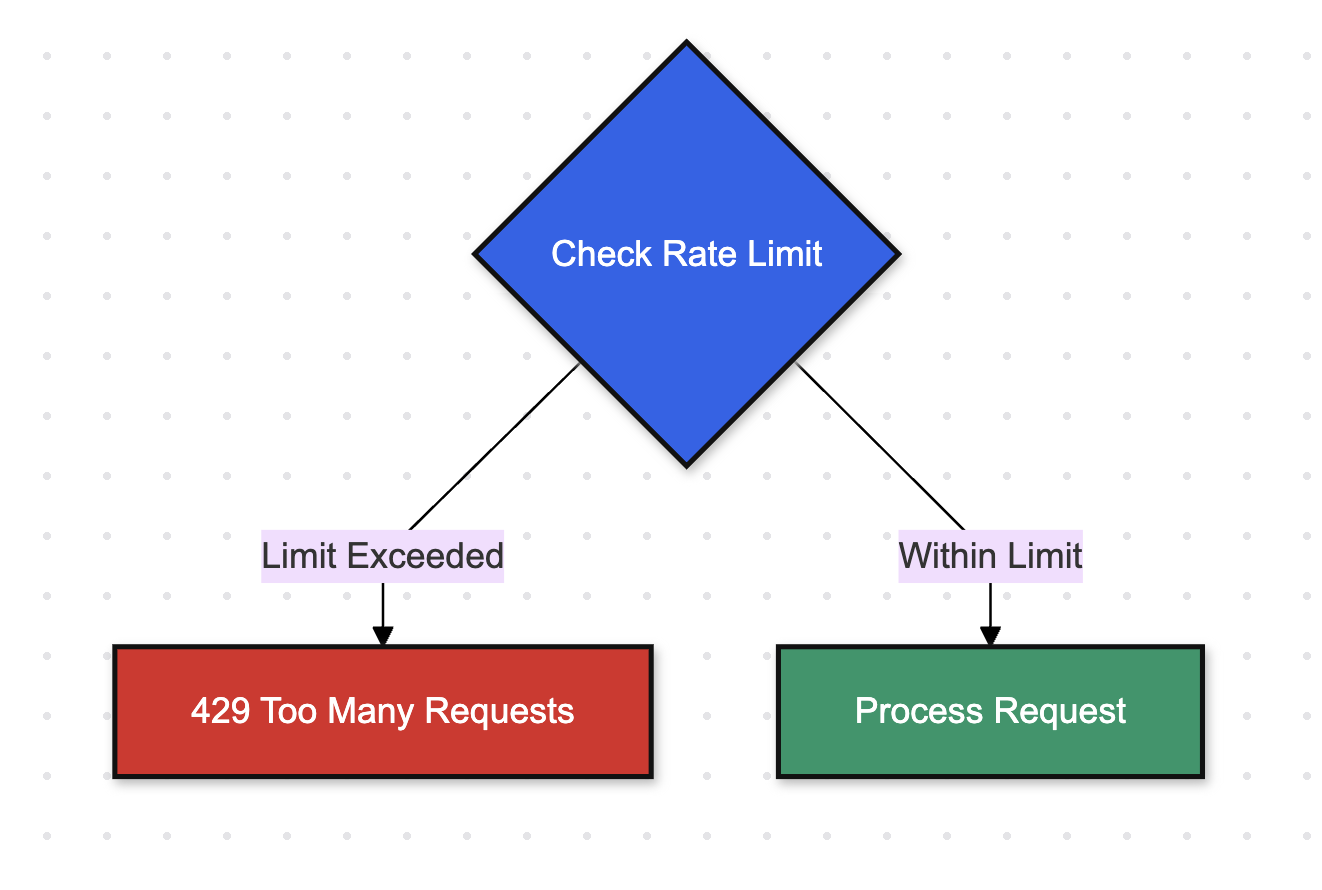
रेट लिमिटिंग जाँच

रेट लिमिटिंग समझाने वाले फ़्लो डायग्राम का भाग 3

FastAPI के साथ प्रोडक्शन में AI डिप्लॉय करना

हमारा API सेटअप करना

from fastapi import FastAPI, Depends, HTTPException
from fastapi.security import APIKeyHeader
from pydantic import BaseModel

app = FastAPI()
model = SentimentAnalyzer(pkl_file_path)

API_KEY_HEADER = APIKeyHeader(name="X-API-Key")
API_KEY = "your-secret-key"
FastAPI के साथ प्रोडक्शन में AI डिप्लॉय करना

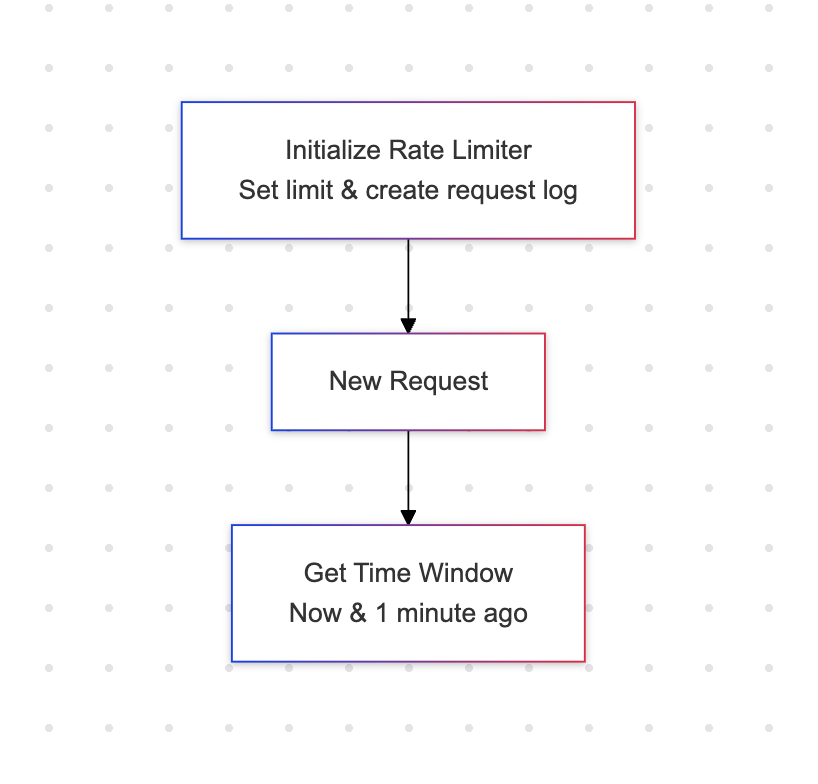
रेट लिमिटर की लॉजिक

from datetime import datetime, timedelta

class RateLimiter:
    def __init__(self, requests_per_min: int = 10):
        self.requests_per_min = requests_per_min
        self.requests = defaultdict(list)

def is_rate_limited( self, api_key: str ) -> tuple[bool, int]:

रेट लिमिटिंग लागू करने के पीछे की लॉजिक का फ़्लो डायग्राम भाग 1

FastAPI के साथ प्रोडक्शन में AI डिप्लॉय करना

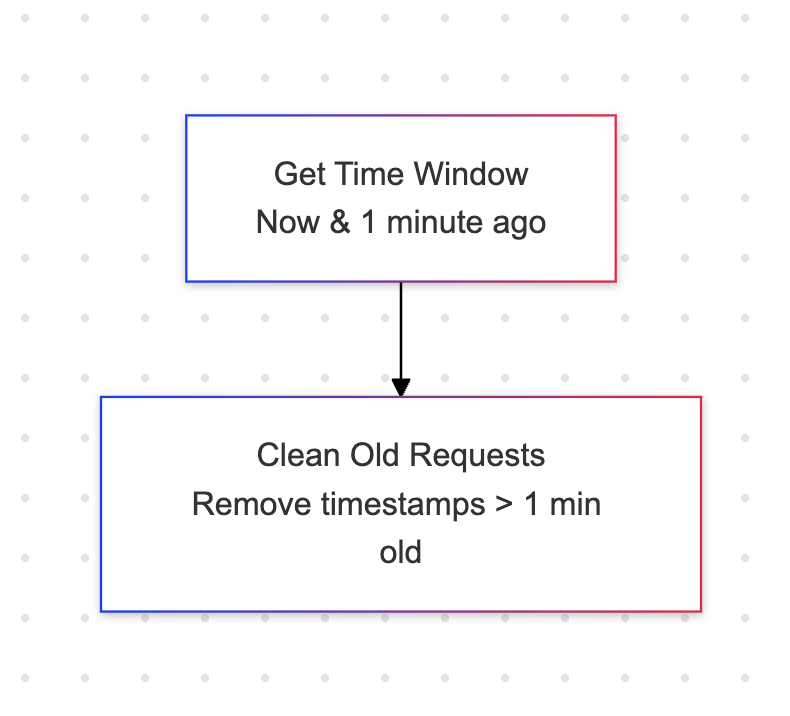
पुरानी रिक्वेस्ट हटाना

from datetime import datetime, timedelta

class RateLimiter:
    def __init__(self, requests_per_min: int = 10):
        self.requests_per_min = requests_per_min
        self.requests = defaultdict(list)

def is_rate_limited( self, api_key: str ) -> tuple[bool, int]:
now = datetime.now() minute_ago = now - timedelta(minutes=1) self.requests[api_key] = [ req_time for req_time in self.requests[api_key] if req_time > minute_ago ]

रेट लिमिटिंग समझाने वाले फ़्लो डायग्राम का भाग 2

FastAPI के साथ प्रोडक्शन में AI डिप्लॉय करना

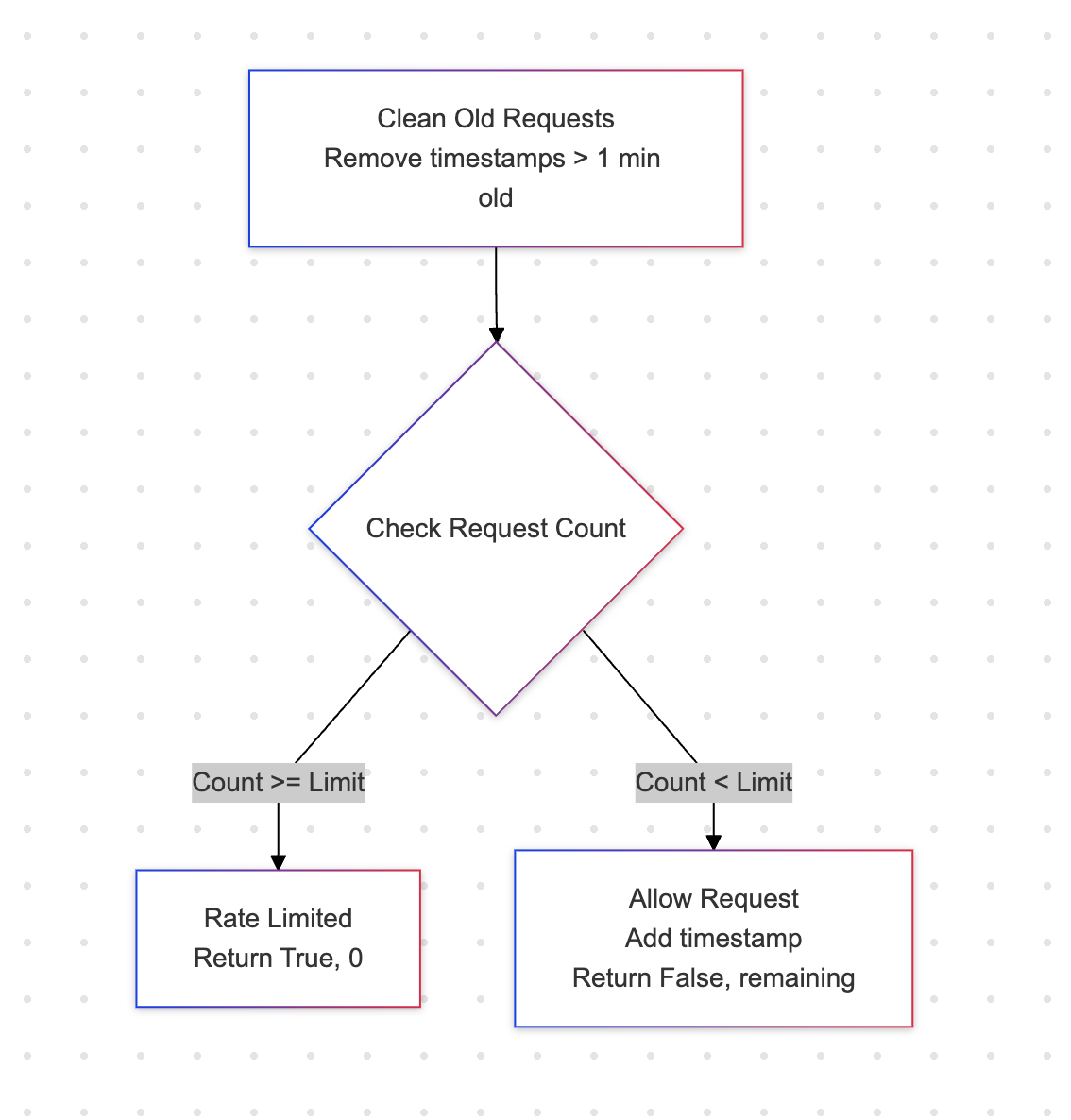
रिक्वेस्ट काउंट जाँचें

    def is_rate_limited(self, api_key: str) -> 
  tuple[bool, int]:
        now = datetime.now()
        minute_ago = now - timedelta(minutes=1)

self.requests[api_key] = [ req_time for req_time in self.requests[api_key] if req_time > minute_ago ]
recent_requests = len(self.requests[api_key]) if recent_requests >= self.requests_per_min: return True, 0 self.requests[api_key].append(now) return False

API द्वारा की गई रिक्वेस्ट की संख्या की जाँच दर्शाता डायग्राम: यदि काउंट सीमा से अधिक या बराबर है तो true लौटाएँ, अन्यथा false.

FastAPI के साथ प्रोडक्शन में AI डिप्लॉय करना

रेट लिमिट जाँच जोड़ें

rate_limiter = RateLimiter(requests_per_minute=10)

def test_api_key(api_key: str = Depends(API_KEY_HEADER)): if api_key != API_KEY: raise HTTPException( status_code=403, detail="Invalid API key" ) is_limited, _ = rate_limiter.is_rate_limited(api_key) if is_limited: raise HTTPException( status_code=429, detail="Rate limit exceeded. Please try again later." ) return api_key
FastAPI के साथ प्रोडक्शन में AI डिप्लॉय करना

एंडपॉइंट पर रेट लिमिट लागू करें

@app.post("/predict")
def predict_sentiment(
    request: SentimentRequest,
    api_key: str = Depends(test_api_key)
):
    result = sentiment_model(request.text)

    _, requests_remaining = 
           rate_limiter.is_rate_limited(api_key)

    return {
        "text": request.text,
        "sentiment": result[0]["label"].lower(),
        "confidence": result[0]["score"],
        "requests_remaining": requests_remaining
    }

रिक्वेस्ट 11 बार भेजें:

curl -X POST "http://localhost:8000/predict" \
     -H "Content-Type: application/json" \
     -H "X-API-Key: your-secret-key" \
     -d '{"text": "I love this product"}'

आउटपुट:

{"detail":"Rate limit exceeded. 
           Please try again later."}
FastAPI के साथ प्रोडक्शन में AI डिप्लॉय करना

अभ्यास करते हैं!

FastAPI के साथ प्रोडक्शन में AI डिप्लॉय करना

Preparing Video For Download...