pandas के साथ तारीखें और समय कैसे उपयोग करें
Python में Time Series डेटा मैनिपुलेट करना

Stefan Jansen
Founder & Lead Data Scientist at Applied Artificial Intelligence
Date & time series फंक्शनैलिटी
- मूल में: तारीख/समय के लिए डेटा टाइप्स
- समय-बिंदु और अवधियों के ऑब्जेक्ट्स
- एट्रिब्यूट्स और मेथड्स समय-संबंधी विवरण दिखाते हैं
- तारीख/अवधि की श्रेणियाँ:
- Series या DataFrame कॉलम्स
- Index: ऑब्जेक्ट को Time Series में बदलें
- कई Series/DataFrame मेथड्स टाइम-सीरीज़ फंक्शनैलिटी के लिए इंडेक्स में समय जानकारी पर निर्भर करते हैं
बेसिक बिल्डिंग ब्लॉक: pd.Timestamp
import pandas as pd # assumed imported going forward from datetime import datetime # To manually create datestime_stamp = pd.Timestamp(datetime(2017, 1, 1))pd.Timestamp('2017-01-01') == time_stamp
True # Understands dates as strings
time_stamp # type: pandas.tslib.Timestamp
Timestamp('2017-01-01 00:00:00')
बेसिक बिल्डिंग ब्लॉक: pd.Timestamp
- Timestamp ऑब्जेक्ट में समय-विशिष्ट जानकारी के कई एट्रिब्यूट्स होते हैं
time_stamp.year
2017
time_stamp.day_name()
'Sunday'
और बिल्डिंग ब्लॉक्स: pd.Period और freq
period = pd.Period('2017-01')period # default: month-end
Period('2017-01', 'M')
period.asfreq('D') # convert to daily
Period('2017-01-31', 'D')
period.to_timestamp().to_period('M')
Period('2017-01', 'M')
- Period ऑब्जेक्ट में फ्रीक्वेंसी जानकारी के लिए
freqएट्रिब्यूट होता है
pd.Period()कोpd.Timestamp()में और वापस बदलें
और बिल्डिंग ब्लॉक्स: pd.Period और freq
period + 2
Period('2017-03', 'M')
pd.Timestamp('2017-01-31', 'M') + 1
Timestamp('2017-02-28 00:00:00', freq='M')
- फ्रीक्वेंसी जानकारी बेसिक डेट अरिथमेटिक सक्षम करती है
तारीखें और समय की श्रृंखलाएँ
pd.date_range:start,end,periods,freq
index = pd.date_range(start='2017-1-1', periods=12, freq='M')
index
DatetimeIndex(['2017-01-31', '2017-02-28', '2017-03-31', ...,
               '2017-09-30', '2017-10-31', '2017-11-30', '2017-12-31'],
              dtype='datetime64[ns]', freq='M')
pd.DateTimeIndex: फ्रीक्वेंसी जानकारी के साथ Timestamp ऑब्जेक्ट्स की श्रृंखला
तारीखें और समय की श्रृंखलाएँ
index[0]
Timestamp('2017-01-31 00:00:00', freq='M')
index.to_period()
PeriodIndex(['2017-01', '2017-02', '2017-03', '2017-04', ...,
             '2017-11', '2017-12'], dtype='period[M]', freq='M')
टाइम सीरीज़ बनाएँ: pd.DateTimeIndex
pd.DataFrame({'data': index}).info()
RangeIndex: 12 entries, 0 to 11
Data columns (total 1 columns):
data    12 non-null datetime64[ns]
dtypes: datetime64[ns](1)
टाइम सीरीज़ बनाएँ: pd.DateTimeIndex
np.random.random:- रैंडम नंबर्स:
[0,1] - 12 रो, 2 कॉलम्स
- रैंडम नंबर्स:
data = np.random.random((size=12,2))pd.DataFrame(data=data, index=index).info()
DatetimeIndex: 12 entries, 2017-01-31 to 2017-12-31
Freq: M
Data columns (total 2 columns):
0    12 non-null float64
1    12 non-null float64
dtypes: float64(2)
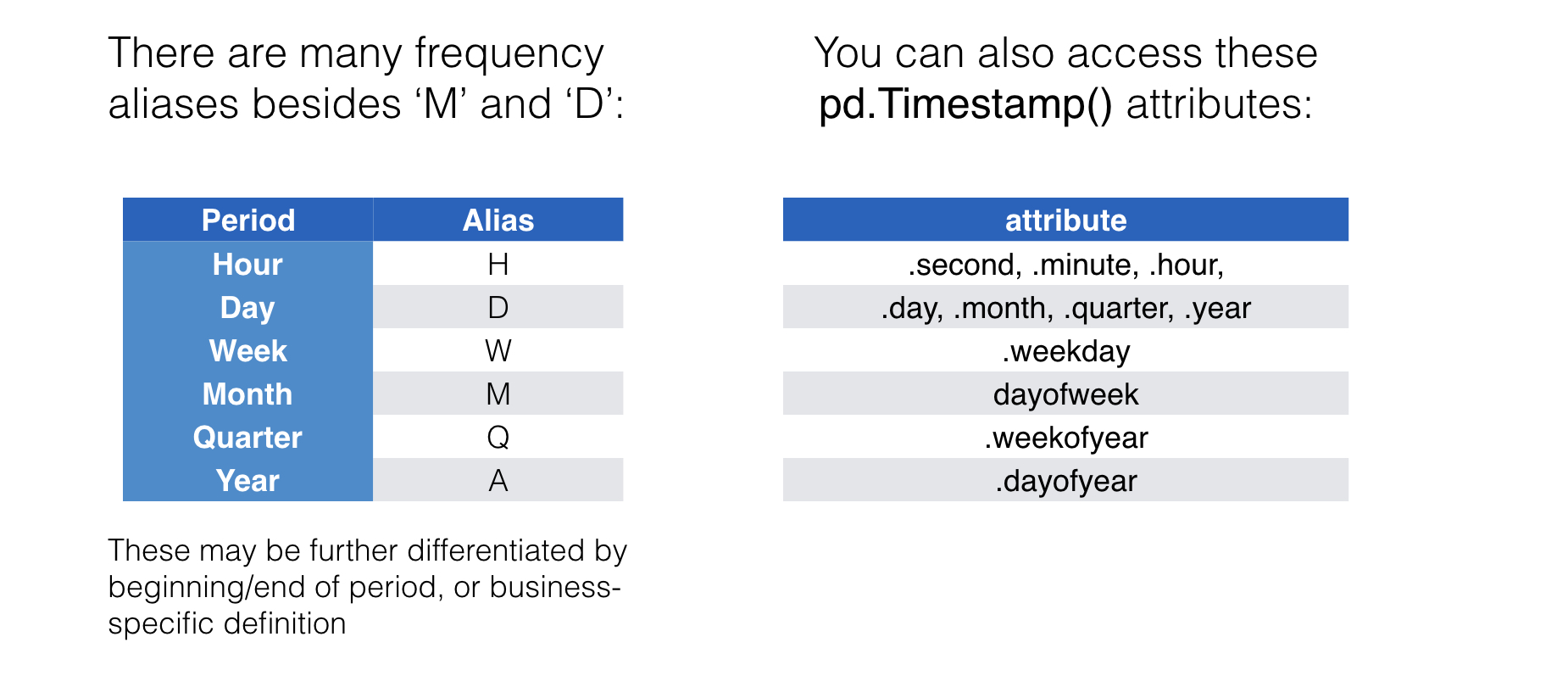
फ्रीक्वेंसी उपनाम और समय जानकारी
अभ्यास करते हैं!
Python में Time Series डेटा मैनिपुलेट करना

