टाइम सीरीज़ का इंडेक्सिंग और रिसैम्पलिंग
Python में Time Series डेटा मैनिपुलेट करना

Stefan Jansen
Founder & Lead Data Scientist at Applied Artificial Intelligence
टाइम सीरीज़ ट्रांसफ़ॉर्मेशन
बेसिक टाइम सीरीज़ ट्रांसफ़ॉर्मेशन में शामिल हैं:
स्ट्रिंग डेट्स पार्स करना और
datetime64में बदलनाचुने हुए सबपीरियड्स के लिए सेलेक्टिंग और स्लाइसिंग
DateTimeIndexकी फ़्रीक्वेंसी सेट/बदलना- अपसैम्पलिंग बनाम डाउनसैम्पलिंग
GOOG स्टॉक प्राइस लाना
google = pd.read_csv('google.csv') # import pandas as pdgoogle.info()
<class 'pandas.core.frame.DataFrame'>
RangeIndex: 504 entries, 0 to 503
Data columns (total 2 columns):
date     504 non-null object
price    504 non-null float64
dtypes: float64(1), object(1)
google.head()
         date   price
0  2015-01-02  524.81
1  2015-01-05  513.87
2  2015-01-06  501.96
3  2015-01-07  501.10
4  2015-01-08  502.68
स्ट्रिंग डेट्स को datetime64 में बदलना
pd.to_datetime():- डेट स्ट्रिंग पार्स करें
datetime64में बदलें
google.date = pd.to_datetime(google.date)google.info()
<class 'pandas.core.frame.DataFrame'>
RangeIndex: 504 entries, 0 to 503
Data columns (total 2 columns):
date     504 non-null datetime64[ns]
price    504 non-null float64
dtypes: datetime64[ns](1), float64(1)
स्ट्रिंग डेट्स को datetime64 में बदलना
.set_index():- डेट को इंडेक्स में डालें
inplace:- कॉपी न बनाएँ
google.set_index('date', inplace=True)google.info()
<class 'pandas.core.frame.DataFrame'>
DatetimeIndex: 504 entries, 2015-01-02 to 2016-12-30
Data columns (total 1 columns):
price    504 non-null float64
dtypes: float64(1)
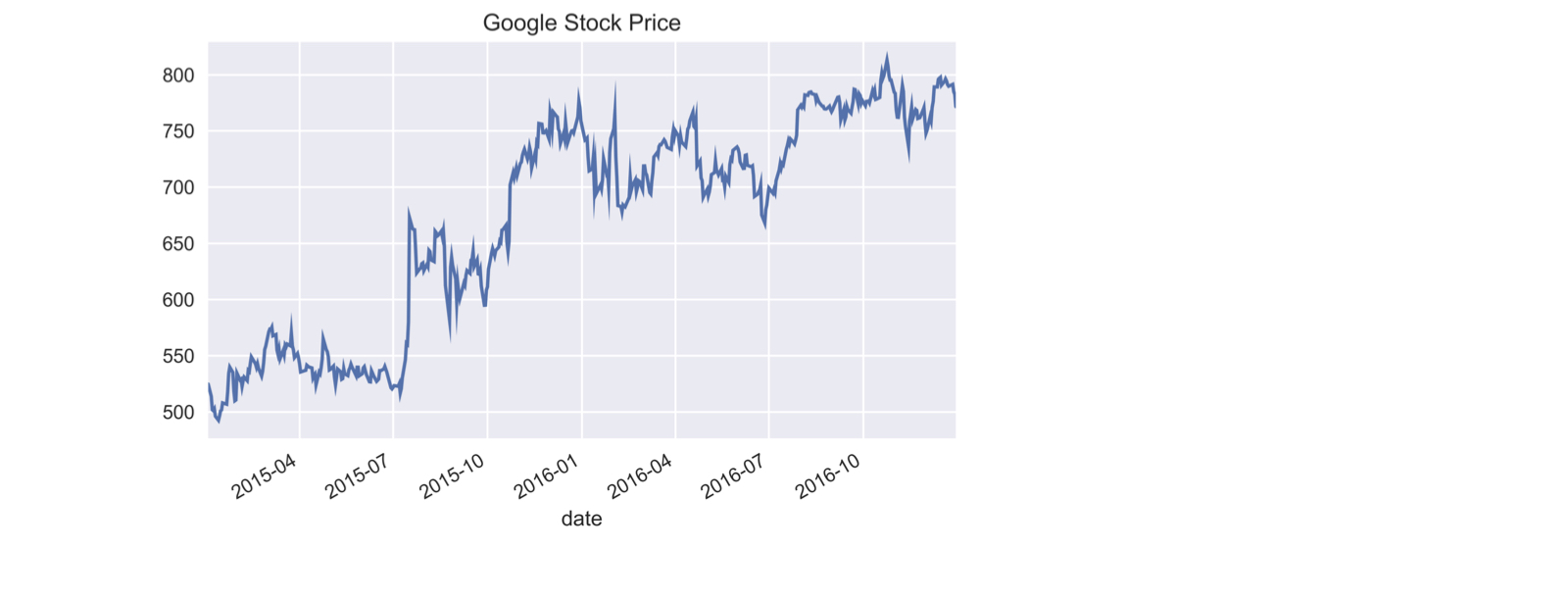
Google स्टॉक टाइम सीरीज़ प्लॉट करना
google.price.plot(title='Google Stock Price')plt.tight_layout(); plt.show()
पार्शियल स्ट्रिंग इंडेक्सिंग
- ऐसी स्ट्रिंग्स से सेलेक्ट/इंडेक्स करें जो डेट में पार्स होती हैं
google['2015'].info() # तारीख के हिस्से की स्ट्रिंग पास करें
DatetimeIndex: 252 entries, 2015-01-02 to 2015-12-31
Data columns (total 1 columns):
price    252 non-null float64
dtypes: float64(1)
google['2015-3': '2016-2'].info() # स्लाइस में आखिरी महीना शामिल है
DatetimeIndex: 252 entries, 2015-03-02 to 2016-02-29
Data columns (total 1 columns):
price    252 non-null float64
dtypes: float64(1)
memory usage: 3.9 KB
पार्शियल स्ट्रिंग इंडेक्सिंग
google.loc['2016-6-1', 'price'] # पूरी तारीख के साथ .loc[] का उपयोग करें
734.15
.asfreq(): फ़्रीक्वेंसी सेट करें
.asfreq('D'):DateTimeIndexको कैलेंडर डे फ़्रीक्वेंसी में बदलें
google.asfreq('D').info() # कैलेंडर डे फ़्रीक्वेंसी सेट करें
DatetimeIndex: 729 entries, 2015-01-02 to 2016-12-30
Freq: D
Data columns (total 1 columns):
price    504 non-null float64
dtypes: float64(1)
.asfreq(): फ़्रीक्वेंसी सेट करें
- अपसैम्पलिंग:
- ऊँची फ़्रीक्वेंसी से नई तारीखें बनती हैं => मिसिंग डेटा
google.asfreq('D').head()
             price
date
2015-01-02  524.81
2015-01-03     NaN
2015-01-04     NaN
2015-01-05  513.87
2015-01-06  501.96
.asfreq(): फ़्रीक्वेंसी रीसेट करें
.asfreq('B'):DateTimeIndexको बिज़नेस डे फ़्रीक्वेंसी में बदलें
google = google.asfreq('B') # कैलेंडर डे फ़्रीक्वेंसी में बदलेंgoogle.info()
DatetimeIndex: 521 entries, 2015-01-02 to 2016-12-30
Freq: B
Data columns (total 1 columns):
price    504 non-null float64
dtypes: float64(1)
.asfreq(): फ़्रीक्वेंसी रीसेट करें
google[google.price.isnull()] # मिसिंग 'price' वैल्यूज़ चुनें
            price
date
2015-01-19    NaN
2015-02-16    NaN
...
2016-11-24    NaN
2016-12-26    NaN
- वे बिज़नेस डे जब ट्रेडिंग नहीं हुई
अभ्यास करते हैं!
Python में Time Series डेटा मैनिपुलेट करना

