PySpark के साथ Feature Engineering
John Hogue
Lead Data Scientist, General Mills

df.select(['NO', 'UNITNUMBER', 'CLASS']).show()
+----+----------+-----+
| NO|UNITNUMBER|CLASS|
+----+----------+-----+
| 1| null| SF|
| 156| A8| SF|
| 157| 207| SF|
| 158| 701G| SF|
| 159| 36| SF|
हमारे विश्लेषण के लिए कई फ़ील्ड्स ज़रूरी नहीं हैं
'NO' ऑटो-जनरेटेड रिकॉर्ड नंबर'UNITNUMBER' अप्रासंगिक डेटा'CLASS' सब एक जैसा (constant)drop(*cols)
*cols – ड्रॉप करने के लिए एक कॉलम नाम या कॉलम नामों की लिस्ट.# List of columns to drop cols_to_drop = ['NO', 'UNITNUMBER', 'CLASS']# Drop the columns df = df.drop(*cols_to_drop)
where(condition)types.BooleanType का Column या SQL expression की string.like(other)~df = df.where(~df['POTENTIALSHORTSALE'].like('Not Disclosed'))
डेटा को mean (μ) से तीन standard deviations (3σ) के भीतर फ़िल्टर करें
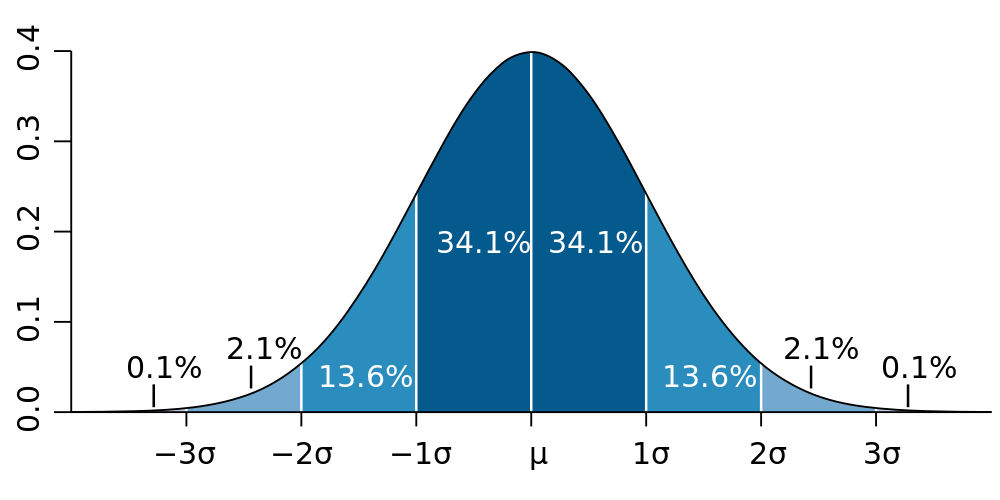
# Calculate values used for filtering std_val = df.agg({'SALESCLOSEPRICE': 'stddev'}).collect()[0][0] mean_val = df.agg({'SALESCLOSEPRICE': 'mean'}).collect()[0][0]# Create three standard deviation (μ ± 3σ) upper and lower bounds for data hi_bound = mean_val + (3 * std_val) low_bound = mean_val - (3 * std_val)# Use where() to filter the DataFrame between values df = df.where((df['LISTPRICE'] < hi_bound) & (df['LISTPRICE'] > low_bound))
DataFrame.dropna()
how: 'any' या 'all'. 'any' होने पर, किसी भी null पर रिकॉर्ड ड्रॉप करें. 'all' होने पर, तभी ड्रॉप करें जब सभी वैल्यूज़ null हों.thresh: int, डिफ़ॉल्ट None. दिया हो तो, जिन रिकॉर्ड्स में non-null वैल्यूज़ thresh से कम हों, उन्हें ड्रॉप करें. यह how को ओवरराइड करता है.subset: जाँचने के लिए कॉलम नामों की ऑप्शनल लिस्ट.# Drop any records with NULL values df = df.dropna()# drop records if both LISTPRICE and SALESCLOSEPRICE are NULL df = df.dropna(how='all', subset['LISTPRICE', 'SALESCLOSEPRICE '])# Drop records where at least two columns have NULL values df = df.dropna(thresh=2)
डुप्लिकेट क्या है?
dropDuplicates()
# Entire DataFrame df.dropDuplicates()# Check only a column list df.dropDuplicates(['streetaddress'])
PySpark के साथ Feature Engineering