डोमेन नॉलेज से नए फीचर बनाना

R में Feature Engineering

Jorge Zazueta

Research Professor and Head of the Modeling Group at the School of Economics, UASLP

डोमेन नॉलेज का महत्व

डोमेन नॉलेज से हम किसी मॉडल या टास्क के लिए प्रासंगिक और उपयोगी फीचर पहचानते और बनाते हैं।

फीचर इंजीनियरिंग में मौजूदा फीचर से नए इनपुट फीचर बनाना शामिल है।

डोमेन नॉलेज के उदाहरण:

  • फाइनेंशियल: दिवालियापन के मुख्य निर्धारक
  • मेडिकल: किसी खास उपचार से जुड़े पूर्व-स्थितियाँ
  • मार्केटिंग: किसी उपभोक्ता समूह की पहचान बताने वाले फीचर
R में Feature Engineering

पेशेवर अनुभव के आधार पर वैरिएबल बनाना

हम निम्न फीचर वेक्टर के आधार पर होटल कैंसिलेशन की भविष्यवाणी करना चाहते हैं:

features <- 
c("IsCanceled", "LeadTime",
  "arrival_date",
  "StaysInWeekendNights",
  "StaysInWeekNights",
  "PreviousCancellations",
  "PreviousBookingsNotCanceled",
  "ReservedRoomType",
  "AssignedRoomType","BookingChanges",
  "DepositType","CustomerType",
  "ADR","TotalOfSpecialRequests")

कच्चे डेटा से निकले फीचर

हम arrival_date से सूचनात्मक फीचर बना सकते हैं।
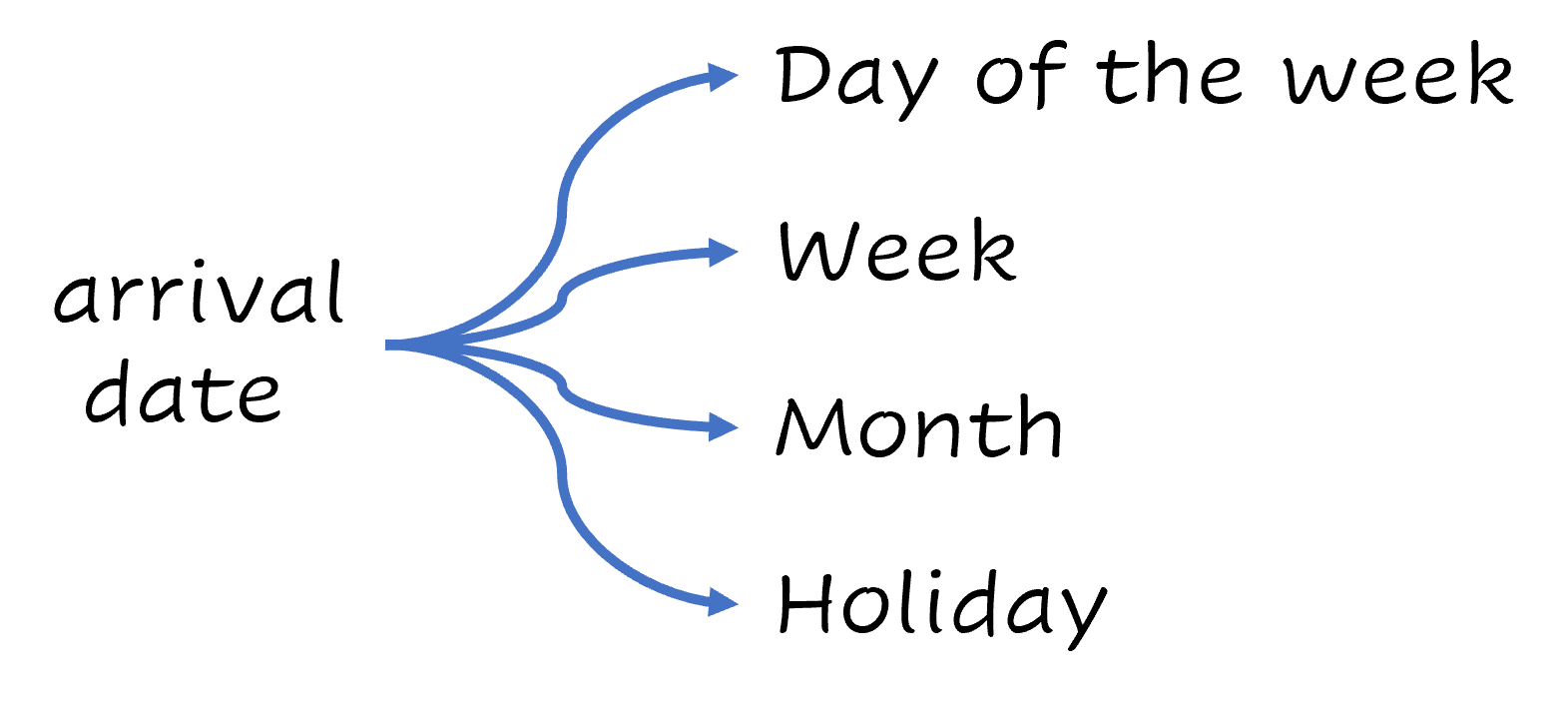
आगमन तिथि को सप्ताह का दिन, सप्ताह, महीना और छुट्टी में तोड़ा जा सकता है

लेकिन यह जल्दी ही थकाने वाला हो जाता है। हमें इसे ऑटोमेट करना होगा!

R में Feature Engineering

tidymodels फ्रेमवर्क

हम tidymodels पर आधारित वर्कफ़्लो इस्तेमाल करेंगे—यह tidyverse सिद्धांतों (1) का उपयोग करते हुए मॉडलिंग और मशीन लर्निंग के लिए पैकेजों का संग्रह है—जिसका फोकस फीचर इंजीनियरिंग पर है।

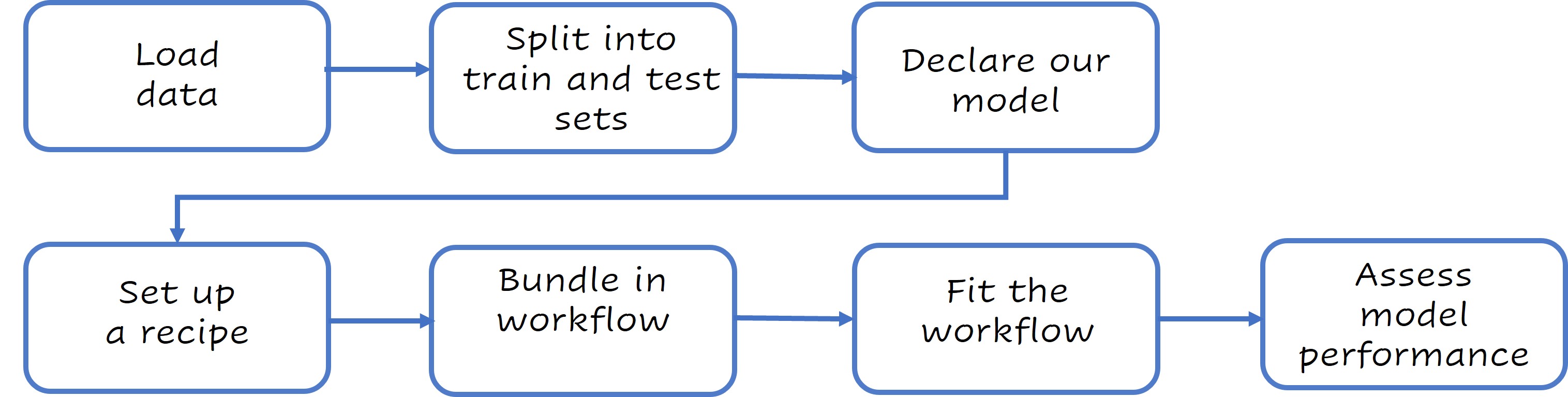
सरल tidymodels वर्कफ़्लो: डेटा लोड करें, मॉडल घोषित करें, डेटा स्प्लिट करें, रेसिपी सेट करें, वर्कफ़्लो में बंडल करें, वर्कफ़्लो फिट करें और परफॉर्मेंस आँकें।

अधिक जानें: www.tidymodels.org

1 [Tidyverse guiding principles.](https://design.tidyverse.org/unifying-principles.html)
R में Feature Engineering

विश्लेषण के लिए डेटा सेटअप

आइए डेटा तैयार करने से शुरू करें।

cancelations <- 
  cancelations %>% 
  mutate(across(where(is_character),as.factor))
set.seed(123)
split <- cancellations %>% 
    initial_split(
    strata = "IsCanceled")
train <- training(split)
test <- testing(split)

prop पैरामीटर से आप train/test स्प्लिट बदल सकते हैं (डिफ़ॉल्ट 3/4 है).

initial_split(data, prop = 3/4, strata = NULL)

जाँचें कि train और test सेट में कैंसिल हुई बुकिंग का अनुपात मिलता-जुलता है।

train %>% 
  select(IsCanceled) %>% table() %>% 
  prop.table()

IsCanceled
        0         1 
0.5826946 0.4173054
test %>% 
  select(IsCanceled) %>% table() %>% 
  prop.table()

IsCanceled
        0         1 
0.5827788 0.4172212
R में Feature Engineering

वर्कफ़्लो बनाना

हमारा मॉडल घोषित करें

lr_model <- logistic_reg()

रेसिपी बनाएँ

lr_recipe <- 
  recipe(IsCanceled ~., data = train) %>%
  update_role(Agent, new_role = "ID" ) %>%
  step_date(arrival_date, 
      features = c("dow", "week", "month")) %>%
  step_holiday(arrival_date, 
      holidays = timeDate::listHolidays("US")) %>%
  step_rm(arrival_date) %>%
  step_dummy(all_nominal_predictors())

lr_recipe प्रिंट करें

DNT_CURLY_TAG_3

Recipe

Inputs:
      role #variables
        ID          1
   outcome          1

 predictor         13

Operations:
Date features from arrival_date
Holiday features from arrival_date
Variables removed arrival_date
Dummy variables from all_nominal_predictors()
R में Feature Engineering

वर्कफ़्लो बनाना

मॉडल और रेसिपी को मिलाकर workflow ऑब्जेक्ट बनाएँ।

lr_workflow <- 
  workflow()%>%
  add_model(lr_model)%>%
  add_recipe(lr_recipe)

वर्कफ़्लो फिट करें

lr_fit <- 
  lr_workflow %>%
  fit(data = train)
R में Feature Engineering

वर्कफ़्लो बनाना

हम tidy(lr_fit) से मॉडल का सारांश देख सकते हैं।

# A tibble: 65 × 5
   term                        estimate std.error statistic   p.value
   <chr>                          <dbl>     <dbl>     <dbl>     <dbl>
 1 (Intercept)                 -1.92     0.228        -8.43 3.57e- 17
 2 LeadTime                     0.00414  0.000268     15.4  1.16e- 53
 3 StaysInWeekendNights         0.0860   0.0382        2.25 2.45e-  2
 4 StaysInWeekNights            0.0804   0.0185        4.34 1.40e-  5
 5 PreviousCancellations        2.39     0.147        16.2  2.45e- 59
 6 PreviousBookingsNotCanceled -0.440    0.0450       -9.77 1.45e- 22
 7 BookingChanges              -0.449    0.0463       -9.69 3.18e- 22
 8 ADR                          0.0104   0.000782     13.2  4.85e- 40
 9 TotalOfSpecialRequests      -0.727    0.0316      -23.0  5.29e-117
10 arrival_date_week            0.0245   0.0171        1.43 1.53e-  1
# … with 55 more rows
# ℹ Use `print(n = ...)` to see more rows
R में Feature Engineering

मॉडल परफॉर्मेंस का आकलन

अब हम मॉडल की परफॉर्मेंस आँक सकते हैं।

lr_aug <- lr_fit %>% augment(test)

bind_rows(
  lr_aug %>% 
  roc_auc(truth = IsCanceled,.pred_0),
  lr_aug %>% 
  accuracy(truth = IsCanceled,.pred_class))
# A tibble: 2 × 3
  .metric  .estimator .estimate
  <chr>    <chr>          <dbl>
1 roc_auc  binary         0.842
2 accuracy binary         0.782
lr_aug %>%
  roc_curve(truth = IsCanceled, .pred_0) %>%
  autoplot()
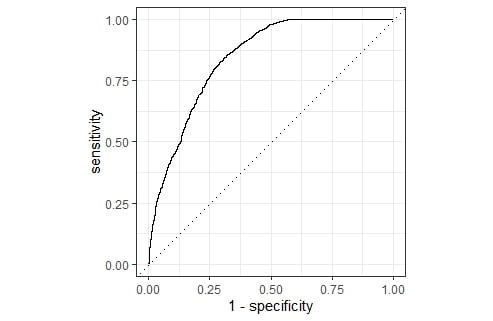
हमारे मॉडल का ROC (Receiver Operator Characteristic) कर्व.

R में Feature Engineering

अभ्यास करते हैं!

R में Feature Engineering

Preparing Video For Download...