เริ่มต้นกับการ Thresholding

การประมวลผลภาพด้วย Python

Rebeca Gonzalez

Data Engineer

Thresholding
การแบ่งภาพเป็นส่วนหน้าและส่วนหลัง

ด้วยการแปลงเป็นขาวดำ

ทำโดยกำหนดค่าแต่ละพิกเซลดังนี้

  • 255 (ขาว) ถ้าพิกเซล $\gt$ ค่า thresh
  • 0 (ดำ) ถ้าพิกเซล $\lt$ ค่า thresh

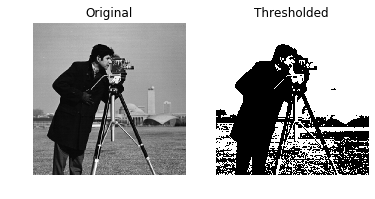
ภาพ Thresholding ของชายถือกล้อง

การประมวลผลภาพด้วย Python

Thresholding

วิธีการแบ่งส่วนภาพที่ง่ายที่สุด

  • แยกวัตถุ
    • การตรวจจับวัตถุ
    • การตรวจจับใบหน้า
    • และอื่นๆ

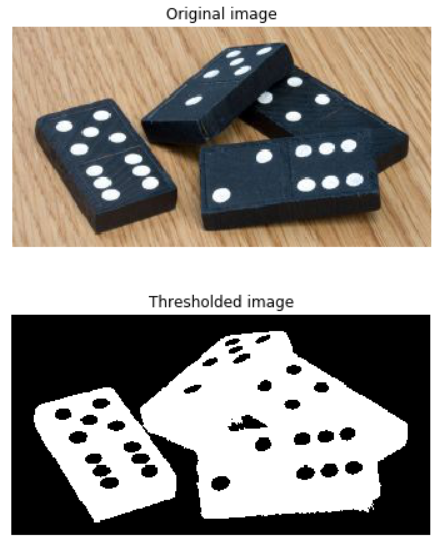
ภาพ Thresholding ของโดมิโน

การประมวลผลภาพด้วย Python

Thresholding

ใช้ได้กับภาพโทนสีเทาเท่านั้น

ขั้นตอน Thresholding โดยใช้โดมิโน เริ่มจากภาพสี RGB-3 จากนั้นเป็นโทนสีเทา และสุดท้ายเป็นภาพที่ผ่าน Thresholding

การประมวลผลภาพด้วย Python

นำไปใช้งาน

# Obtain the optimal threshold value
thresh = 127

# Apply thresholding to the image binary = image > thresh
# Show the original and thresholded show_image(image, 'Original') show_image(binary, 'Thresholded')

ภาพ Thresholding ของชายถือกล้อง

การประมวลผลภาพด้วย Python

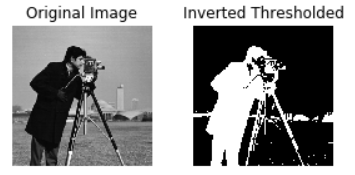
Inverted Thresholding

# Obtain the optimal threshold value
thresh = 127

# Apply thresholding to the image inverted_binary = image <= thresh
# Show the original and thresholded show_image(image, 'Original') show_image(inverted_binary, 'Inverted thresholded')

ภาพ Inverted Thresholding ของชายถือกล้อง

การประมวลผลภาพด้วย Python

ประเภท

  • แบบ Global หรืออิงฮิสโตแกรม: เหมาะกับพื้นหลังสม่ำเสมอ

  • แบบ Local หรือ Adaptive: เหมาะกับพื้นหลังที่มีแสงไม่สม่ำเสมอ
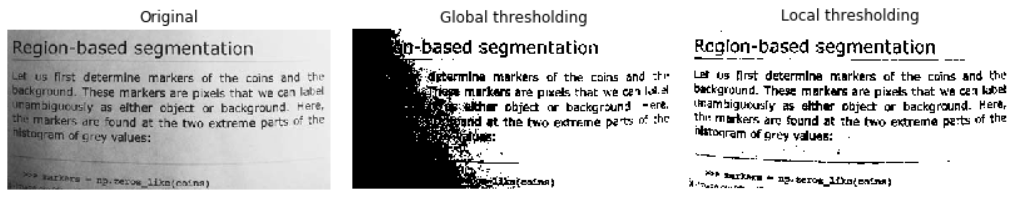
การเปรียบเทียบ Global Thresholding และ Local Thresholding

การประมวลผลภาพด้วย Python

ลองใช้อัลกอริทึม Thresholding หลายแบบ
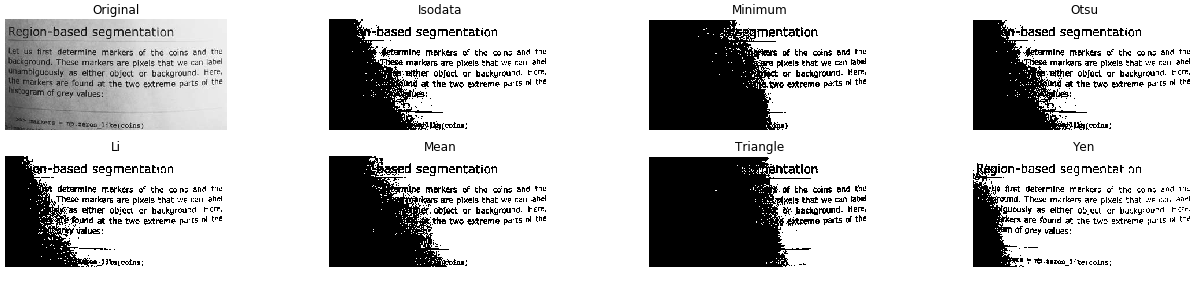
from skimage.filters import try_all_threshold

# Obtain all the resulting images fig, ax = try_all_threshold(image, verbose=False)
# Showing resulting plots show_plot(fig, ax)
การประมวลผลภาพด้วย Python

ลองใช้อัลกอริทึม Thresholding หลายแบบ

ผลการทดสอบวิธี Global Thresholding ทั้งหมดกับภาพโทนสีเทาของหน้าข้อความ

การประมวลผลภาพด้วย Python

ค่า Thresh ที่เหมาะสม

Global

พื้นหลังสม่ำเสมอ
# Import the otsu threshold function
from skimage.filters import threshold_otsu

# Obtain the optimal threshold value thresh = threshold_otsu(image)
# Apply thresholding to the image binary_global = image > thresh
การประมวลผลภาพด้วย Python

ค่า Thresh ที่เหมาะสม

Global

# Show the original and binarized image
show_image(image, 'Original')
show_image(binary_global, 'Global thresholding')
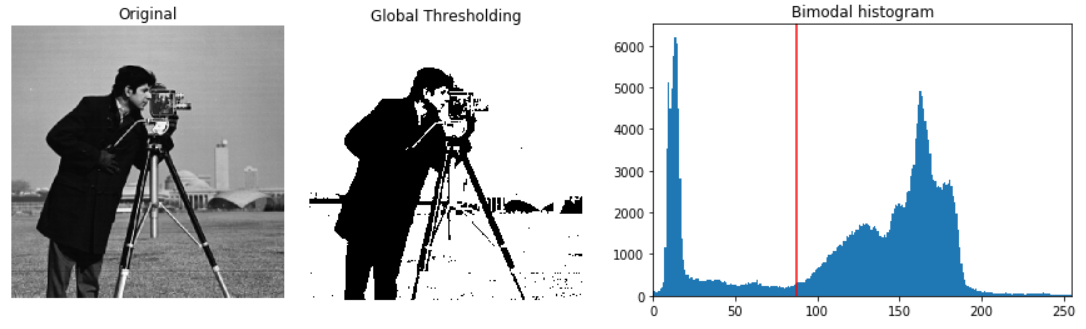
ภาพต้นฉบับของชายถือกล้อง ภาพที่ผ่าน Thresholding และฮิสโตแกรมพร้อมเส้นสีแดงแสดงค่า Thresh ที่เหมาะสม

การประมวลผลภาพด้วย Python

ค่า Thresh ที่เหมาะสม

Local

พื้นหลังไม่สม่ำเสมอ
# Import the local threshold function
from skimage.filters import threshold_local

# Set the block size to 35 block_size = 35
# Obtain the optimal local thresholding local_thresh = threshold_local(text_image, block_size, offset=10)
# Apply local thresholding and obtain the binary image binary_local = text_image > local_thresh
การประมวลผลภาพด้วย Python

ค่า Thresh ที่เหมาะสม

Local

# Show the original and binarized image
show_image(text_image, 'Original')
show_image(binary_local, 'Local thresholding')
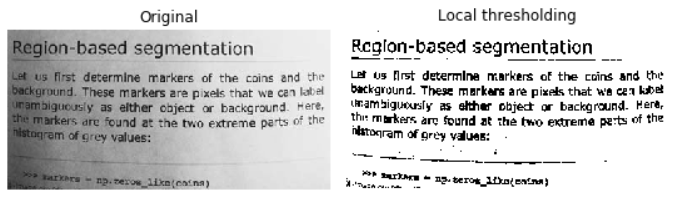
ภาพหน้าข้อความที่ผ่าน Local Thresholding

การประมวลผลภาพด้วย Python

มาฝึกกันเถอะ!

การประมวลผลภาพด้วย Python

Preparing Video For Download...