Extract

Data Engineering เบื้องต้น

Vincent Vankrunkelsven

Data Engineer @ DataCamp

การดึงข้อมูล: หมายความว่าอย่างไร?

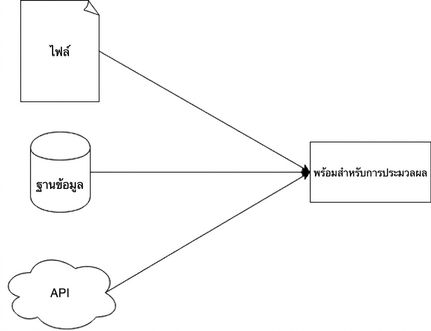
แผนภาพแสดงขั้นตอน extract อย่างง่าย

Data Engineering เบื้องต้น

ดึงข้อมูลจากไฟล์ข้อความ

ไม่มีโครงสร้าง

  • ข้อความธรรมดา
  • เช่น บทหนึ่งจากหนังสือ


Call me Ishmael. Some years ago—never 
mind how long precisely—having little or
no money in my purse, and nothing particular
to interest me on shore, I thought ....

ไฟล์แบบแบน

  • แถว = ระเบียน
  • คอลัมน์ = แอตทริบิวต์
  • เช่น .tsv หรือ .csv


Year,Make,Model,Price
1997,Ford,E350,3000.00
1999,Chevy,"Venture Extended Edition",4900.00
1999,Chevy,"Venture Extended Edition",5000.00
1996,Jeep,Grand Cherokee,4799.00
Data Engineering เบื้องต้น

JSON

  • JavaScript Object Notation
  • กึ่งมีโครงสร้าง
  • ชนิดข้อมูลพื้นฐาน
    • number
    • string
    • boolean
    • null
  • ชนิดข้อมูลรวม
    • array
    • object
{
  "an_object": {
    "nested": [
      "one",
      "two",
      "three",
      {
        "key": "four"
      }
    ]
  }
}
import json

result = json.loads('{"key_1": "value_1", "key_2":"value_2"}') print(result["key_1"])
value_1
Data Engineering เบื้องต้น

ข้อมูลบนเว็บ

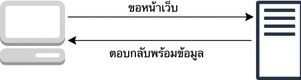
คำขอ

แผนภาพแสดงโมเดลการส่งคำขอและรับการตอบกลับ

ตัวอย่าง

  1. เปิดเว็บไซต์ Google
  2. ส่งคำขอไปยังเซิร์ฟเวอร์ Google
  3. Google ตอบกลับด้วยหน้าเว็บ
Data Engineering เบื้องต้น

ดึงข้อมูลบนเว็บผ่าน API

  • ส่งข้อมูลในรูปแบบ JSON
  • API: application programming interface
  • ตัวอย่าง
    • Twitter API
{ "statuses": [{ "created_at": "Mon May 06 20:01:29 +0000 2019", "text": "this is a tweet"}] }
  • Hackernews API
import requests

response = requests.get("https://hacker-news.firebaseio.com/v0/item/16222426.json") print(response.json())
{'by': 'neis', 'descendants': 0, 'id': 16222426, 'score': 17, 'time': 1516800333, 'title': .... }
Data Engineering เบื้องต้น

ข้อมูลในฐานข้อมูล

ฐานข้อมูลสำหรับแอปพลิเคชัน

  • ธุรกรรม
  • การแทรกหรือแก้ไขข้อมูล
  • OLTP
  • เชิงแถว

ฐานข้อมูลเชิงวิเคราะห์

  • OLAP
  • เชิงคอลัมน์
Data Engineering เบื้องต้น

การดึงข้อมูลจากฐานข้อมูล

Connection string/URI

postgresql://[user[:password]@][host][:port]

การใช้งานใน Python

import sqlalchemy
connection_uri = "postgresql://repl:password@localhost:5432/pagila" 
db_engine = sqlalchemy.create_engine(connection_uri)

import pandas as pd pd.read_sql("SELECT * FROM customer", db_engine)
Data Engineering เบื้องต้น

มาฝึกกันเถอะ!

Data Engineering เบื้องต้น

Preparing Video For Download...