MLflow เบื้องต้น
Weston Bassler
Senior MLOps Engineer
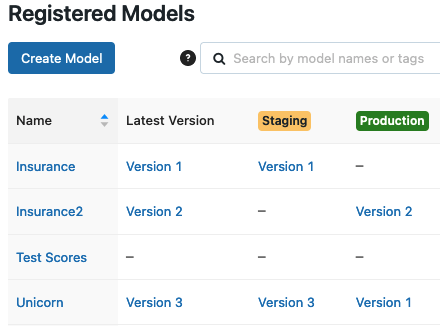
เวอร์ชันโมเดล
สถานะโมเดล
โหลดโมเดล
# MLflow flavor
mlflow.FLAVOR.load_model()
เสิร์ฟโมเดล
# MLflow serve command-line
mlflow models serve
รูปแบบ
models:/
models:/model_name/version
models:/model_name/stage
# Import flavor
import mlflow.FLAVOR


# Load version
mlflow.FLAVOR.load_model("models:/model_name/version")


# Load stage
mlflow.FLAVOR.load_model("models:/model_name/stage")
# Import flavor import mlflow.FLAVOR
# Load version mlflow.FLAVOR.load_model("models:/model_name/version")
# Load stage mlflow.FLAVOR.load_model("models:/model_name/stage")
# Import flavor
import mlflow.sklearn


# Load Unicorn model in Staging
model = mlflow.sklearn.load_model("models:/Unicorn/Staging")

# Print model
model
# Import flavor import mlflow.sklearn
# Load Unicorn model in Staging model = mlflow.sklearn.load_model("models:/Unicorn/Staging")
# Print model model
LogisticRegression()
# Inference
model.predict(data)
# Serve Unicorn model in Production stage
mlflow models serve -m "models:/Unicorn/Production"
2023/03/26 15:07:00 INFO mlflow.models.flavor_backend_registry:
Selected backend for flavor 'python_function'
2023/03/26 15:07:00 INFO mlflow.pyfunc.backend: === Running command 'exec gunicorn
--timeout=60 -b 127.0.0.1:5000 -w 1 ${GUNICORN_CMD_ARGS} --
mlflow.pyfunc.scoring_server.wsgi:app'
[2023-03-26 15:07:00 -0400] [86409] [INFO] Starting gunicorn 20.1.0
[2023-03-26 15:07:00 -0400] [86409] [INFO] Listening at: http://127.0.0.1:5000
[2023-03-26 15:07:00 -0400] [86409] [INFO] Using worker: sync
[2023-03-26 15:07:00 -0400] [86410] [INFO] Booting worker with pid: 86410
http://localhost:5000/invocations
รูปแบบ CSV
pandas_df.to_csv()
รูปแบบ JSON
{
  "dataframe_split": {
      "columns": ["R&D Spend", "Administration", "Marketing Spend", "State"],
      "data": [["165349.20", 136897.80, 471784.10, 1]]
  }
}
# Send payload to invocations endpoint
curl http://127.0.0.1:5000/invocations -H 'Content-Type: application/json' -d
{
  "dataframe_split": {
      "columns": ["R&D Spend", "Administration", "Marketing Spend", "State"],
      "data": [["165349.20", 136897.80, 471784.10, 1]]
  }
}
[[104055.1842384]]