แนะนำ Spreadsheet

การนำเข้าข้อมูลด้วย pandas อย่างมีประสิทธิภาพ

Amany Mahfouz

Instructor

Spreadsheet

  • รู้จักกันในชื่อไฟล์ Excel
  • จัดเก็บข้อมูลในรูปแบบตาราง โดยมีเซลล์เรียงเป็นแถวและคอลัมน์
  • ต่างจาก flat file ตรงที่รองรับการจัดรูปแบบและสูตรคำนวณ
  • หนึ่ง workbook สามารถมีได้หลาย spreadsheet
การนำเข้าข้อมูลด้วย pandas อย่างมีประสิทธิภาพ

การโหลด Spreadsheet

  • pandas มีฟังก์ชันโหลด spreadsheet โดยเฉพาะ ได้แก่ read_excel()

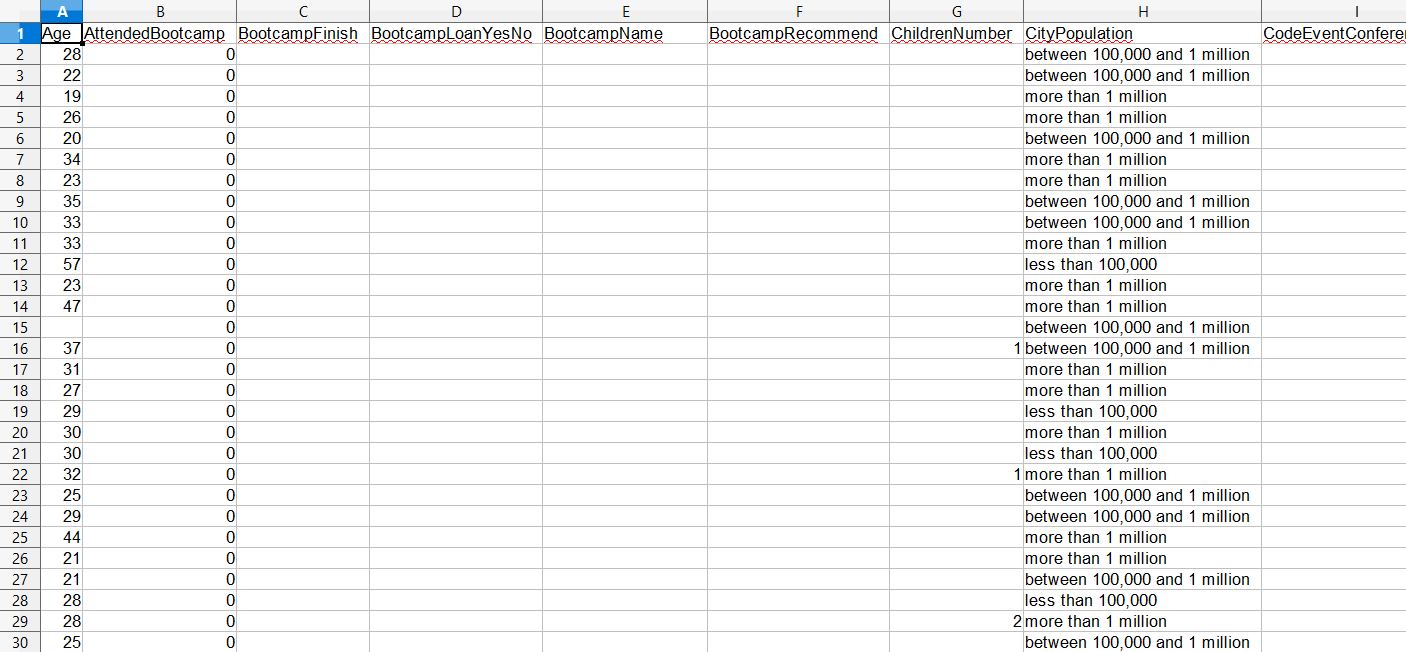
ภาพหน้าจอข้อมูลแบบสำรวจนักพัฒนาใหม่ของ FreeCodeCamp ในโปรแกรม spreadsheet

การนำเข้าข้อมูลด้วย pandas อย่างมีประสิทธิภาพ

การโหลด Spreadsheet

import pandas as pd

# Read the Excel file
survey_data = pd.read_excel("fcc_survey.xlsx")

# View the first 5 lines of data print(survey_data.head())
    Age  AttendedBootcamp       ...                    SchoolMajor  StudentDebtOwe
0  28.0               0.0       ...                            NaN           20000
1  22.0               0.0       ...                            NaN             NaN
2  19.0               0.0       ...                            NaN             NaN
3  26.0               0.0       ...        Cinematography And Film            7000
4  20.0               0.0       ...                            NaN             NaN

[5 rows x 98 columns]
การนำเข้าข้อมูลด้วย pandas อย่างมีประสิทธิภาพ

การโหลดคอลัมน์และแถวที่เลือก

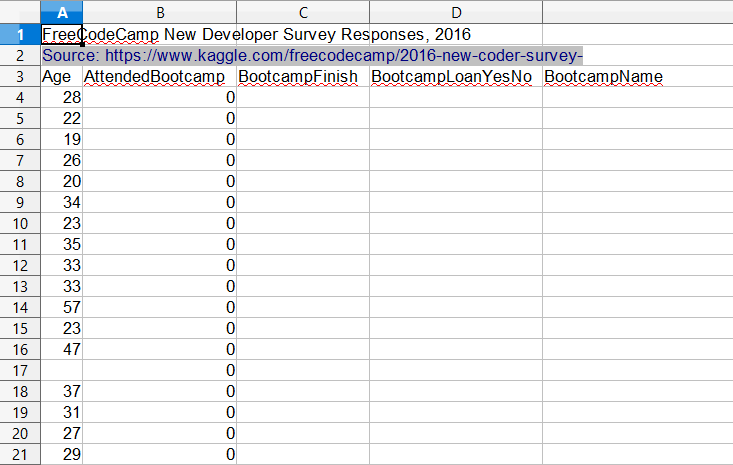
Spreadsheet ข้อมูลแบบสำรวจที่มีแถว header เมตาดาตา

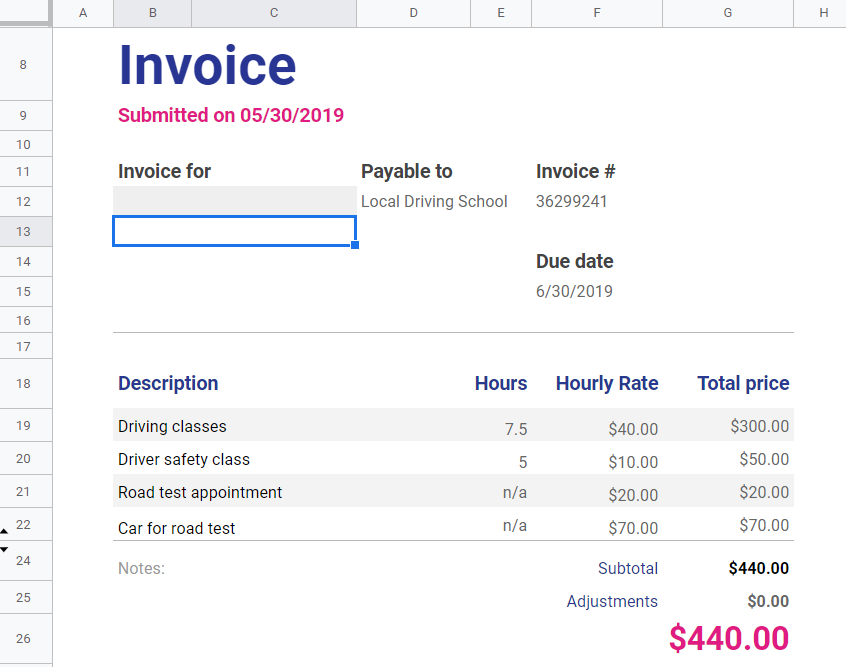
Spreadsheet ใบแจ้งหนี้ที่มีตารางข้อมูลขนาดเล็กหลายตาราง

การนำเข้าข้อมูลด้วย pandas อย่างมีประสิทธิภาพ

การโหลดคอลัมน์และแถวที่เลือก

  • read_excel() มี keyword argument หลายตัวที่เหมือนกับ read_csv()
    • nrows: จำกัดจำนวนแถวที่โหลด
    • skiprows: ระบุจำนวนแถวหรือหมายเลขแถวที่ต้องการข้าม
    • usecols: เลือกคอลัมน์ด้วยชื่อ ตำแหน่ง หรือตัวอักษร (เช่น "A:P")
การนำเข้าข้อมูลด้วย pandas อย่างมีประสิทธิภาพ

การโหลดคอลัมน์และแถวที่เลือก

การนำเข้าข้อมูลด้วย pandas อย่างมีประสิทธิภาพ

การโหลดคอลัมน์และแถวที่เลือก

# Read columns W-AB and AR of file, skipping metadata header
survey_data = pd.read_excel("fcc_survey_with_headers.xlsx",
                            skiprows=2,
                            usecols="W:AB, AR")

# View data print(survey_data.head())
   CommuteTime            CountryCitizen  ...    EmploymentFieldOther    EmploymentStatus   Income
0         35.0  United States of America  ...                     NaN  Employed for wages  32000.0
1         90.0  United States of America  ...                     NaN  Employed for wages  15000.0
2         45.0  United States of America  ...                     NaN  Employed for wages  48000.0
3         45.0  United States of America  ...                     NaN  Employed for wages  43000.0
4         10.0  United States of America  ...                     NaN  Employed for wages   6000.0

[5 rows x 7 columns]
การนำเข้าข้อมูลด้วย pandas อย่างมีประสิทธิภาพ

มาฝึกกันเถอะ!

การนำเข้าข้อมูลด้วย pandas อย่างมีประสิทธิภาพ

Preparing Video For Download...