ชนิดข้อมูลและการจัดการข้อยกเว้นใน Java
Jim White
Java Developer
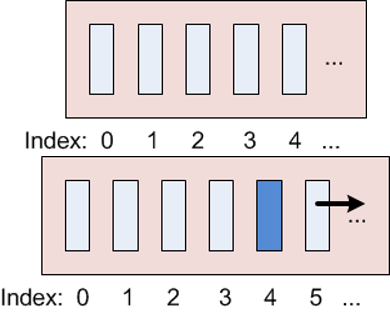
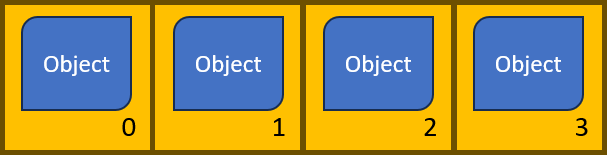
List เป็น sub-interface ของ CollectionList หลายแบบArrayList — รายการอ็อบเจกต์แบบมีลำดับ ปรับขนาดได้ และเข้าถึงด้วย index (คล้าย array)
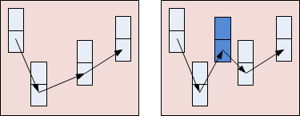
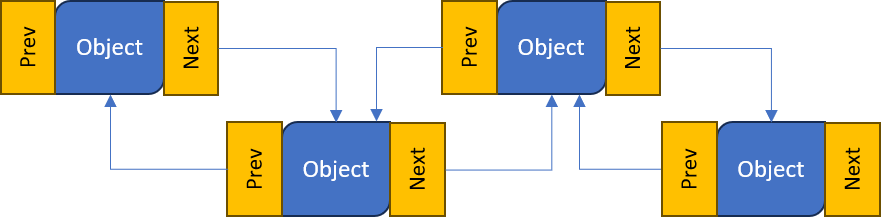
LinkedList — อ็อบเจกต์ที่เชื่อมต่อกันด้วย link ไปยังอ็อบเจกต์ถัดไปและก่อนหน้า
new และใช้ generics ระบุชนิดของข้อมูล.add(object).get(index)ArrayList ใช้ index เริ่มต้นที่ศูนย์.set(index, object).remove(index).clear().size()import java.util.ArrayList; ... ArrayList<String> animals = new ArrayList<String>();animals.add("horse"); animals.add("cow"); animals.add("horse"); // Duplicates allowedString c = animals.get(1); // c="cow" animals.set(1, "chicken");// Removes the first horse animals.remove(0); // Removes all objects animals.clear();animals.size();
ArrayList<Integer> list = new ArrayList<Integer>();
list.add(new Integer(5));
list.add(6); // 6 is automatically wrapped by Integer then added
Object เป็น parameterized typeArrayList<Object> list = new ArrayList<Object>(); // Allow any object
list.add(new Integer(5)); // Add an Integer
list.add(6); // Add an Integer using autoboxing
list.add("Hello"); // Add a String
ListArrayList<String> animals = new ArrayList<String>();
animals.add("horse");
animals.add("cow");
animals.add("chicken");
for (String animal : animals) { // fore-each to loop through all in the ArrayList
System.out.println(animal);
}
horse
cow
chicken
List (เช่น ArrayList) ด้วย println ได้โดยตรงArrayList<String> animals = new ArrayList<String>();
animals.add("horse");
animals.add("cow");
animals.add("chicken");
System.out.println(animals); // Display all the elements in the ArrayList
ArrayList<Object> list = new ArrayList<Object>();
list.add(5);
list.add("Hello");
System.out.println(list); // Display all the elements in the ArrayList
[horse, cow, chicken]
[5, Hello]
LinkedList ในลักษณะเดียวกับ ArrayListLinkedList มีเมธอดเหมือนกับ ArrayListimport java.util.LinkedList;
...
LinkedList<String> cars // Create a new ...
= new LinkedList<String>(); // ... LinkedList
cars.add("Ford"); // Add an object to the list
cars.add("Mercedes");
String c = cars.get(1);
cars.set(1, "Toyota"); // Replace an object
System.out.println(cars); // Display the list
cars.remove(0); // Remove an object
cars.clear(); // Remove all objects
cars.size(); // Get the list length
[Ford, Toyota]
addFirst() เพิ่มที่ต้นรายการaddLast() เพิ่มที่ท้ายรายการremoveFirst() ลบจากต้นรายการremoveLast() ลบจากท้ายรายการcars.addFirst("Fiat"); // Add to the beginning
cars.addLast("BMW"); // Add the the end
cars.removeFirst(); // Remove the first object
cars.removeLast(); // Remove the last object
ArrayList และ LinkedList มีรูปแบบการใช้งานคล้ายกันListArrayList และ LinkedList (หรือ List ใดก็ตาม) เหมือนกันList ขึ้นอยู่กับการใช้งานArrayList:list.get(11))
LinkedList:list.get(11))
ชนิดข้อมูลและการจัดการข้อยกเว้นใน Java