CSS Locators

Web Scraping ด้วย Python

Thomas Laetsch

Data Scientist, NYU

Rosetta CSStone

  • / แทนด้วย > (ยกเว้นตัวอักษรแรก)
    • XPath: /html/body/div
    • CSS Locator: html > body > div
  • // แทนด้วยช่องว่าง (ยกเว้นตัวอักษรแรก)
    • XPath: //div/span//p
    • CSS Locator: div > span p
  • [N] แทนด้วย :nth-of-type(N)
    • XPath: //div/p[2]
    • CSS Locator: div > p:nth-of-type(2)
Web Scraping ด้วย Python

Rosetta CSStone

XPATH

xpath = '/html/body//div/p[2]'

CSS

css = 'html > body div > p:nth-of-type(2)'
Web Scraping ด้วย Python

Attributes ใน CSS

  • ค้นหา element ตาม class ใช้จุด .
    • ตัวอย่าง: p.class-1 เลือก element ย่อหน้าทั้งหมดที่อยู่ใน class-1
  • ค้นหา element ตาม id ใช้เครื่องหมาย #
    • ตัวอย่าง: div#uid เลือก element div ที่มี id เท่ากับ uid
Web Scraping ด้วย Python

Attributes ใน CSS

เลือก element ย่อหน้าภายใน class class1:

css_locator = 'div#uid > p.class1'

เลือก element ทั้งหมดที่มี attribute class เป็น class1:

css_locator = '.class1'
Web Scraping ด้วย Python

สถานะ Class

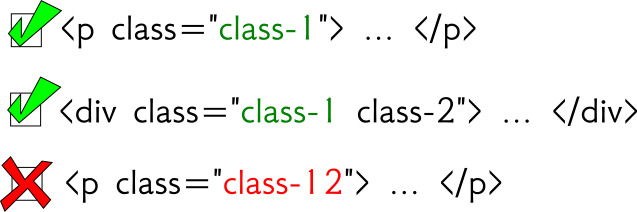
css = '.class1'

การเลือกด้วย CSS ตาม class เท่านั้น

Web Scraping ด้วย Python

สถานะ Class

xpath = '//*[@class="class1"]'
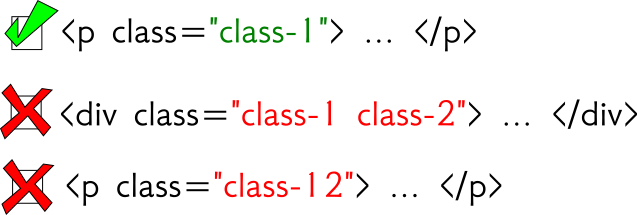
การเลือกด้วย XPath แบบเท่ากัน

Web Scraping ด้วย Python

สถานะ Class

xpath = '//*[contains(@class,"class1")]'
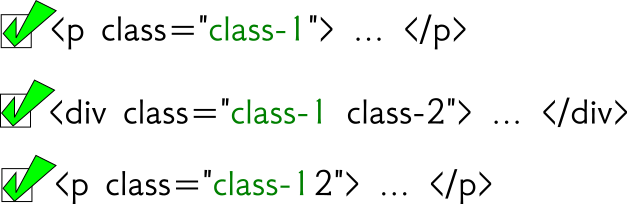
การเลือกด้วย XPath แบบ contains

Web Scraping ด้วย Python

การใช้ Selector กับ CSS

from scrapy import Selector 

html = '''
<html>
  <body>
    <div class="hello datacamp">
      <p>Hello World!</p>
    </div>
    <p>Enjoy DataCamp!</p>
  </body>
</html>
''' 
sel = Selector( text = html )
>>> sel.css("div > p")
out: [<Selector xpath='...' data='<p>Hello World!</p>'>] 

>>> sel.css("div > p").extract()
out: [ '<p>Hello World!</p>' ]
Web Scraping ด้วย Python

มาฝึกกันเถอะ!

Web Scraping ด้วย Python

Preparing Video For Download...